



Question: For this project: 1. You will need to link to an external JavaScript file in the head of the page so that you can write
For this project:
1. You will need to link to an external JavaScript file in the head of the page so that you can write code in its own file.
2. You should define a CSS style to use when highlighting a blank field.
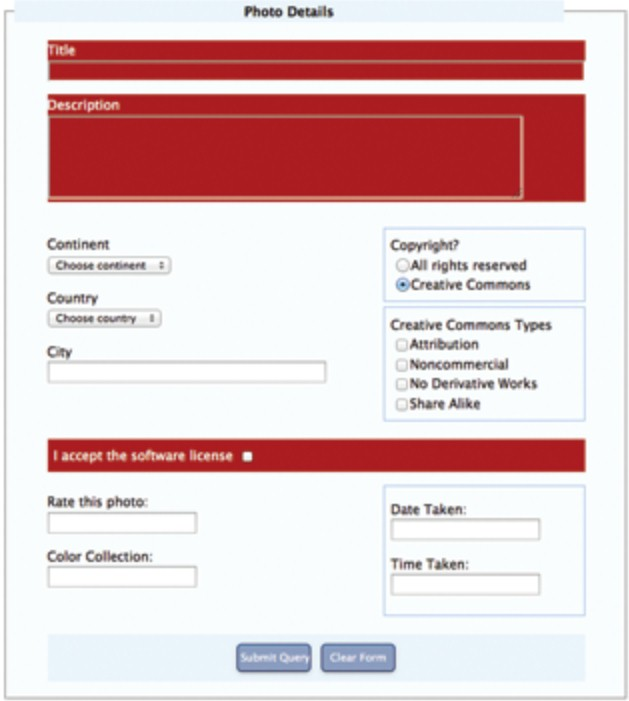
3. Set up a listener on the form's submit event so that coe prevents submission of the form (preventDefault()) if either the titl of description field is left blank or the accept license box is not checked, but otherwise submits the form.
4. Enhance the JavaScript so that blank fields triggers a change in the appearance of the form (using the style defined earlier).
5. Add another listener to the fields so that when the user types into a field (changed event) JavaScript removes the red color you just added.
I have both the CSS and HTML code below:
HTML
CSS
/* general text formatting */
h1, h2, h3, nav, footer { font-family: Georgia, Cambria, "Times New Roman", serif; } body { font-family: "Lucida Sans", Verdana, Arial, sans-serif; font-size: 85%; }
table { border: collapse; border-spacing: 0; width; 90%; margin: 0 auto; } table tbody td{ /* border: 1pt solid #95BEF0; */ line-height: 1.5em; vertical-align: top; padding: 0.5em 0.75em; }
legend { background-color: #EBF4FB ; margin: 0 auto; width: 90%; padding: 0.25em; text-align: center; font-weight: bold; font-size: 100%; } fieldset { margin: 1em auto; background-color: #FAFCFF; width: 60%; } form p { margin-top: 0.5em; }
.box { border: 1pt solid #95BEF0; padding: 0.5em; margin-bottom: 0.4em; }
.rectangle { background-color: #EBF4FB; padding: 0.5em; } .centered { text-align: center; }
.rounded, .rounded:hover { border: 1px solid #172d6e; border-bottom: 1px solid #0e1d45; border-radius: 5px; text-align: center; color: white; background-color: #8c9cbf; padding: 0.5em 0 0.5em 0; margin: 0.3em; width: 7em; -webkit-box-shadow: inset 0 1px 0 0 #72b9eb, 0 1px 4px 0 #b3b3b3; box-shadow: inset 0 1px 0 0 #72b9eb, 0 1px 4px 0 #b3b3b3; } .rounded:hover { background-color: #7f8dad; }
--------------------------------------------------
Thank you
Photo Details Title ption Continent Copyright? OAll rights reserved Coose cere nert Creative Commons Country Choove countbry Creative Commons Types Attibution Noncommercial No Derivative Works Share Alike City I accept the software license . Rate this photo Date Taken: Color Collection Time Taken: Clear Form Photo Details Title ption Continent Copyright? OAll rights reserved Coose cere nert Creative Commons Country Choove countbry Creative Commons Types Attibution Noncommercial No Derivative Works Share Alike City I accept the software license . Rate this photo Date Taken: Color Collection Time Taken: Clear Form
Step by Step Solution
There are 3 Steps involved in it

Get step-by-step solutions from verified subject matter experts