







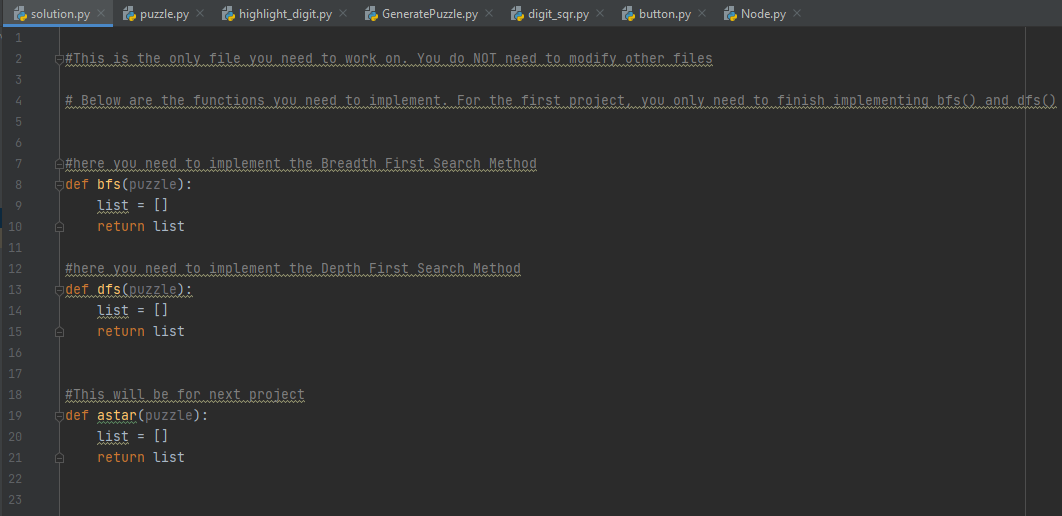
Question: For this project, you just use the same framework as project 1 but finish implementing the third function astar() in the solution.py. After finishing the
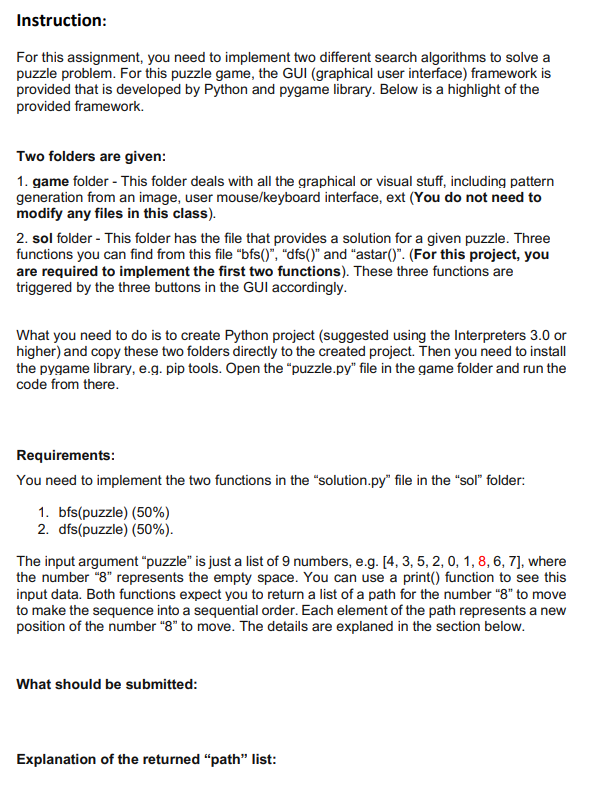
For this project, you just use the same framework as project 1 but finish implementing the third function "astar()" in the "solution.py". After finishing the code, you are required to provide document report (.pdf file) to demonstrate the advantage of A-star search against breadth first search. As discussed in the class, you can measure the time performance of searching the path (measured in milliseconds) between these two methods. To make a fair comparison, you have both search methods with the same starting state.
To generate the same starting state, you can either modify the framework and set a fixed input puzzle every time. Or you can start with goal state when you play the puzzle. Then move the pieces (or tiles) randomly in several steps (e.g. 20), you then manually record these 20 steps. Then run bfs() first with a time recording Then repeat the same process by following the 20 steps to generate the same starting state and run astar(). Below are some example of comparison. The format is not necessary to strictly follow. You can provide your report in whatever format to demonstrate the comparison. But you are suggested to provide at least 3 cases (the more the better) to show the performance contrast and also try to make these cases have high diversity in terms of step # of the path, e.g. 10 steps, 50 steps, 120 steps.
Case I:
Starting state: 056421378 -> 012345678
BFS - 5000ms
Astart() - 1200ms
Case II:
Starting state: 058124376 -> 012345678
BFS - 3000ms
Astart() - 600ms
Framwork for a-star search:
Class State{
int value[]; //9 number array
int g_cost; //g() int h_cost; //h() State p; //parent
State(v[])
{
Values = v;
}
}
List
List
aStarSearch(nums[])
{
State initial_state = State(nums)
mem_list.add(initial_state) //Add the initial state into list
State expanded_goal_state; //Hold the first expanded goal state
//Keep expanding states from the mem_list
While (mem_list != Empty)
{
Mem_list.remove(minimum_state) If(minimum_state == goal_state){
expanded_goal_state = minimum_state
break;}
Expanded_list.add(minimum_state) //If minimum_state.value = 214785630
List
//214875630, 214758630, 214735680
for child in children{
if(child is NOT in expanded_list){
child.parent = minimum_state
child.g_cost = minimum_state.g_cost + 1
child.h_cost = calcuateBy8and0Position()
expanded_list.add(child)
}
}//End of For-loop of children
} //End of While-loop for expanding
State parent = expanded_goal_state.parent
List path=[]
Path.add(expanded_goal_state.get8pos())
While(parent != initial_state) //Trace back from goal state to initial state to get the path
{
Path.add(parent.get8pos())
}
retrun path.reverse()
}
solution.py Le puzzle.py highlight_digit.py GeneratePuzzle.py digit_sqr.py button.py Node.py 2 #This is the only file you need to work on: You do NOT need to modify other files 3 # Below are the functions you need to implement. For the first project..you only need to finish implementing bfs and dfs. 5 6 7 8 9 #here you need to implement the Breadth First Search Method Edef bfs(puzzle): list = [] return list 10 11 12 13 14 #here you need to implement the Depth First Search Method def dfs (puzzle): List = [] A return list 15 16 17 18 19 20 21 22 23 #This will be for next project def astar(puzzle): list = [] return list Instruction: For this assignment, you need to implement two different search algorithms to solve a puzzle problem. For this puzzle game, the GUI (graphical user interface) framework is provided that is developed by Python and pygame library. Below is a highlight of the provided framework. Two folders are given: 1. game folder - This folder deals with all the graphical or visual stuff, including pattern generation from an image, user mouse/keyboard interface, ext (You do not need to modify any files in this class). 2. sol folder - This folder has the file that provides a solution for a given puzzle. Three functions you can find from this file "bfs()", "dfs()" and "astar()". (For this project, you are required to implement the first two functions). These three functions are triggered by the three buttons in the GUI accordingly. What you need to do is to create Python project (suggested using the Interpreters 3.0 or higher) and copy these two folders directly to the created project. Then you need to install the pygame library, e.g. pip tools. Open the "puzzle.py" file in the game folder and run the code from there. Requirements: You need to implement the two functions in the "solution.py" file in the "sol" folder: 1. bfs(puzzle) (50%) 2. dfs(puzzle) (50%). The input argument puzzle" is just a list of 9 numbers, e.g. [4, 3, 5, 2, 0, 1, 8, 6, 7), where the number "8" represents the empty space. You can use a print() function to see this input data. Both functions expect you to return a list of a path for the number "8" to move to make the sequence into a sequential order. Each element of the path represents a new position of the number "8" to move. The details are explaned in the section below. What should be submitted: Explanation of the returned "path" list: solution.py Le puzzle.py highlight_digit.py GeneratePuzzle.py digit_sqr.py button.py Node.py 2 #This is the only file you need to work on: You do NOT need to modify other files 3 # Below are the functions you need to implement. For the first project..you only need to finish implementing bfs and dfs. 5 6 7 8 9 #here you need to implement the Breadth First Search Method Edef bfs(puzzle): list = [] return list 10 11 12 13 14 #here you need to implement the Depth First Search Method def dfs (puzzle): List = [] A return list 15 16 17 18 19 20 21 22 23 #This will be for next project def astar(puzzle): list = [] return list Instruction: For this assignment, you need to implement two different search algorithms to solve a puzzle problem. For this puzzle game, the GUI (graphical user interface) framework is provided that is developed by Python and pygame library. Below is a highlight of the provided framework. Two folders are given: 1. game folder - This folder deals with all the graphical or visual stuff, including pattern generation from an image, user mouse/keyboard interface, ext (You do not need to modify any files in this class). 2. sol folder - This folder has the file that provides a solution for a given puzzle. Three functions you can find from this file "bfs()", "dfs()" and "astar()". (For this project, you are required to implement the first two functions). These three functions are triggered by the three buttons in the GUI accordingly. What you need to do is to create Python project (suggested using the Interpreters 3.0 or higher) and copy these two folders directly to the created project. Then you need to install the pygame library, e.g. pip tools. Open the "puzzle.py" file in the game folder and run the code from there. Requirements: You need to implement the two functions in the "solution.py" file in the "sol" folder: 1. bfs(puzzle) (50%) 2. dfs(puzzle) (50%). The input argument puzzle" is just a list of 9 numbers, e.g. [4, 3, 5, 2, 0, 1, 8, 6, 7), where the number "8" represents the empty space. You can use a print() function to see this input data. Both functions expect you to return a list of a path for the number "8" to move to make the sequence into a sequential order. Each element of the path represents a new position of the number "8" to move. The details are explaned in the section below. What should be submitted: Explanation of the returned "path" list
Step by Step Solution
There are 3 Steps involved in it

Get step-by-step solutions from verified subject matter experts
 Study Help