







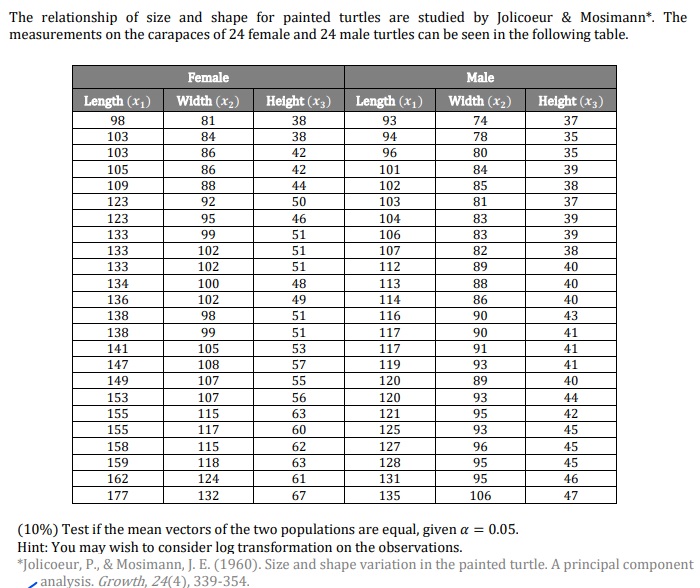
Question: For this question, considering multivariate case, we run the code: # import package import pandas as pd import numpy as np from scipy import stats
For this question, considering "multivariate case", we run the code:
# import package
import pandas as pd
import numpy as np
from scipy import stats
# read data
Femaledata pdreadcsvrC:UsersfemalecsvheaderNone
Maledata pdreadcsvrc:UsersmalecsvheaderNone
N lenFemaledata
# log transformation
Femaledatalog nplogpFemaledata
Maledatalog nplogpMaledata
# covariance matrices
covmatrixfemale Femaledatalogcov
covmatrixmale Maledatalogcov
# number of samples in each group
nfemale lenFemaledata
nmale lenMaledata
# pooled covariance matrix
pooledcovmatrix nfemale covmatrixfemale nmale covmatrixmalenfemale nmale
# mean difference
meandiff Femaledatalogmean Maledatalogmean
# Hotelling's Tsquared statistic
tsquared npdotmeandiff.T npdotnplinalg.invpooledcovmatrix meandiffnfemale nmalenfemale nmale
# degrees of freedom
dftsquared lenFemaledata.columns
df nfemale nmale
# calculate pvalue after comparison with the Fdistribution
ptsquared stats.fcdftsquared, dfndftsquared, dfddf
printHotellings Tsquared strtsquared
printp strptsquared
# ttest for each variable
t p stats.ttestindFemaledatalog Maledatalog
printpt str p
for i in range lenp:
if pi pi:
printFemaledata.columnsi is significantly different"
else:
printFemaledata.columnsi is not significantly different"
And we get the result:
Hotelling's Tsquared
p e
pteee
which is wrong. Can you help me to correct the code and help me to explain the result? Thank you!:
Step by Step Solution
There are 3 Steps involved in it
1 Expert Approved Answer
Step: 1 Unlock

Question Has Been Solved by an Expert!
Get step-by-step solutions from verified subject matter experts
Step: 2 Unlock
Step: 3 Unlock
 Study Help