







Question: For this section of the assignment our turtle will start on a journey and then realize it is heading in the wrong direction. This will
For this section of the assignment our turtle will start on a journey and then realize it is heading in the
wrong direction. This will involve getting the turtle to move forward and make turns. To do that we will be
using the .forward(), right() and left() methods.
The .forward() method makes the turtle move forward a specified number of pixels. For instance, if we
wanted the turtle to move 50 pixels we would type:
turtle.forward()
The .right() and left() methods allow the turtle to turn right or left a specified number of degrees. For
instance to get the turtle to make a 90 degree turn, we would type:
turtle.right(90)
The instructions below will help you to write a small program that will move the turtle forward and make
some turns. The end result is a small program that retraces steps.
1. Open up IDLE and open a new window. Save this file as TracingSteps.py.
2. At the top of your new window, type in import turtle. This statement imports the turtle libray or
class.
3. Type in the following code:
import turtle #retracting steps turtle.forward(100) turtle.right(90) turtle.forward(100) turtle.left(90) turtle.forward(100) turtle.right(90) turtle.forward(100) turtle.left(180) turtle.forward(100) turtle.left(90) turtle.forward(100) turtle.right(90) turtle.forward(100) turtle.left(90) turtle.forward(100)
Change th default shape of your turle to something different.
6. Now add the text Starting Our Walk when the turtle first starts on its journey.
7. When the turtle gets to the bottom of the screen and before it turns around, print to the screen,
Oops Wrong Direction.
8. Next have your turtle go forward, down, forward, down and forward on the left side of the screen.
9. When your turtle has finished its journey print to the screen All Done
10. When completed my program looked like the following:
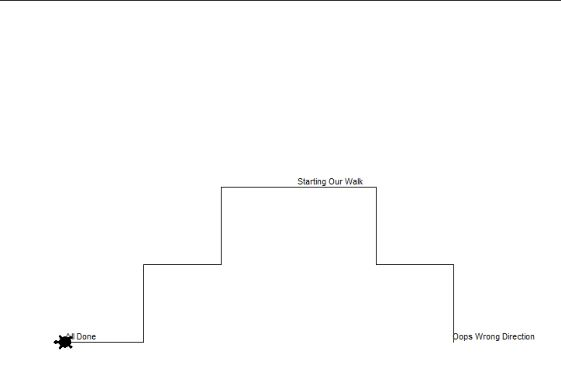
Starting Our Wak Done pops Wrong Direction
Step by Step Solution
There are 3 Steps involved in it

Get step-by-step solutions from verified subject matter experts
 Study Help