







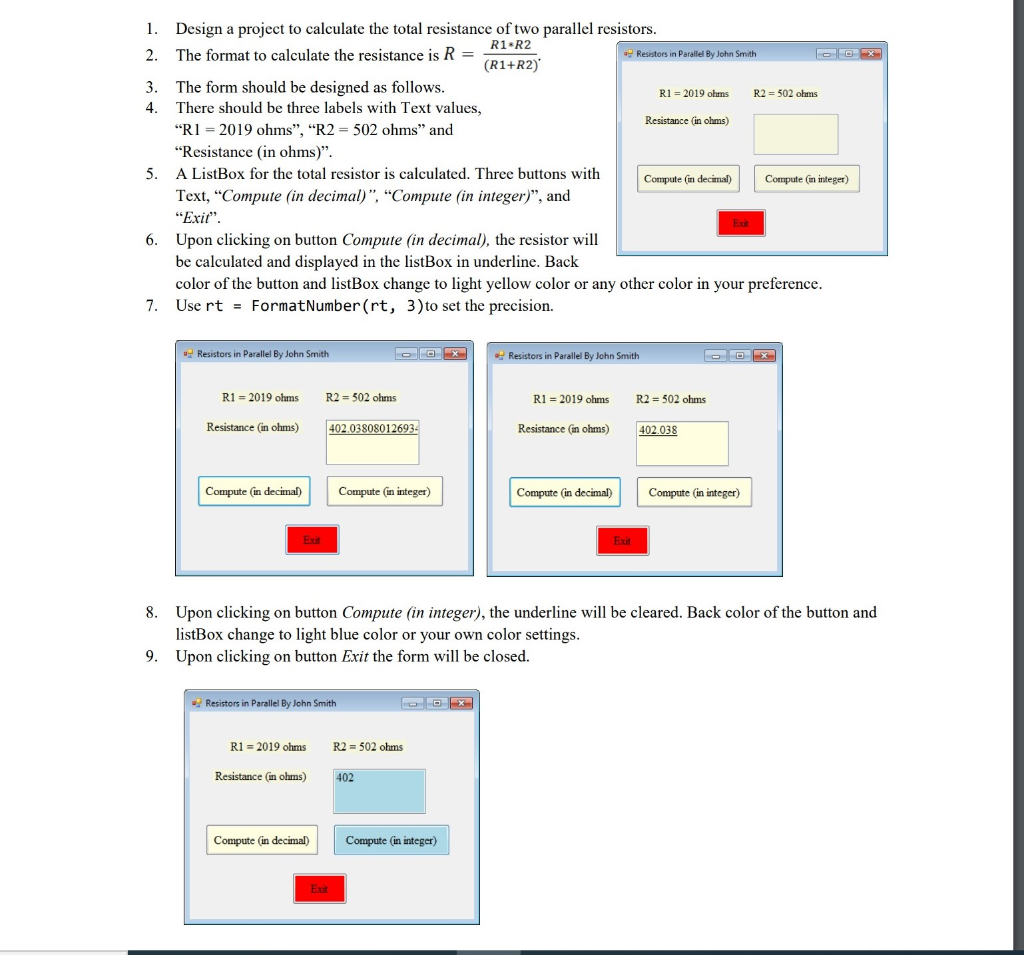
Question: For Visual Studio visual basic 1. Design a project to calculate the total resistance of two parallel resistors. R1 R2 2. The format to calculate
For Visual Studio
visual basic
1. Design a project to calculate the total resistance of two parallel resistors. R1 R2 2. The format to calculate the resistance is R = Resistors in Parallel By John Smith (R1+R2) 3. The form should be designed as follows. R1 = 2019 ohms R2 - 502 ohms 4. There should be three labels with Text values, Resistance in ohms) RI -2019 ohms", "R2 = 502 ohms" and Resistance in ohms)". 5. A ListBox for the total resistor is calculated. Three buttons with Compute (in decimal Compute (in integer) Text, "Compute (in decimal)", "Compute (in integer)", and "Exit". 6. Upon clicking on button Compute (in decimal), the resistor will be calculated and displayed in the listBox in underline. Back color of the button and listBox change to light yellow color or any other color in your preference. 7. Use rt = FormatNumber(rt, 3) to set the precision. Resistors in Parallel By John Smith Resistors in Parallel By John Smith R1 - 2019 ohms R2 = 502 ohms R1 = 2019 ohms R2 = 502 ohms Resistance (in ohms) 402.03808012693 Resistance (in ohms) 402.038 Compute (in decimal) Compute (in integer) Compute (in decimal) Compute (in integer) 8. Upon clicking on button Compute (in integer), the underline will be cleared. Back color of the button and listBox change to light blue color or your own color settings. 9. Upon clicking on button Exit the form will be closed. Resistors in Parallel By John Smith R1 = 2019 ohms R2 = 502 ohms Resistance (in olums) 402 Compute (in decimal) Compute in integer) 1. Design a project to calculate the total resistance of two parallel resistors. R1 R2 2. The format to calculate the resistance is R = Resistors in Parallel By John Smith (R1+R2) 3. The form should be designed as follows. R1 = 2019 ohms R2 - 502 ohms 4. There should be three labels with Text values, Resistance in ohms) RI -2019 ohms", "R2 = 502 ohms" and Resistance in ohms)". 5. A ListBox for the total resistor is calculated. Three buttons with Compute (in decimal Compute (in integer) Text, "Compute (in decimal)", "Compute (in integer)", and "Exit". 6. Upon clicking on button Compute (in decimal), the resistor will be calculated and displayed in the listBox in underline. Back color of the button and listBox change to light yellow color or any other color in your preference. 7. Use rt = FormatNumber(rt, 3) to set the precision. Resistors in Parallel By John Smith Resistors in Parallel By John Smith R1 - 2019 ohms R2 = 502 ohms R1 = 2019 ohms R2 = 502 ohms Resistance (in ohms) 402.03808012693 Resistance (in ohms) 402.038 Compute (in decimal) Compute (in integer) Compute (in decimal) Compute (in integer) 8. Upon clicking on button Compute (in integer), the underline will be cleared. Back color of the button and listBox change to light blue color or your own color settings. 9. Upon clicking on button Exit the form will be closed. Resistors in Parallel By John Smith R1 = 2019 ohms R2 = 502 ohms Resistance (in olums) 402 Compute (in decimal) Compute in integer)
Step by Step Solution
There are 3 Steps involved in it

Get step-by-step solutions from verified subject matter experts
 Study Help