



Question: For your reference:| 1 2 3 4 5 6 7 A Detailed Guidelines for doing the project Personal Long-Term Saving B C D E
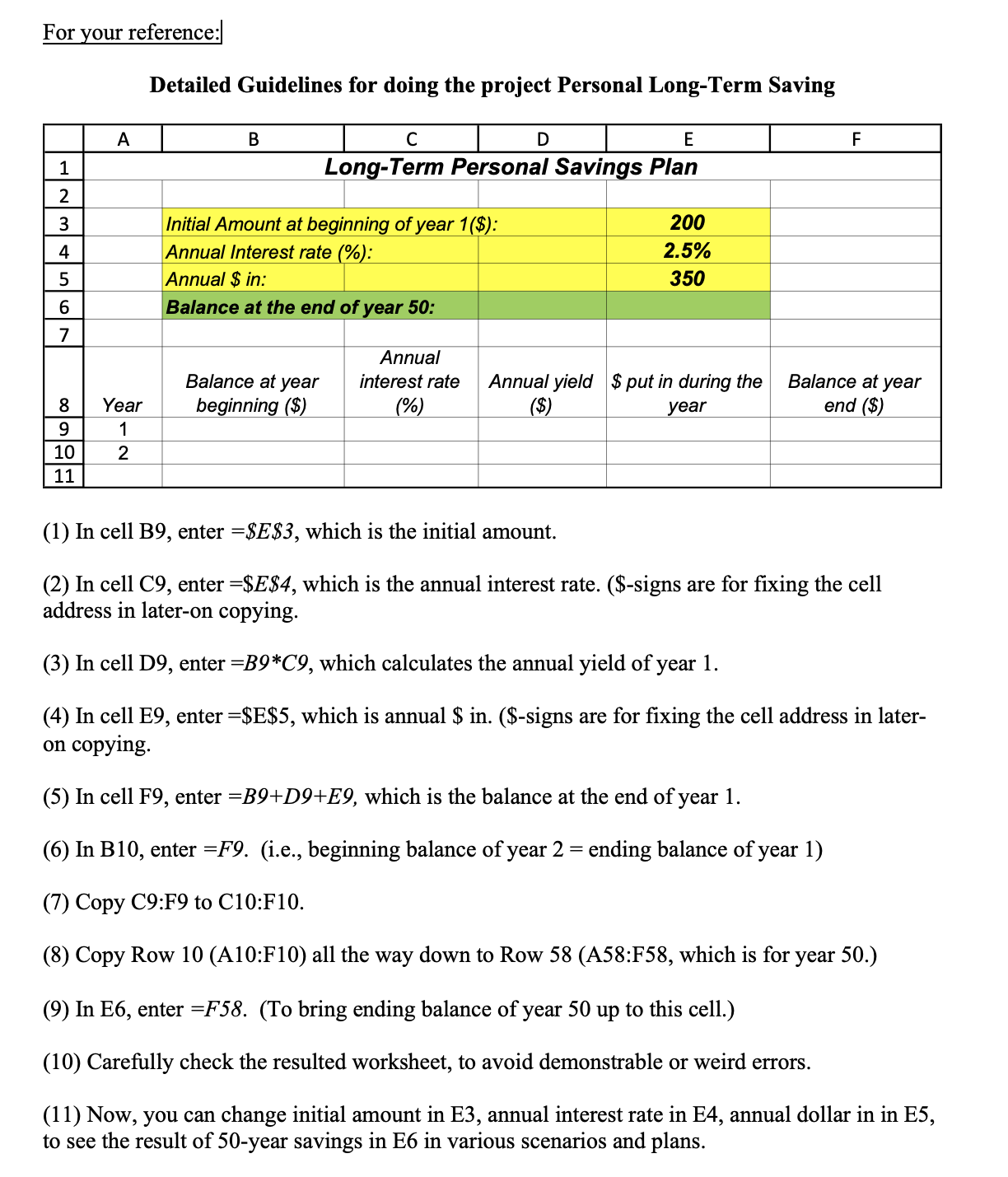
For your reference:| 1 2 3 4 5 6 7 A Detailed Guidelines for doing the project Personal Long-Term Saving B C D E Long-Term Personal Savings Plan Initial Amount at beginning of year 1($): Annual Interest rate (%): Annual $ in: Balance at the end of year 50: 200 2.5% 350 F Annual 8 Year Balance at year beginning ($) interest rate (%) Annual yield $ put in during the ($) year Balance at year end ($) 9 1 10 2 11 (1) In cell B9, enter =$E$3, which is the initial amount. (2) In cell C9, enter =$E$4, which is the annual interest rate. ($-signs are for fixing the cell address in later-on copying. (3) In cell D9, enter =B9*C9, which calculates the annual yield of year 1. (4) In cell E9, enter =$E$5, which is annual $ in. ($-signs are for fixing the cell address in later- on copying. (5) In cell F9, enter =B9+D9+E9, which is the balance at the end of year 1. (6) In B10, enter =F9. (i.e., beginning balance of year 2 = ending balance of year 1) (7) Copy C9:F9 to C10:F10. (8) Copy Row 10 (A10:F10) all the way down to Row 58 (A58:F58, which is for year 50.) (9) In E6, enter =F58. (To bring ending balance of year 50 up to this cell.) (10) Carefully check the resulted worksheet, to avoid demonstrable or weird errors. (11) Now, you can change initial amount in E3, annual interest rate in E4, annual dollar in in E5, to see the result of 50-year savings in E6 in various scenarios and plans.
Step by Step Solution
There are 3 Steps involved in it

Get step-by-step solutions from verified subject matter experts