







Question: Form database using the attached Jaunty Coffee Co. ERD by doing the following: 1. Develop SQL code to create each table as specified in the
Form database using the attached "Jaunty Coffee Co. ERD" by doing the following:
1. Develop SQL code to create each table as specified in the attached "Jaunty Coffee Co. ERD" by doing the following:
a. Provide the SQL code you wrote to create all the tables.
b. Demonstrate that you tested your code by providing a screenshot showing your SQL commands and the database server's response.
2. Develop SQL code to populate each table in the database design document by doing the following:
Note: This data is not provided. You will be fabricating the data for this step.
a. Provide the SQL code you wrote to populate the tables with at least three rows of data in each table.
b. Demonstrate that you tested your code by providing a screenshot showing your SQL commands and the database server's response.
3. Develop SQL code to create a view by doing the following:
a. Provide the SQL code you wrote to create your view. The view should show all of the information from the "Employee" table but concatenate each employee's first and last name, formatted with a space between the first and last name, into a new attribute called employee_full_name.
b. Demonstrate that you tested your code by providing a screenshot showing your SQL commands and the database server's response.
4. Develop SQL code to create an index on the coffee_name field by doing the following:
a. Provide the SQL code you wrote to create your index on the coffee_name field from the "Coffee" table.
b. Demonstrate that you tested your code by providing a screenshot showing your SQL commands and the database server's response.
5. Develop SQL code to create an SFW (SELECT-FROM-WHERE) query for any of your tables or views by doing the following:
a. Provide the SQL code you wrote to create your SFW query.
b. Demonstrate that you tested your code by providing a screenshot showing your SQL commands and the database server's response.
6. Develop SQL code to create a query by doing the following:
a. Provide the SQL code you wrote to create your table joins query. The query should join together three different tables and include attributes from all three tables in its output.
b. Demonstrate that you tested your code by providing a screenshot showing your SQL commands and the database server's response.
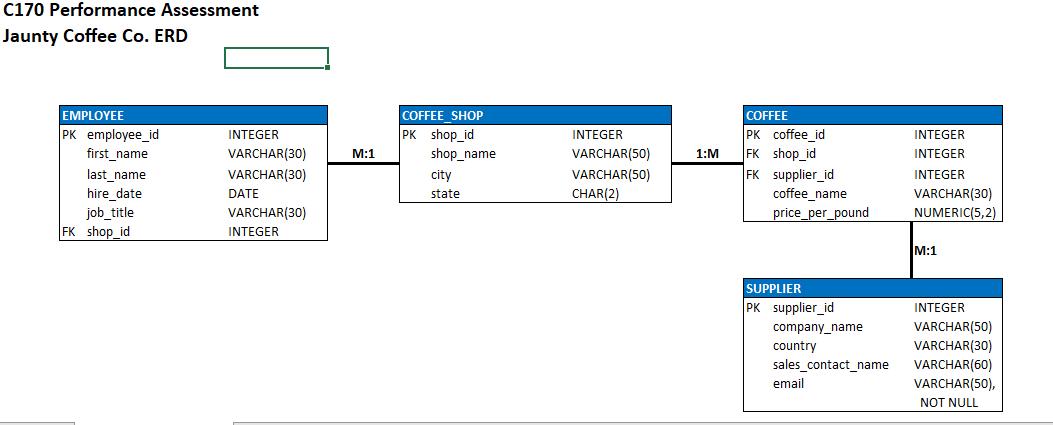
C170 Performance Assessment Jaunty Coffee Co. ERD EMPLOYEE PK employee_id first_name last_name hire_date job_title FK shop_id INTEGER VARCHAR(30) VARCHAR(30) DATE VARCHAR(30) INTEGER M:1 COFFEE SHOP PK shop_id shop_name city state INTEGER VARCHAR(50) VARCHAR(50) CHAR(2) 1:M COFFEE PK coffee_id FK shop_id FK supplier_id coffee_name price_per_pound SUPPLIER PK supplier_id company_name country sales_contact_name email INTEGER INTEGER INTEGER VARCHAR(30) NUMERIC(5,2) M:1 INTEGER VARCHAR(50) VARCHAR(30) VARCHAR(60) VARCHAR(50), NOT NULL
Step by Step Solution
3.50 Rating (147 Votes )
There are 3 Steps involved in it
I can provide you with sample SQL code for creating the tables and views based on the Jaunty Coffee Co ERD However since I cant directly execute SQL o... View full answer

Get step-by-step solutions from verified subject matter experts
 Study Help