







Question: *FORM HTML CODING ATTACHED THAT MUST BE VALIDATED USING JAVASCRIPT FOLLOWING INSTRUCTIONS BELOW* 1. First Name and Last fields should not have less than four
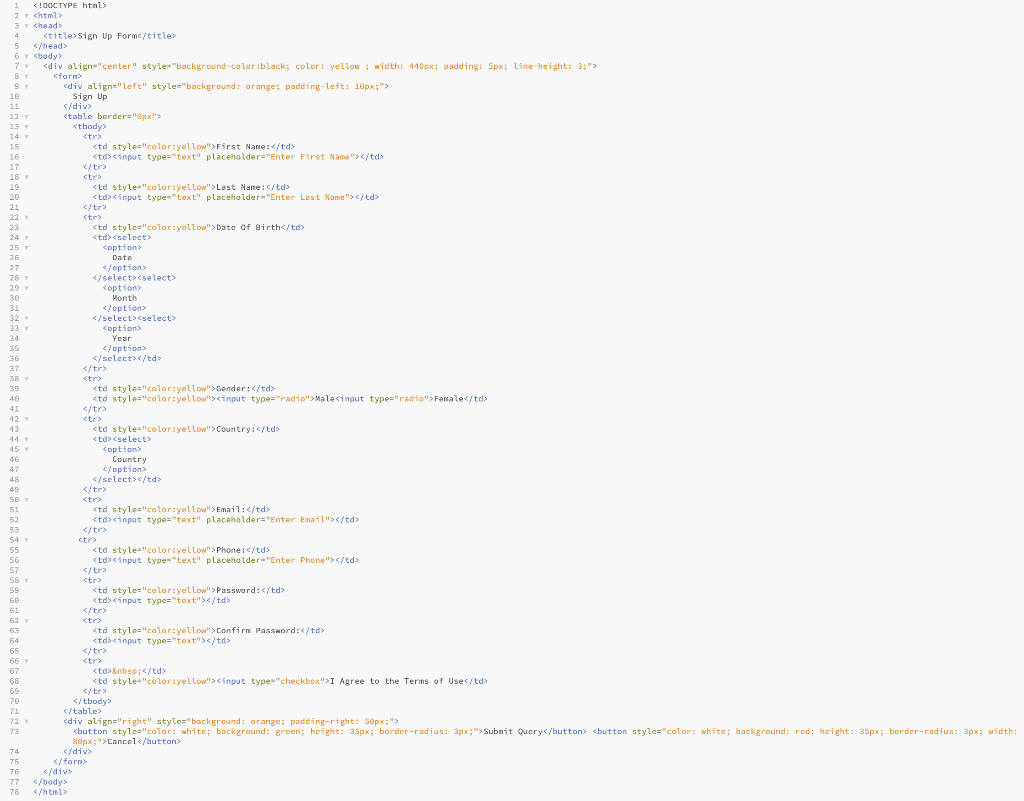
*FORM HTML CODING ATTACHED THAT MUST BE VALIDATED USING JAVASCRIPT FOLLOWING INSTRUCTIONS BELOW*
1. First Name and Last fields should not have less than four (4) characters as input.
2. Names (First and Last) should only consist of text input (no special characters, symbols or numeric input allowed). An error message should pop up if input is in incorrect format.
3. Email should be entered in proper format. e.g it should include @ and .com
4. Phone number should be entered in the format (xxx)-(xxx)-(xxxx) and by default the format appears (greyed out) in the text box.
5. Password should be at least 8 characters in length and : i) Must have atleast one upper and one lower case character ii) Must have atleast one digit iii) Must have one special character such as @, $ etc iv) These instructions to be displayed on the left of the box, so user knows what type of password to be created.
6. Password and confirm password MUST match with each other.
7. If any of the fields is left BLANK (not filled) by the user, an warning message should show up, asking the user to fill in the required field.
If the user enters any wrong type of input, an alert should be displayed showing what correct input is required.
All field must have an (*) next to them showing that they are mandatory to be filled.
Try to display a brief note in front of the files about what type of input is required. For example , next to password field , you can display message minimum 8 characters in length with upper and lower case, digit and a special character
1 1 2 3 4
5 6
77 78
Step by Step Solution
There are 3 Steps involved in it

Get step-by-step solutions from verified subject matter experts
 Study Help