







Question: form validation examples: https://css-tricks.com/form-validation-ux-html-css/ For better understanding and maintaining the code, please follow these guidelines. Header: THREE components. 1.Identification: NAME! / Date / Class 2.
form validation examples: https://css-tricks.com/form-validation-ux-html-css/
For better understanding and maintaining the code, please follow these guidelines.
Header: THREE components.
1.Identification: NAME! / Date / Class
2. Purpose: Why is the program being written?
3. Algorithm / Overview: The steps you are going to take to solve the problem. Write in bullets - not prose-style rambling...
Body: FOUR components
1. Meaningful Names: Names should reflect their purpose.
2. Indent: indent code in loops and if statements.
3. White Space: Use horizontal & vertical white space.
4. Comments: explain WHY. Don't repeat the obvious. Insight!
Additional Functions / Methods:
1. Identification: Name / Date / Class (if in separate file)
2. Purpose:What does it DO?
3. Indent, Naming, White Space, Comments
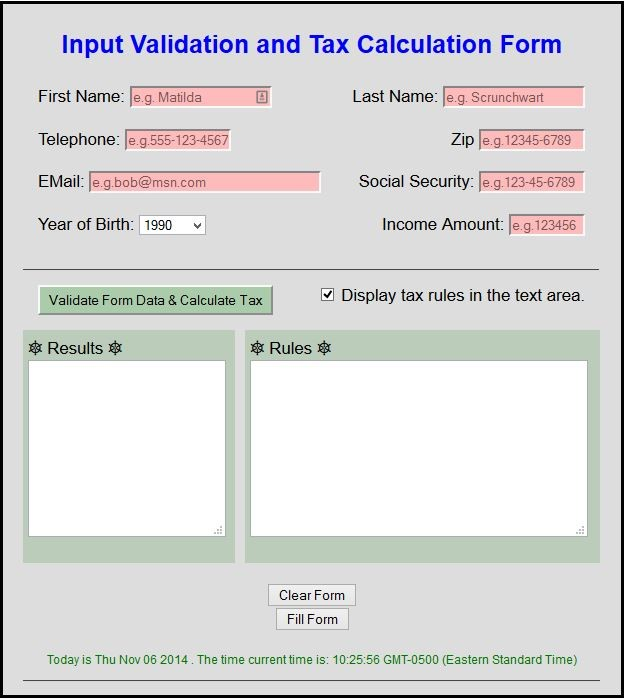
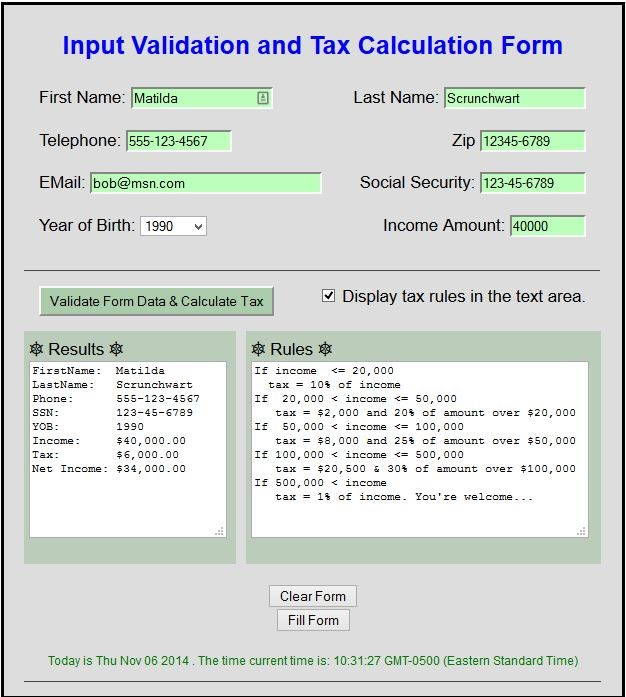
Your Task----
Create a form with inputs & selections as follows:
First Name: Betty [Letters only, first letter capitalized.]
Last Name: Betters [Letters only, first letter capitalized.]
Challenge: If first letter of name not capitalized, CAPITALIZE the first letter! (onblur, charAt, substr)
Telephone: 123-456-7890 [length 12, digits and hyphen separator only]
Zip: 12345 [length 10, digits only]
12345-7890 [length 10, digits and hyphen separator only] ? How do you reject 12345-22 ?
E-Mail: type="email"
SS#: 123-45-6789 [length 11, digits and hyphen separator only]
Income: 0-999999 [check for number, range ]
> text, password, email, tel, checkbox, radio, submit
id=" "
name=" "
size=" " maxlength=" "
title=" "
placeholder=" what the user sees"
pattern=" " ==>> regex quick start regex overview pattern reference!
tabindex=" "
required
/>
BirthDate: ONE Dropdown (Year): 1990-2000. Check? None
select
option
====================================================================
Tax Rate Calculated from Income:
1. 10% of amount between $0 - 20,000.00
2. 20% of amount between $20,000.01 - 50,000.00 + 2,000(from line 1)
3. 25% of amount between $50,000.01 - 100,000.00 + 6,000(from line 2) + 2,000
(from line 1)
30% of amount between $100,000.01 - 500,000.00 + 12,500(from line 3) + 6,000
(from line 2) + 2,000(from line 1)
If income is over $500,000 = 1% flat rate on all income. :) The 1%
NOTE: .toFixed(2) ==> forces 2 decimal places
Explained:
Income is your "Gross Income".
To calculate "Net Income" (take home pay):
Tax is subtracted from income.
Income: $500.00
Tax: $50.00
Net Income: $450.00
(see more examples at end of page)
Validate form before calculating and submitting!
Do not allow bad data onto the form.
Report any error and allow the user to correct that input.
Put focus where error was detected.
DO NOT clear entire form on error!
Use pseudo-classes to style input boxes
:valid
:invalid
(NOTE these will throw css validation errors - ok)
Do not calculate until all data fields are valid.
Note that calculation is separate from submission
but should occur at the same time.
How?
if ( $(formId).checkValidity() )
{
code to execute if all fields valid
...
}
A checkbox will determine if tax rules are displayed (see example).
if ( $(id).checked)
{
code to execute if checked
}
'Clear' resets all fields to blank (default in drop down).
'Fill' fills all fields to valid values (default in drop down).
USE THIS for form:
Step by Step Solution
There are 3 Steps involved in it

Get step-by-step solutions from verified subject matter experts
 Study Help