







Question: ----------------------------------------------------------------------------------------------------------------------------------------------------------------- fractal.cpp code to change #include #include #include #include cs43805351.h static const double Delta = 0.004; static const double xMid = 0.2389; static const double
-----------------------------------------------------------------------------------------------------------------------------------------------------------------
fractal.cpp code to change
#include
static const double Delta = 0.004; static const double xMid = 0.2389; static const double yMid = 0.55267;
static void fractal(const int width, const int frames, unsigned char* pic) { // compute frames for (int frame = 0; frame 0) && ((x2 + y2)
int main(int argc, char *argv[]) { printf("Fractal v1.7 ");
// check command line if (argc != 3) {fprintf(stderr, "usage: %s frame_width num_frames ", argv[0]); exit(-1);} const int width = atoi(argv[1]); if (width
// allocate picture array unsigned char* pic = new unsigned char[frames * width * width];
// start time timeval start, end; gettimeofday(&start, NULL);
fractal(width, frames, pic);
// end time gettimeofday(&end, NULL); const double runtime = end.tv_sec - start.tv_sec + (end.tv_usec - start.tv_usec) / 1000000.0; printf("compute time: %.3f s ", runtime);
// verify result by writing frames to BMP files if ((width
delete [] pic; return 0; }
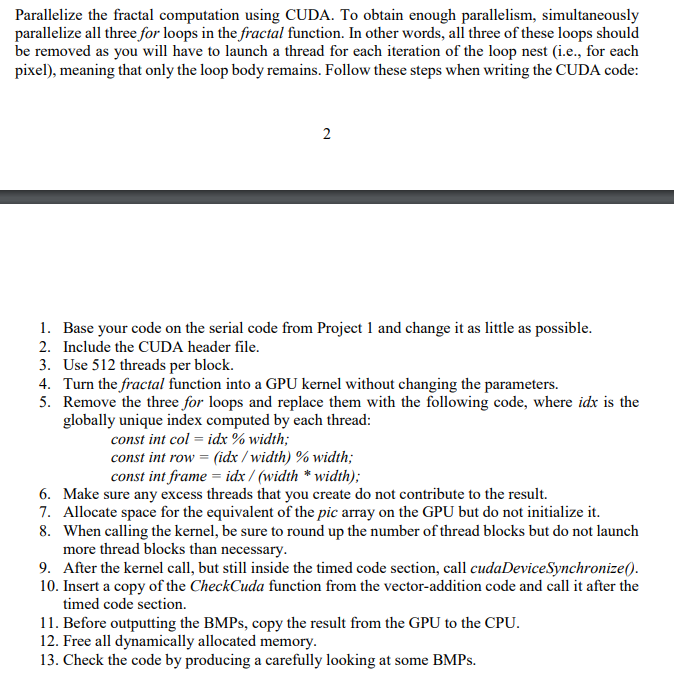
Parallelize the fractal computation using CUDA. To obtain enough parallelism, simultaneously parallelize all three for loops in the fractal function. In other words, all three of these loops should be removed as you will have to launch a thread for each iteration of the loop nest (i.e., for each pixel), meaning that only the loop body remains. Follow these steps when writing the CUDA code 1. 2. 3. 4. 5. Base your code on the serial code from Project 1 and change it as little as possible Include the CUDA header file. Use 512 threads per block. Turn the fractal function into a GPU kernel without changing the parameters. Remove the three for loops and replace them with the following code, where idx is the globally unique index computed by each thread const int col-idx% width const int row-idx / width) %) width const int frame idx/ (width * width) 6. Make sure any excess threads that you create do not contribute to the result. 7. Allocate space for the equivalent of the pic array on the GPU but do not initialize it. 8. When calling the kernel, be sure to round up the number of thread blocks but do not launch more thread blocks than necessary 9. After the kernel call, but still inside the timed code section, call cudaDeviceSynchronize( 10. Insert a copy of the CheckCuda function from the vector-addition code and call it after the timed code section. 11. Before outputting the BMPs, copy the result from the GPU to the CPU 12. Free all dynamically allocated memory 13. Check the code by producing a carefully looking at some BMPs. Parallelize the fractal computation using CUDA. To obtain enough parallelism, simultaneously parallelize all three for loops in the fractal function. In other words, all three of these loops should be removed as you will have to launch a thread for each iteration of the loop nest (i.e., for each pixel), meaning that only the loop body remains. Follow these steps when writing the CUDA code 1. 2. 3. 4. 5. Base your code on the serial code from Project 1 and change it as little as possible Include the CUDA header file. Use 512 threads per block. Turn the fractal function into a GPU kernel without changing the parameters. Remove the three for loops and replace them with the following code, where idx is the globally unique index computed by each thread const int col-idx% width const int row-idx / width) %) width const int frame idx/ (width * width) 6. Make sure any excess threads that you create do not contribute to the result. 7. Allocate space for the equivalent of the pic array on the GPU but do not initialize it. 8. When calling the kernel, be sure to round up the number of thread blocks but do not launch more thread blocks than necessary 9. After the kernel call, but still inside the timed code section, call cudaDeviceSynchronize( 10. Insert a copy of the CheckCuda function from the vector-addition code and call it after the timed code section. 11. Before outputting the BMPs, copy the result from the GPU to the CPU 12. Free all dynamically allocated memory 13. Check the code by producing a carefully looking at some BMPs
Step by Step Solution
There are 3 Steps involved in it

Get step-by-step solutions from verified subject matter experts
 Study Help