







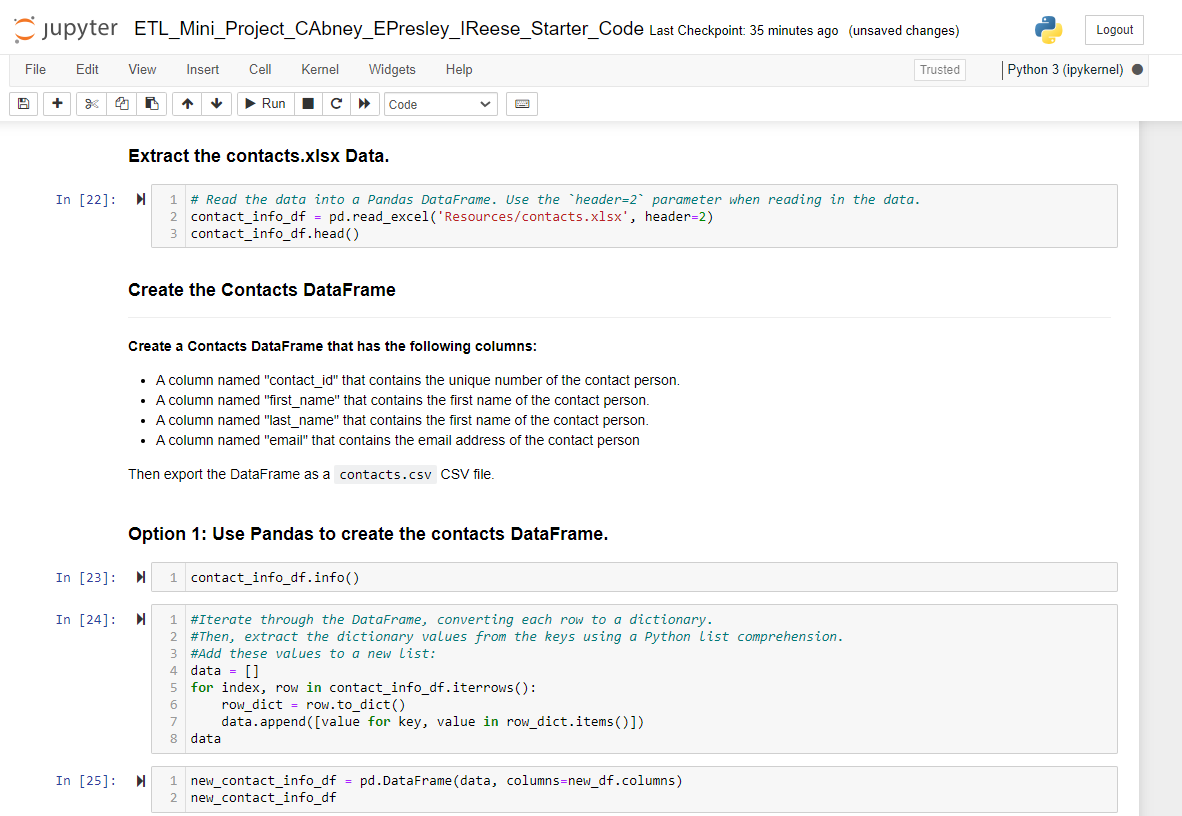
Question: from my prior request for help recievec valueerror 4 columns passed, passed data had 1 columnExtract the contacts.xIsx Data. In [ 2 2 ] :
from my prior request for help recievec valueerror columns passed, passed data had columnExtract the contacts.xIsx Data.
In :
V
# Read the data into a Pandas DataFrame. Use the 'header parameter when reading in the data.
contactinfodf pdreadexcelResourcescontactsxlsx header
contactinfodfhead
Create the Contacts DataFrame
Create a Contacts DataFrame that has the following columns:
A column named "contactid that contains the unique number of the contact person.
A column named "firstname" that contains the first name of the contact person.
A column named "lastname" that contains the first name of the contact person.
A column named "email" that contains the email address of the contact person
Then export the DataFrame as a contacts.csv CSV file.
Option : Use Pandas to create the contacts DataFrame.
In : contactinfodfinfo
In : #Iterate through the DataFrame, converting each row to a dictionary.
#Then, extract the dictionary values from the keys using a Python list comprehension.
#Add these values to a new list:
data
for index, row in contactinfodfiterrows:
rowdict row.todict
data.appendvalue for key, value in rowdict.items
data
In : newcontactinfodf pdDataFramedata columnsnewdfcolumns
newcontactinfodf
Step by Step Solution
There are 3 Steps involved in it
1 Expert Approved Answer
Step: 1 Unlock

Question Has Been Solved by an Expert!
Get step-by-step solutions from verified subject matter experts
Step: 2 Unlock
Step: 3 Unlock
 Study Help