







Question: From project1 (0.8 0.3 0.2 0.7) Example Let us first shift the initial you have created by 0.8 units horizontally and by 0.3 units vertically.

From project1
(0.8 0.3
0.2 0.7)
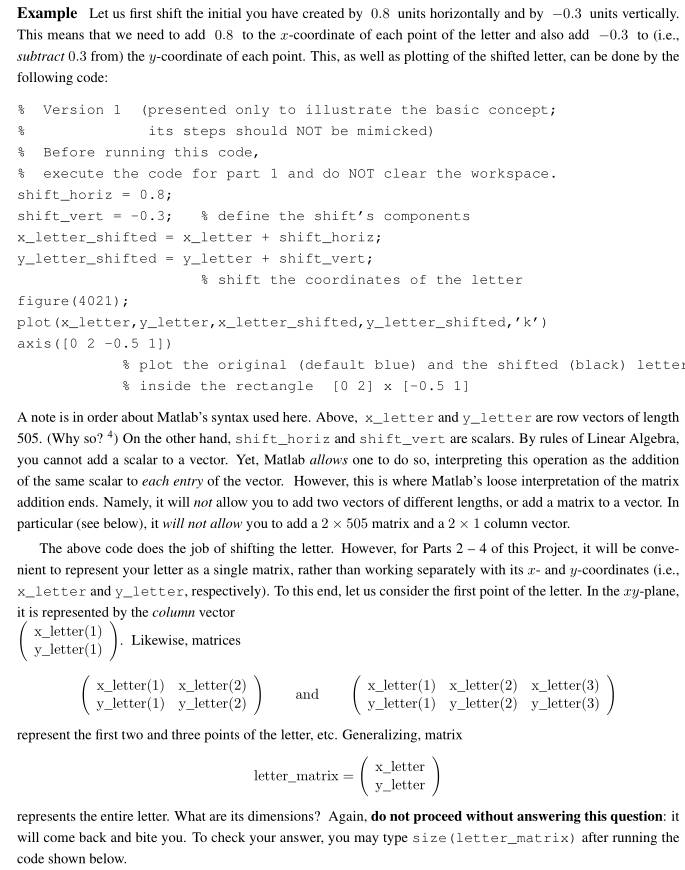
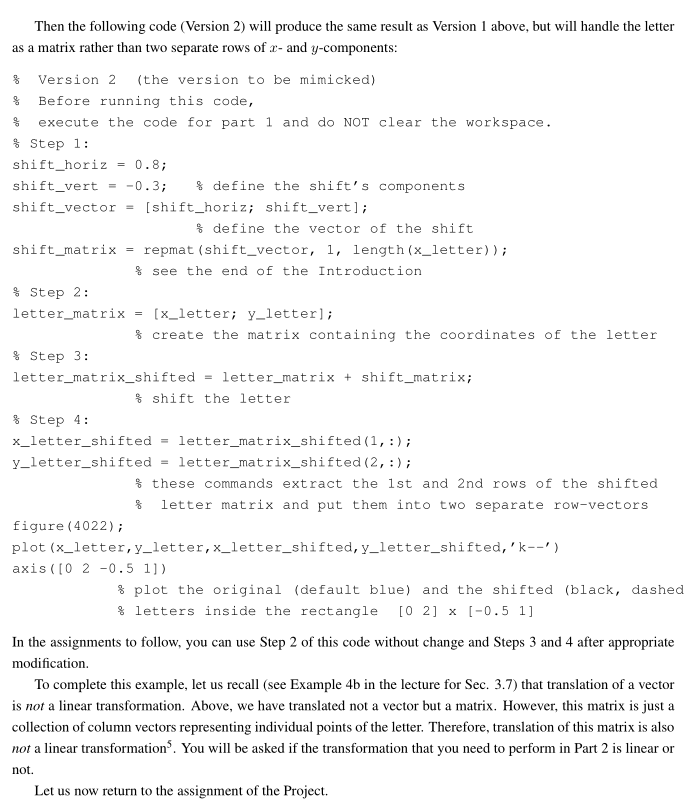
Example Let us first shift the initial you have created by 0.8 units horizontally and by 0.3 units vertically. This means that we need to add 0.8 to the a-coordinate of each point of the letter and also add 0.3 to (i.e subtract 0.3 from) the y-coordinate of each point. This, as we as plotting of the shifted letter, can be done by the following code: (presented only to illustrate the basic concept Version 1 its steps should NOT be mimicked) Before running this code execute the code for part 1 and do NOT clear the workspace. shift horiz shift vert define the shift's components x letter shifted x letter shift horiz y letter shifted y letter shift vert shift the coordinates of the letter figure (4021) plot (x letter, y letter, x lette shifted y letter shifted 'k') axis (CO 2 0.5 1 plot the original (default blue) and the shifted (black) letter inside the rectangle (0 21 I-0.5 1 A note is in order about Matlab's syntax used here. Above, x letter and y letter are row vectors of length 505. (Why so 4 On the other hand, shift horiz and shift vert are scalars. By rules of Linear Algebra, you cannot add a scalar to a vector. Yet, Matlab allows one to do so, interpreting this operation as the addition of the same scalar to each entry of the vector. However, this is where Matlab's loose interpretation of the matrix addition ends. Namely, it will not allow you to add two vectors of different lengths, or add a matrix to a vector. In particular (see below), it will not allow you to add a 2 x 505 matrix and a 2 x 1 column vector. The above code does the job of shifting the letter. However, for Parts 2 4 of thi s Project, it will be conve nient to represent your letter as a single matrix, rather than working separately with its r- and y-coordinates (i.e x letter and y letter, respectively). To this end, let us consider the first point of the letter. In the ary-plane it is represented by the column vector x letter (1) Likewise, matrices y letter (1) lett (1) letter(2) etter(1) x letter(2) letter (3 and y letter (1) y letter(2) y letter (1) y letter (2) y letter(3) represent the first two and three points of the letter, etc. Generalizing, matrix x letter letter matrix y letter represents the entire letter. What are its dimensions? Again do not proceed without answering this question it will come back and bite you. To check your answer, you may type size (letter matrix) after running the code shown below
Step by Step Solution
There are 3 Steps involved in it

Get step-by-step solutions from verified subject matter experts
 Study Help