







Question: From this picture above: Write a Python program that: prints a string with a new line prints the result of a long integer operation prints
From this picture above:
Write a Python program that:
- prints a string with a new line
- prints the result of a long integer operation
- prints a value in decimal, octal, hex, and binary
- uses the escape character to print symbols in a string
- uses a print statement of string in multiple lines
- uses the escape character and a tab
- uses the ASCII and Hex values of the "lower case a" character
- assigns values to variables
- reassign the value of a to equal the value of b
- uses unary operators on a couple of variables
- uses basic and not-so-simple math operators
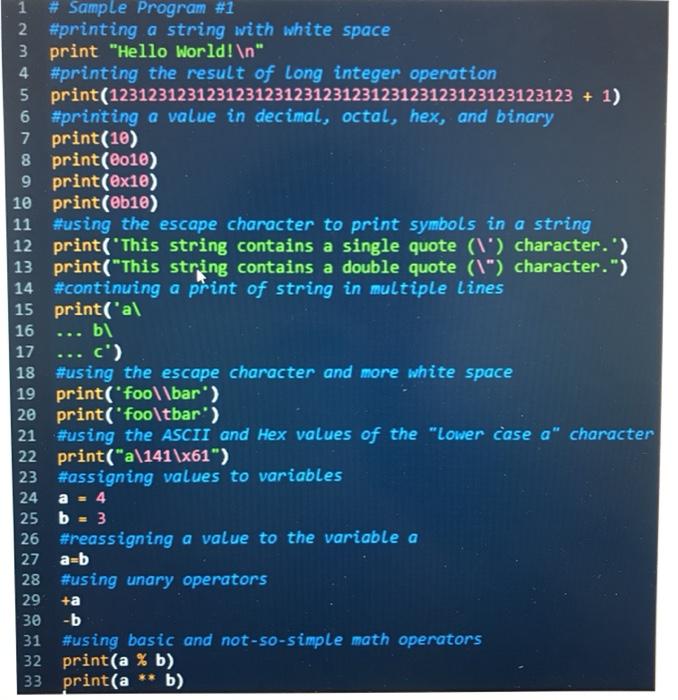
1 # Sample Program #1 2 #printing a string with white space 3 print "Hello world! " 4 #printing the result of long integer operation 5 print(123123123123123123123123123123123123123123123123 + 1) #printing a value in decimal, octal, hex, and binary 7 print(10) 8 print (2010) 9 print(@x10) 10 print(@b10) 11 #using the escape character to print symbols in a string 12 print('This string contains a single quote (l') character.') 13 print("This string contains a double quote (\") character.") 14 #continuing a print of string in multiple lines 15 print('al 16 ... bl 17 ... c') 18 #using the escape character and more white space 19 print('fool\bar') 20 print('foo\tbar') 21 #using the ASCII and Hex values of the "Lower case a" character 22 print("a\141\x61") 23 #assigning values to variables 24 a = 4 25 b = 3 26 #reassigning a value to the variable a 27 28 #using unary operators 29 +a 30 -b 31 #using basic and not-so-simple math operators 32 print(a % b) 33 print(a ** b) 1 1 1 arb
Step by Step Solution
There are 3 Steps involved in it

Get step-by-step solutions from verified subject matter experts
 Study Help