







Question: from turtle import Turtle, mainloop class Etch(Turtle): def __init__(self): super().__init__() #calls the init of Turtle self.screen = self.getscreen() self.color('blue') self.shape('turtle') self.pensize(2) self.distance = 5 self.turn
from turtle import Turtle, mainloop
class Etch(Turtle):
def __init__(self):
super().__init__() #calls the init of Turtle
self.screen = self.getscreen()
self.color('blue')
self.shape('turtle')
self.pensize(2)
self.distance = 5
self.turn = 10
self.screen.onkey(self.fwd, "Up")
self.screen.onkey(self.bkwd, "Down")
self.screen.onkey(self.leftTurn, "Left")
self.screen.onkey(self.rightTurn, "Right")
self.screen.onkey(self.colorRed, "r")
self.screen.onkey(self.colorBlue, "b")
self.screen.onkey(self._up, "u")
self.screen.onkey(self._down, "d")
self.speed("fastest")
self.screen.listen()
self.main()
def _up(self):
self.up()
def _down(self):
self.down()
def colorRed(self):
self.color("red")
def colorBlue(self):
self.color("blue")
def fwd(self):
self.forward(self.distance)
def bkwd(self):
self.backward(self.distance)
def leftTurn(self):
self.left(self.turn)
def rightTurn(self):
self.right(self.turn)
def main(self):
mainloop()
#A way of running the program with an instance of the object Etch
if __name__ == '__main__':
etch = Etch()
(With Python function) add comments and output pictures
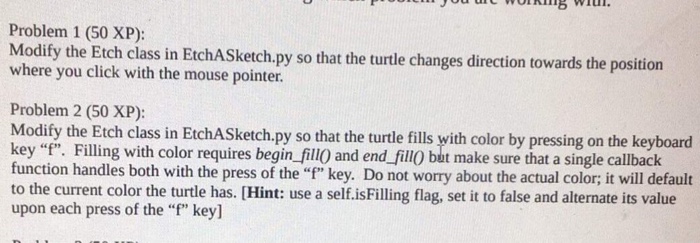
WOR Problem 1 (50 XP): Modify the Etch class in EtchASketch.py so that the turtle changes direction towards the position where you click with the mouse pointer. Problem 2 (50 XP): Modify the Etch class in EtchASketchpy so thathe turtle fills yith color by pressing on the keyboard key"f". Filling with color requires begin fill0 and end fill0 bat make sure that a single callback function handles both with the press of the "" key. Do not worry about the actual color; it will default to the current color the turtle has. [Hint: use a self.isFilling flag, set it to false and alternate its value upon each press of the "f" key]
Step by Step Solution
There are 3 Steps involved in it
1 Expert Approved Answer
Step: 1 Unlock

Question Has Been Solved by an Expert!
Get step-by-step solutions from verified subject matter experts
Step: 2 Unlock
Step: 3 Unlock
 Study Help