







Question: Func_headers.py import re # '$' isn't allowed in Python variable names #Python variable names must start with a letter or a '_'... start_var_chars = '[a-zA-Z_]'
Func_headers.py
import re
# '$' isn't allowed in Python variable names
#Python variable names must start with a letter or a '_'...
start_var_chars = '[a-zA-Z_]'
#... but digits are also allowed in trailing chacters
trail_var_chars = '[a-zA-Z0-9_]'
var_chars = start_var_chars + trail_var_chars + '*'
#Verbose regex definition
#Some notes on Python string literal syntax
# 1. A triple-quoted string, delimited by ''' or """, is allowed to span
# multiple lines in the source file.
#
# 2. The 'r' string defintion prefix stands for 'raw', and means that the
# backslash characters are passed to the regular expression engine
# without interpretation.
#
# 3. The f string defintion prefix allows for inserting variables
# into the string by enclosing them in curly braces. For
# example, {var_chars}
#
#FOR THE MIDTERM, ENHANCE THIS REGULAR EXPRESSION ACCORDING TO THE INSTRUCTIONS
func_header_regex =\
re.compile(fr'''^\s* # any and all blanks & tabs at start of string
def\s+ # "def" then blanks & tabs
{var_chars} # function name
\s*\(\s* # blanks & tabs, '(', blanks & tabs
{var_chars} , #parameter name
*\s*\)\s*:\s*$ # blanks & tabs, ')', blanks & tabs, ':'
# blanks & tabs, end of string
''', re.VERBOSE)
def Match_func_header(text):
#FOR THE MIDTERM, MODIFY THE RETURN SO THAT THIS FUNCTION ONLY RETURNS THE
# FUNCTION HEADER, OMITTING ENCLOSING WHITE SPACE.
return func_header_regex.search(text)
if __name__ == '__main__':
o = open('func_headers.out','w')
while True:
filename = input('Enter file to check for function headers, or enter to quit: ')
if filename == '': break
try:
f = open(filename, 'r')
except:
print(f'Could not open "{filename}" for reading')
continue
print(f'Looking for function headers in "{filename}" ...', file=o)
lineNum = 1
for line in f.readlines():
#THE PROCESSING BELOW DEPENDS ON Match_func_header RETURNING A MATCH
# OBJECT, WHICH WILL NOT NECESSARILY BE TRUE AFTER YOU MAKE YOUR
# MODIFICATIONS
m = Match_func_header(line)
#IN THE PROCESSING BELOW, THE "[:-1]" AT THE END OF THE OUTPUT
# STRING JUST REMOVES THE TRAILING NEWLINE CHAR. THAT MAY NO LONGER
# BE NEEDED AFTER YOU MAKE YOUR MODIFICATIONS
if m:
pfx = 'Python function header on line'
print(f'{pfx} {lineNum}: "{m.group()[:-1]}"', file=o)
else:
pfx = 'No Python function header on line'
print(f'{pfx} {lineNum}: "{line[:-1]}"', file=o)
lineNum += 1
print(f'... "{filename}" function header search complete ', file=o)
f.close()
print('Function header detection testing complete.')
o.close()
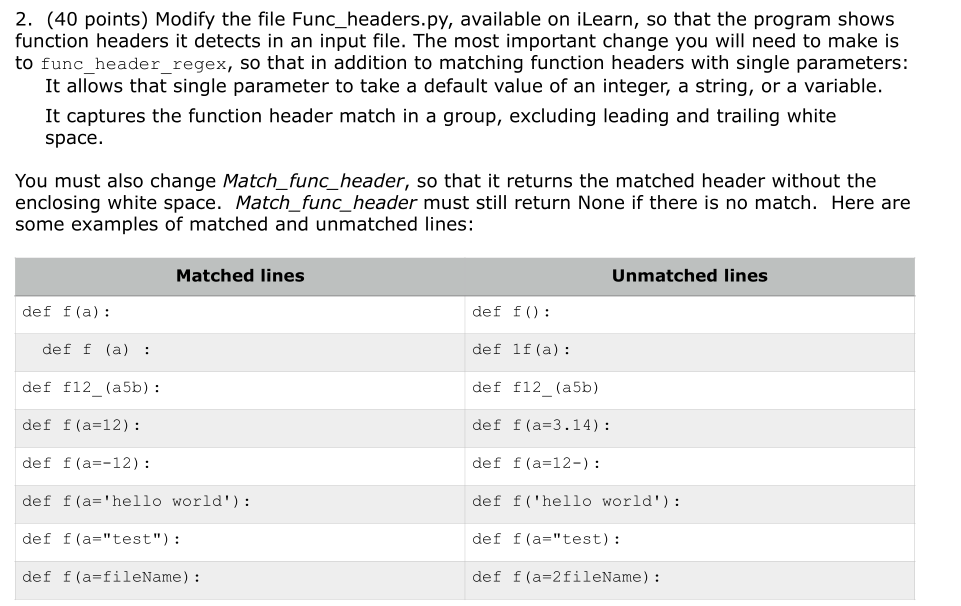
2. (40 points) Modify the file Func_headers.py, available on iLearn, so that the program shows function headers it detects in an input file. The most important change you will need to make is to func_header_regex, so that in addition to matching function headers with single parameters: It allows that single parameter to take a default value of an integer, a string, or a variable. It captures the function header match in a group, excluding leading and trailing white space. You must also change Match_func_header, so that it returns the matched header without the enclosing white space. Match_func_header must still return None if there is no match. Here are some examples of matched and unmatched lines: Matched lines Unmatched lines def f(a): def f(): def f (a) : def lf (a): def f12_(a5b): def f12_(a5b) def f(a=12): def f(a=3.14): def f(a=-12): def f(a=12-): def f(a='hello world') : def f('hello world') : def f(a="test"): def f(a="test): def f(a=fileName) : def f(a=2 fileName)
Step by Step Solution
There are 3 Steps involved in it

Get step-by-step solutions from verified subject matter experts
 Study Help