







Question: Function name: currency_trading Parameter(s): symbol (str) limit (int) Return Type: dict Description: Given a cryptocurrency trading symbol and the limit of time data points, write
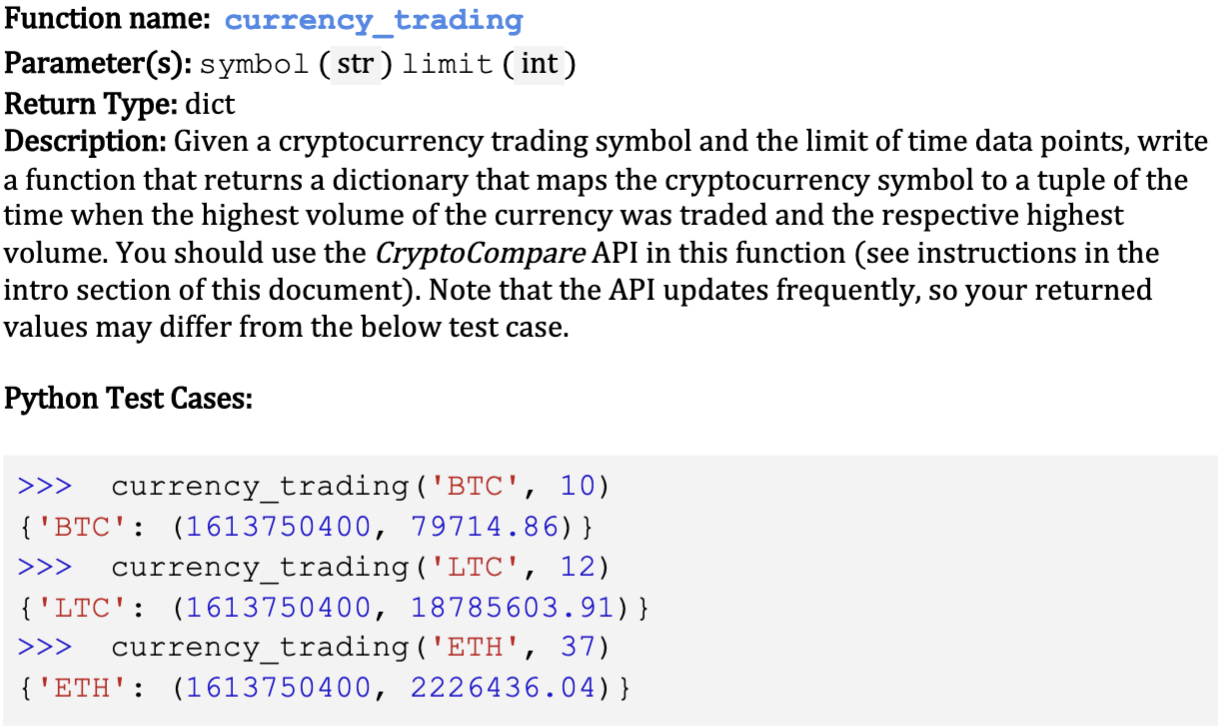
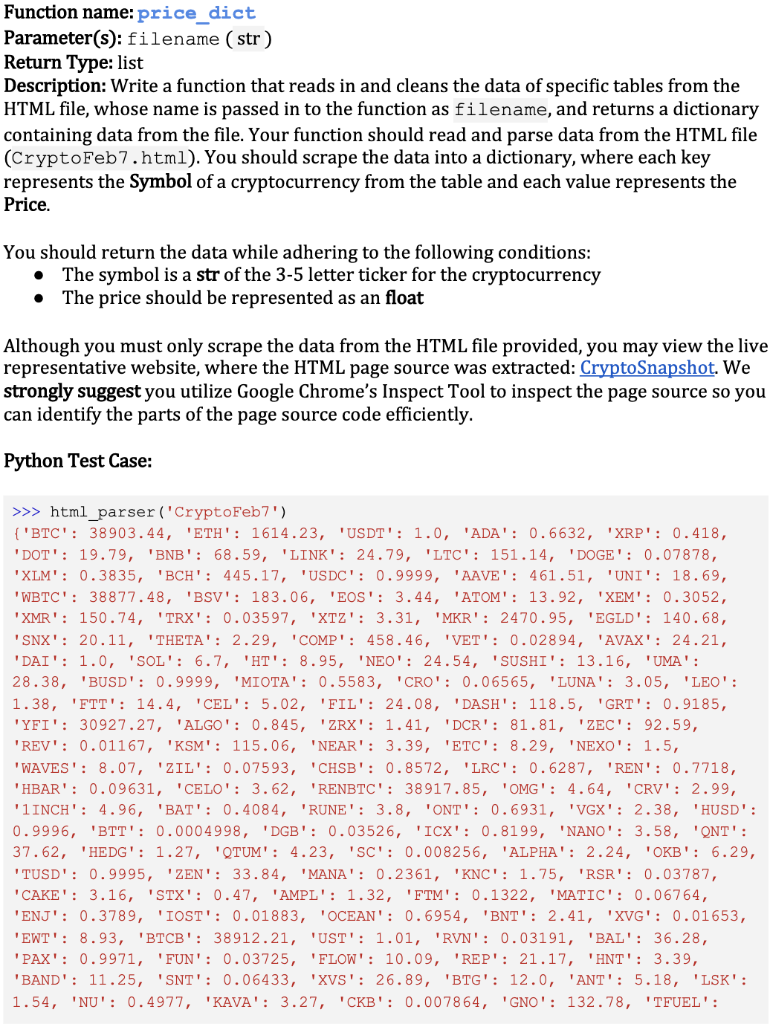
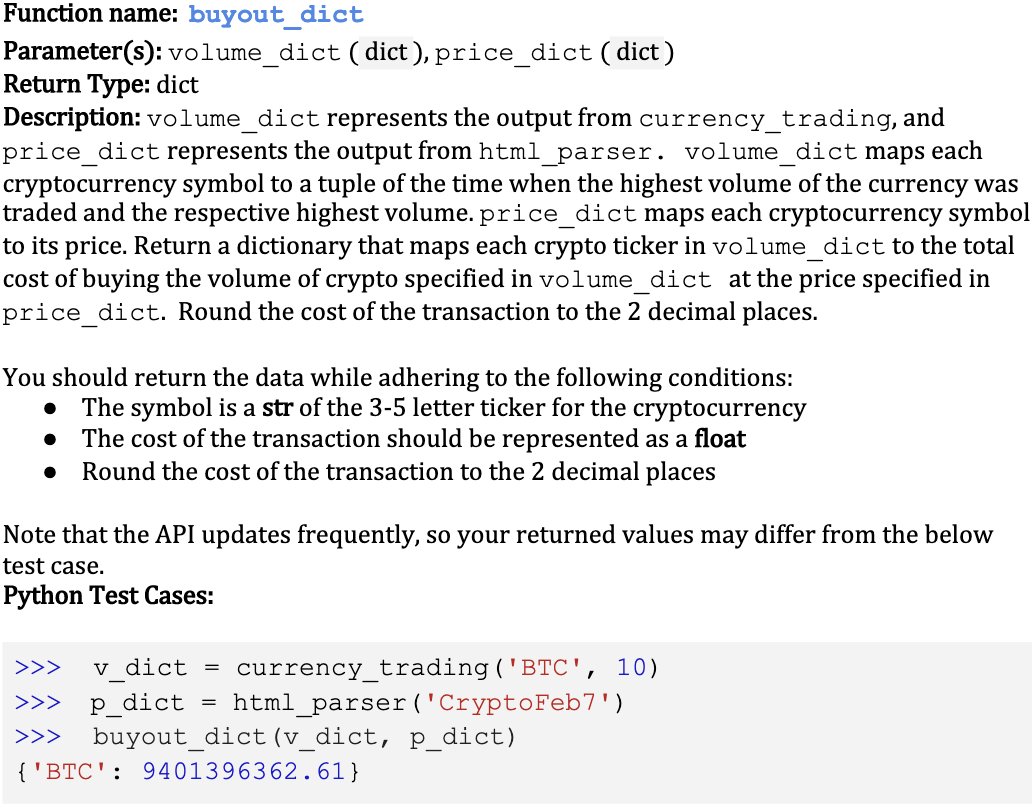
Function name: currency_trading Parameter(s): symbol (str) limit (int) Return Type: dict Description: Given a cryptocurrency trading symbol and the limit of time data points, write a function that returns a dictionary that maps the cryptocurrency symbol to a tuple of the time when the highest volume of the currency was traded and the respective highest volume. You should use the CryptoCompare API in this function (see instructions in the intro section of this document). Note that the API updates frequently, so your returned values may differ from the below test case. Python Test Cases: >>> currency_trading ('BTC', 10) { 'BTC': (1613750400, 79714.86) } >>> currency_trading ('LTC', 12) {'LTC': (1613750400, 18785603.91) } >>> currency_trading ('ETH', 37) { 'ETH': (1613750400, 2226436.04)} Function name: price_dict Parameter(s): filename (str) Return Type: list Description: Write a function that reads in and cleans the data of specific tables from the HTML file, whose name is passed in to the function as filename, and returns a dictionary containing data from the file. Your function should read and parse data from the HTML file (CryptoFeb7.html). You should scrape the data into a dictionary, where each key represents the Symbol of a cryptocurrency from the table and each value represents the Price. You should return the data while adhering to the following conditions: The symbol is a str of the 3-5 letter ticker for the cryptocurrency The price should be represented as an float . Although you must only scrape the data from the HTML file provided, you may view the live representative website, where the HTML page source was extracted: CryptoSnapshot. We strongly suggest you utilize Google Chrome's Inspect Tool to inspect the page source so you can identify the parts of the page source code efficiently. Python Test Case: >>> html_parser('CryptoFeb7') {"BTC': 38903.44, 'ETH': 1614.23, 'USDT': 1.0, 'ADA': 0.6632, 'XRP': 0.418, DOT': 19.79, 'BNB': 68.59, 'LINK': 24.79, LTC': 151.14, 'DOGE': 0.07878, "XLM': 0.3835, 'BCH': 445.17, USDC': 0.9999, 'AAVE': 461.51, 'UNI': 18.69, "WBTC': 38877.48, 'BSV': 183.06, 'EOS': 3.44, ATOM': 13.92, 'XEM': 0.3052, 'XMR': 150.74, TRX': 0.03597, 'XTZ': 3.31, 'MKR': 2470.95, 'EGLD': 140.68, 'SNX': 20.11, 'THETA': 2.29, 'COMP': 458.46, 'VET': 0.02894, 'AVAX': 24.21, DAI': 1.0, 'SOL': 6.7, 'HT': 8.95, 'NEO': 24.54, 'SUSHI': 13.16, 'UMA': 28.38, 'BUSD': 0.9999, 'MIOTA': 0.5583, CRO': 0.06565, 'LUNA': 3.05, 'LEO': 1.38, 'FTT': 14.4, 'CEL': 5.02, 'FIL': 24.08, 'DASH': 118.5, GRT': 0.9185, 'YFI': 30927.27, 'ALGO': 0.845, "ZRX': 1.41, 'DCR': 81.81, 'ZEC': 92.59, REV': 0.01167, 'KSM': 115.06, 'NEAR': 3.39, 'ETC': 8.29, 'NEXO': 1.5, 'WAVES': 8.07, ZIL': 0.07593, 'CHSB': 0.8572, 'LRC): 0.6287, 'REN': 0.7718, "HBAR': 0.09631, CELO': 3.62, 'RENBTC': 38917.85, 'OMG': 4.64, CRV': 2.99, '1INCH': 4.96, 'BAT': 0.4084, 'RUNE': 3.8, ONT': 0.6931, 'VGX': 2.38, 'HUSD': 0.9996, 'BTT': 0.0004998, 'DGB': 0.03526, 'ICX': 0.8199, 'NANO': 3.58, 'ONT': 37.62, 'HEDG': 1.27, QTUM': 4.23, 'SC': 0.008256, 'ALPHA': 2.24, 'OKB': 6.29, 'TUSD': 995, 'ZEN': 33.84, 'MANA': 0.2361, 'KNC': 1.75, RSR': 0.03787, CAKE': 3.16, 'STX': 0.47, 'AMPL': 1.32, 'FTM': 0.1322, 'MATIC': 0.06764, 'ENJ': 0.3789, 'IOST': 0.01883, 'OCEAN': 0.6954, 'BNT': 2.41, 'XVG': 0.01653, 'EWT': 8.93, 'BTCB': 38912.21, 'UST': 1.01, 'RVN': 0.03191, 'BAL': 36.28, PAX': 0.9971, 'FUN': 0.03725, 'FLOW': 10.09, 'REP': 21.17, 'HNT': 3.39, 'BAND': 11.25, 'SNT': 0.06433, 'XVS': 26.89, 'BTG': 12.0, 'ANT': 5.18, 'LSK': 1.54, 'NU': 0.4977, 'KAVA': 3.27, 'CKB': 0.007864, 'GNO': 132.78, 'TFUEL': Function name: buyout_dict Parameter(s): volume_dict ( dict), price_dict (dict) Return Type: dict Description: volume_dict represents the output from currency_trading, and price_dict represents the output from html_parser. volume_dict maps each cryptocurrency symbol to a tuple of the time when the highest volume of the currency was traded and the respective highest volume.price_dict maps each cryptocurrency symbol to its price. Return a dictionary that maps each crypto ticker in volume_dict to the total cost of buying the volume of crypto specified in volume_dict at the price specified in price_dict. Round the cost of the transaction to the 2 decimal places. You should return the data while adhering to the following conditions: The symbol is a str of the 3-5 letter ticker for the cryptocurrency The cost of the transaction should be represented as a float Round the cost of the transaction to the 2 decimal places . Note that the API updates frequently, so your returned values may differ from the below test case. Python Test Cases: >>> v_dict currency_trading ('BTC', 10) >>> p_dict html_parser('CryptoFeb7') >>> buyout_dict (v_dict, p_dict) { 'BTC': 9401396362.61} Function name: currency_trading Parameter(s): symbol (str) limit (int) Return Type: dict Description: Given a cryptocurrency trading symbol and the limit of time data points, write a function that returns a dictionary that maps the cryptocurrency symbol to a tuple of the time when the highest volume of the currency was traded and the respective highest volume. You should use the CryptoCompare API in this function (see instructions in the intro section of this document). Note that the API updates frequently, so your returned values may differ from the below test case. Python Test Cases: >>> currency_trading ('BTC', 10) { 'BTC': (1613750400, 79714.86) } >>> currency_trading ('LTC', 12) {'LTC': (1613750400, 18785603.91) } >>> currency_trading ('ETH', 37) { 'ETH': (1613750400, 2226436.04)} Function name: price_dict Parameter(s): filename (str) Return Type: list Description: Write a function that reads in and cleans the data of specific tables from the HTML file, whose name is passed in to the function as filename, and returns a dictionary containing data from the file. Your function should read and parse data from the HTML file (CryptoFeb7.html). You should scrape the data into a dictionary, where each key represents the Symbol of a cryptocurrency from the table and each value represents the Price. You should return the data while adhering to the following conditions: The symbol is a str of the 3-5 letter ticker for the cryptocurrency The price should be represented as an float . Although you must only scrape the data from the HTML file provided, you may view the live representative website, where the HTML page source was extracted: CryptoSnapshot. We strongly suggest you utilize Google Chrome's Inspect Tool to inspect the page source so you can identify the parts of the page source code efficiently. Python Test Case: >>> html_parser('CryptoFeb7') {"BTC': 38903.44, 'ETH': 1614.23, 'USDT': 1.0, 'ADA': 0.6632, 'XRP': 0.418, DOT': 19.79, 'BNB': 68.59, 'LINK': 24.79, LTC': 151.14, 'DOGE': 0.07878, "XLM': 0.3835, 'BCH': 445.17, USDC': 0.9999, 'AAVE': 461.51, 'UNI': 18.69, "WBTC': 38877.48, 'BSV': 183.06, 'EOS': 3.44, ATOM': 13.92, 'XEM': 0.3052, 'XMR': 150.74, TRX': 0.03597, 'XTZ': 3.31, 'MKR': 2470.95, 'EGLD': 140.68, 'SNX': 20.11, 'THETA': 2.29, 'COMP': 458.46, 'VET': 0.02894, 'AVAX': 24.21, DAI': 1.0, 'SOL': 6.7, 'HT': 8.95, 'NEO': 24.54, 'SUSHI': 13.16, 'UMA': 28.38, 'BUSD': 0.9999, 'MIOTA': 0.5583, CRO': 0.06565, 'LUNA': 3.05, 'LEO': 1.38, 'FTT': 14.4, 'CEL': 5.02, 'FIL': 24.08, 'DASH': 118.5, GRT': 0.9185, 'YFI': 30927.27, 'ALGO': 0.845, "ZRX': 1.41, 'DCR': 81.81, 'ZEC': 92.59, REV': 0.01167, 'KSM': 115.06, 'NEAR': 3.39, 'ETC': 8.29, 'NEXO': 1.5, 'WAVES': 8.07, ZIL': 0.07593, 'CHSB': 0.8572, 'LRC): 0.6287, 'REN': 0.7718, "HBAR': 0.09631, CELO': 3.62, 'RENBTC': 38917.85, 'OMG': 4.64, CRV': 2.99, '1INCH': 4.96, 'BAT': 0.4084, 'RUNE': 3.8, ONT': 0.6931, 'VGX': 2.38, 'HUSD': 0.9996, 'BTT': 0.0004998, 'DGB': 0.03526, 'ICX': 0.8199, 'NANO': 3.58, 'ONT': 37.62, 'HEDG': 1.27, QTUM': 4.23, 'SC': 0.008256, 'ALPHA': 2.24, 'OKB': 6.29, 'TUSD': 995, 'ZEN': 33.84, 'MANA': 0.2361, 'KNC': 1.75, RSR': 0.03787, CAKE': 3.16, 'STX': 0.47, 'AMPL': 1.32, 'FTM': 0.1322, 'MATIC': 0.06764, 'ENJ': 0.3789, 'IOST': 0.01883, 'OCEAN': 0.6954, 'BNT': 2.41, 'XVG': 0.01653, 'EWT': 8.93, 'BTCB': 38912.21, 'UST': 1.01, 'RVN': 0.03191, 'BAL': 36.28, PAX': 0.9971, 'FUN': 0.03725, 'FLOW': 10.09, 'REP': 21.17, 'HNT': 3.39, 'BAND': 11.25, 'SNT': 0.06433, 'XVS': 26.89, 'BTG': 12.0, 'ANT': 5.18, 'LSK': 1.54, 'NU': 0.4977, 'KAVA': 3.27, 'CKB': 0.007864, 'GNO': 132.78, 'TFUEL': Function name: buyout_dict Parameter(s): volume_dict ( dict), price_dict (dict) Return Type: dict Description: volume_dict represents the output from currency_trading, and price_dict represents the output from html_parser. volume_dict maps each cryptocurrency symbol to a tuple of the time when the highest volume of the currency was traded and the respective highest volume.price_dict maps each cryptocurrency symbol to its price. Return a dictionary that maps each crypto ticker in volume_dict to the total cost of buying the volume of crypto specified in volume_dict at the price specified in price_dict. Round the cost of the transaction to the 2 decimal places. You should return the data while adhering to the following conditions: The symbol is a str of the 3-5 letter ticker for the cryptocurrency The cost of the transaction should be represented as a float Round the cost of the transaction to the 2 decimal places . Note that the API updates frequently, so your returned values may differ from the below test case. Python Test Cases: >>> v_dict currency_trading ('BTC', 10) >>> p_dict html_parser('CryptoFeb7') >>> buyout_dict (v_dict, p_dict) { 'BTC': 9401396362.61}
Step by Step Solution
There are 3 Steps involved in it

Get step-by-step solutions from verified subject matter experts
 Study Help