







Question: function name edgy, please use matlab!! Function Name: edgy Inputs 1. (char) Filename of an image with file extension File Outputs: 1. An edgy image
 function name edgy, please use matlab!!
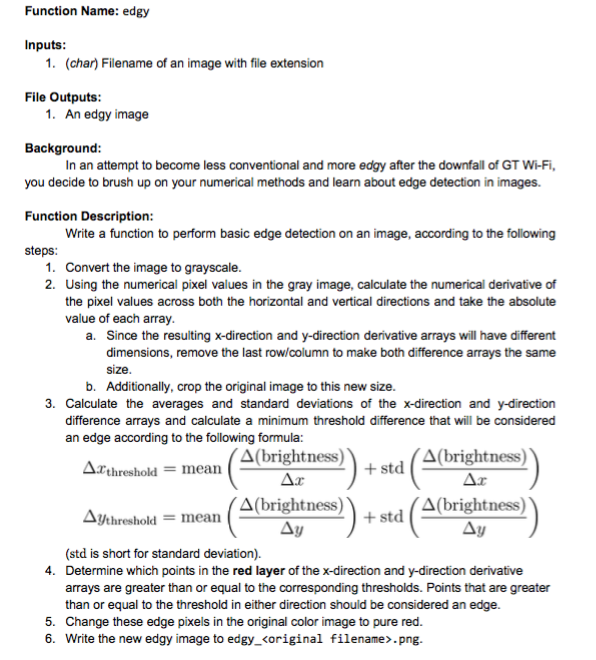
Function Name: edgy Inputs 1. (char) Filename of an image with file extension File Outputs: 1. An edgy image Background you decide to brush up on your numerical methods and learn about edge detection in images. Function Description In an attempt to become less conventional and more edgy after the downfall of GT Wi-Fi, Write a function to perform basic edge detection on an image, according to the following steps 1. Convert the image to grayscale 2. Using the numerical pixel values in the gray image, calculate the numerical derivative of the pixel values across both the horizontal and vertical directions and take the absolute value of each array Since the resulting x-direction and y-direction derivative arrays will have different dimensions, remove the last row/column to make both difference arrays the same a. size b. Additionally, crop the original image to this new size 3. Calculate the averages and standard deviations of the x-direction and y-direction difference arrays and calculate a minimum threshold difference that will be considered an edge according to the following formula: A(brightness) + std thresholdmean AJthreshold mean A(brightness))+ std A (brightness) (std is short for standard deviation). Determine which points in the red layer of the x-direction and y-direction derivative arrays are greater than or equal to the corresponding thresholds. Points that are greater than or equal to the threshold in either direction should be considered an edge. Change these edge pixels in the original color image to pure red. Write the new edgy image to edgy_
Step by Step Solution
There are 3 Steps involved in it

Get step-by-step solutions from verified subject matter experts
 Study Help