







Question: Function: SUM; Formulas: Add; Multiply; Divide; Cell Referencing E 1 4 . 2 a - Using Excel to Allocate Support Department Costs Using the Direct
Function: SUM; Formulas: Add; Multiply; Divide; Cell Referencing
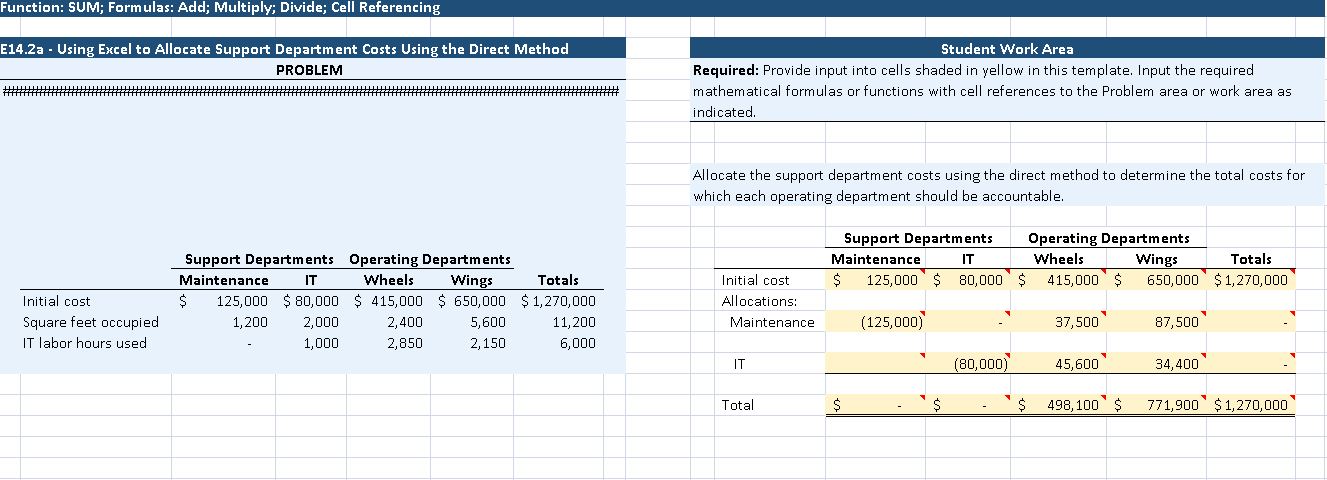
Ea Using Excel to Allocate Support Department Costs Using the Direct Method
PROBLEM
Student Work Area
Required: Provide input into cells shaded in yellow in this template. Input the required
mathematical formulas or functions with cell references to the Problem area or work area as
indicated.
Allocate the support department costs using the direct method to determine the total costs for
which each operating department should be accountable.
Step by Step Solution
There are 3 Steps involved in it
1 Expert Approved Answer
Step: 1 Unlock

Question Has Been Solved by an Expert!
Get step-by-step solutions from verified subject matter experts
Step: 2 Unlock
Step: 3 Unlock
 Study Help