



Question: Future Value Exercise: A lump sum cash flow of $ 4 2 2 . 4 1 is available now ( t = 0 ) .
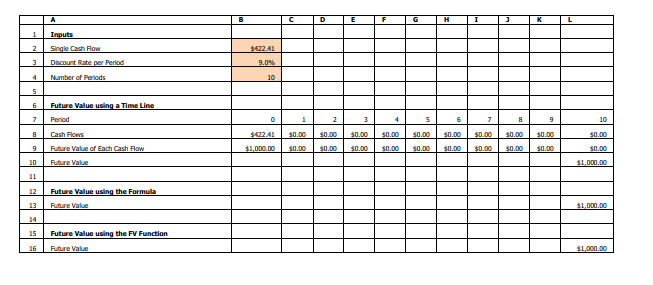
Future Value Exercise: A lump sum cash flow of $ is available now t For this cash flow, the appropriate discount rate per period is What is the future value of this cash flow periods from now? We will calculate the future value of the single cash flow in three equivalent ways. First, we will calculate the future value using a time line, where each column corresponds to a period of calendar time. Second, we use a formula for the future value. Third, we use Excels FV function for the future value. Procedures: Inputs: Enter the inputs PV r and n in the range B:B Future Value using a Time Line: Create a time line from period to period Enter the single cash flow in period Calculate the period future value of each cash flow and sum the future values as follows. Period: Enter in the range B:L Cash Flows: Enter B in cell B Enter $ in cell C and copy it across to L Future Value of Each Cash Flow Cash Flow Discount Rate per PeriodNumber of PeriodsCurrent Period o Enter B$B$$B$B in cell B and copy it across. The exponent term $B$B causes the period cash flow to be compounded times into the future, the period cash flow to be compounded times into the future, the period cash flow to be compounded times into the future, etc. The $ signs in $B$ and $B$ lock the column and the row when copying. Future Value Sum over all periods of the Future Value of Each Cash Flow. o Enter SUMB:L in cell L Future Value using the Formula: For a lump sum single cash flow, the formula is Future Value Cash Flow Discount Rate per PeriodNumber of Periods Enter BBB in cell L Future Value using the FV Function: The Excel FV function can be used to calculate the future value of a single cash flow, the future value of an annuity, or the future value of a bond. For a single cash flow, the format is FVDiscount Rate per Period, Number of Periods, Single Cash Flow Enter FVBBB in cell L The Future Value of this Single Cash Flow is $ Notice you get the same answer all three ways: using the time line, using the formula, or using the FV function! A B C D E F G H I J K L Inputs Single Cash Flow $ Discount Rate per Period Number of Periods Future Value using a Time Line Period Cash Flows $ $ $ $ $ $ $ $ $ $ $ Future Value of Each Cash Flow $ $ $ $ $ $ $ $ $ $ $ Future Value $ Future Value using the Formula Future Value $ Future Value using the FV Function Future Value $begintabularlllllllllllll
hline & A & B & C & D & E & F & G & H & I & J & K & L
hline & Inputs & & & & & & & & & & &
hline & Single Cash Flow & $ & & & & & & & & & &
hline & Discount Rate per Period & & & & & & & & & & &
hline & Number of Periods & & & & & & & & & & &
hline & & & & & & & & & & & &
hline & Future Value using a Time Line & & & & & & & & & & &
hline & Perrod & & & & & & & & & & &
hline & Cash flows & $ & $ & $ & $ & $ & $ & $ & $ & $ & $ & $
hline & Rubure Value of Each Cash Flow & $ & $ & $ & $ & $ & $ & $ & $ & $ & $ & $
hline & Pubure Value & & & & & & & & & & & $
hline & & & & & & & & & & & &
hline & Future Value using the Formula & & & & & & & & & & &
hline & Pubure Value & & & & & & & & & & & $
hline & & & & & & & & & & & &
hline & Future Value using the FV Function & & & & & & & & & & &
hline & Pubure Value & & & & & & & & & & & $
hline
endtabular
Step by Step Solution
There are 3 Steps involved in it
1 Expert Approved Answer
Step: 1 Unlock

Question Has Been Solved by an Expert!
Get step-by-step solutions from verified subject matter experts
Step: 2 Unlock
Step: 3 Unlock