







Question: fx AutoSum Logical e Lookup & Reference Define Name Recently Used A Text Math & Trig Insert Function Use in Formula Name Manager Trace Precedents
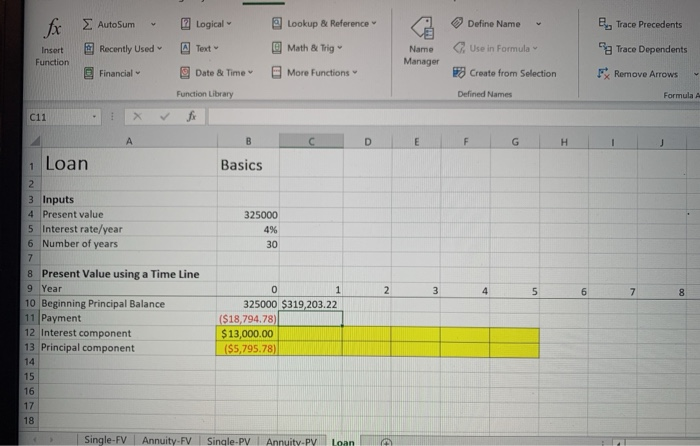
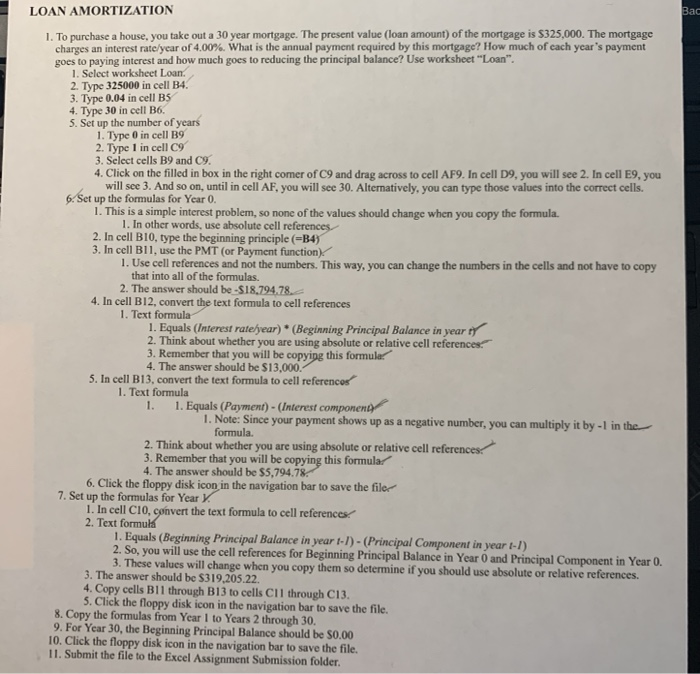
fx AutoSum Logical e Lookup & Reference Define Name Recently Used A Text Math & Trig Insert Function Use in Formula Name Manager Trace Precedents Trace Dependents FRemove Arrows Financial Date & Time More Functions Create from Selection Function Library Defined Names Formula A C11 fx A D E F G H 1 Basics 325000 4% 30 1 Loan 2 3 Inputs 4 Present value 5 Interest rate/year 6 Number of years 7 8 Present Value using a Time Line 9 Year 10 Beginning Principal Balance 11 Payment 12 Interest component 13 Principal component 14 15 16 17 18 2 3 4 5 om 7 8 0 1 325000 $319,203.22 ($18,794.78) $ 13,000.00 ($5,795.78) Single-FV Annuity-FV Single-PV Annuity-PY Loan Bac LOAN AMORTIZATION 1. To purchase a house, you take out a 30 year mortgage. The present value (loan amount) of the mortgage is $325,000. The mortgage charges an interest rate/year of 4.00%. What is the annual payment required by this mortgage? How much of cach year's payment goes to paying interest and how much goes to reducing the principal balance? Use worksheet "Loan". 1. Select worksheet Loan. 2. Type 325000 in cell B4. 3. Type 0.04 in cell BS 4. Type 30 in cell 06. 5. Set up the number of years 1. Type O in cell B9 2. Type 1 in cell C9 3. Select cells B9 and 9. 4. Click on the filled in box in the right comer of C9 and drag across to cell AF9. In cell D9, you will see 2. In cell E9, you will see 3. And so on, until in cell AF, you will see 30. Alternatively, you can type those values into the correct cells. 6. Set up the formulas for Year 0. 1. This is a simple interest problem, so none of the values should change when you copy the formula 1. In other words, use absolute cell references 2. In cell B10, type the beginning principle (=B4) 3. In cell B11, use the PMT (or Payment function) 1. Use cell references and not the numbers. This way, you can change the numbers in the cells and not have to copy that into all of the formulas. 2. The answer should be -$18.794.78 4. In cell B12, convert the text formula to cell references 1. Text formula 1. Equals (Interest rate/year) * (Beginning Principal Balance in year ty 2. Think about whether you are using absolute or relative cell references 3. Remember that you will be copying this formular 4. The answer should be $13,000. 5. In cell B13, convert the text formula to cell references 1. Text formula 1. 1. Equals (Payment) - (Interest components 1. Note: Since your payment shows up as a negative number, you can multiply it by -1 in the formula 2. Think about whether you are using absolute or relative cell references 3. Remember that you will be copying this formular 4. The answer should be $5,794.78. 6. Click the floppy disk icon in the navigation bar to save the filer 7. Set up the formulas for Year y 1. In cell C10, convert the text formula to cell references 2. Text formula 1. Equals (Beginning Principal Balance in year 1-1) - (Principal Component in year 1-1) 2. So, you will use the cell references for Beginning Principal Balance in Year and Principal Component in Year 0. 3. These values will change when you copy them so determine if you should use absolute or relative references. 3. The answer should be $319,205.22. 4. Copy cells Bll through B13 to cells Cll through C13. 5. Click the floppy disk icon in the navigation bar to save the file. 8. Copy the formulas from Year 1 to Years 2 through 30. 9. For Year 30, the Beginning Principal Balance should be 50.00 10. Click the floppy disk icon in the navigation bar to save the file. 11. Submit the file to the Excel Assignment Submission folder
Step by Step Solution
There are 3 Steps involved in it

Get step-by-step solutions from verified subject matter experts
 Study Help