







Question: 0 1 2 3 4 5 6 7 8 9 Challenge 3-The Matrix Guide: Allow 2 hours for this challenge. What is the Matrix?
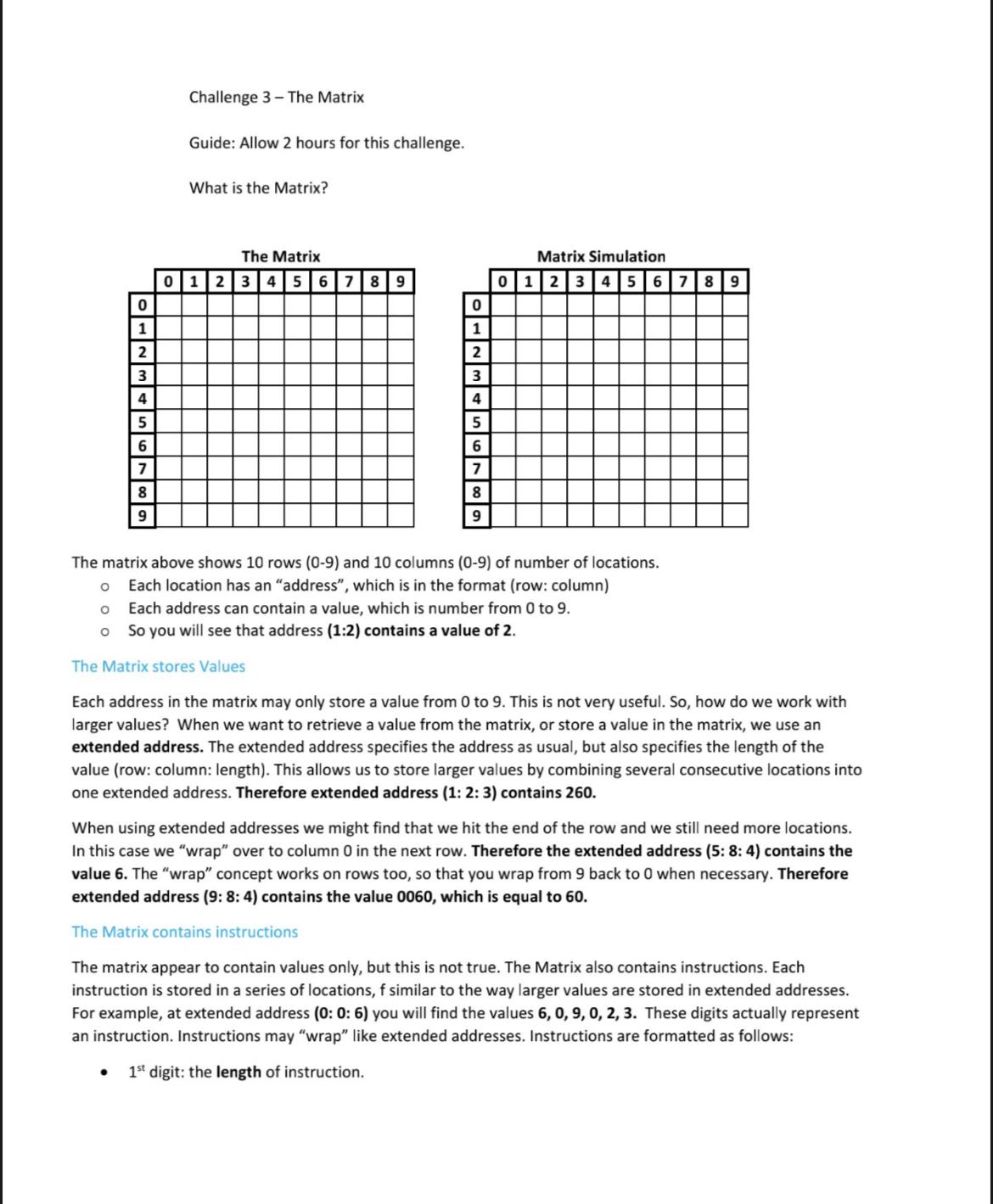
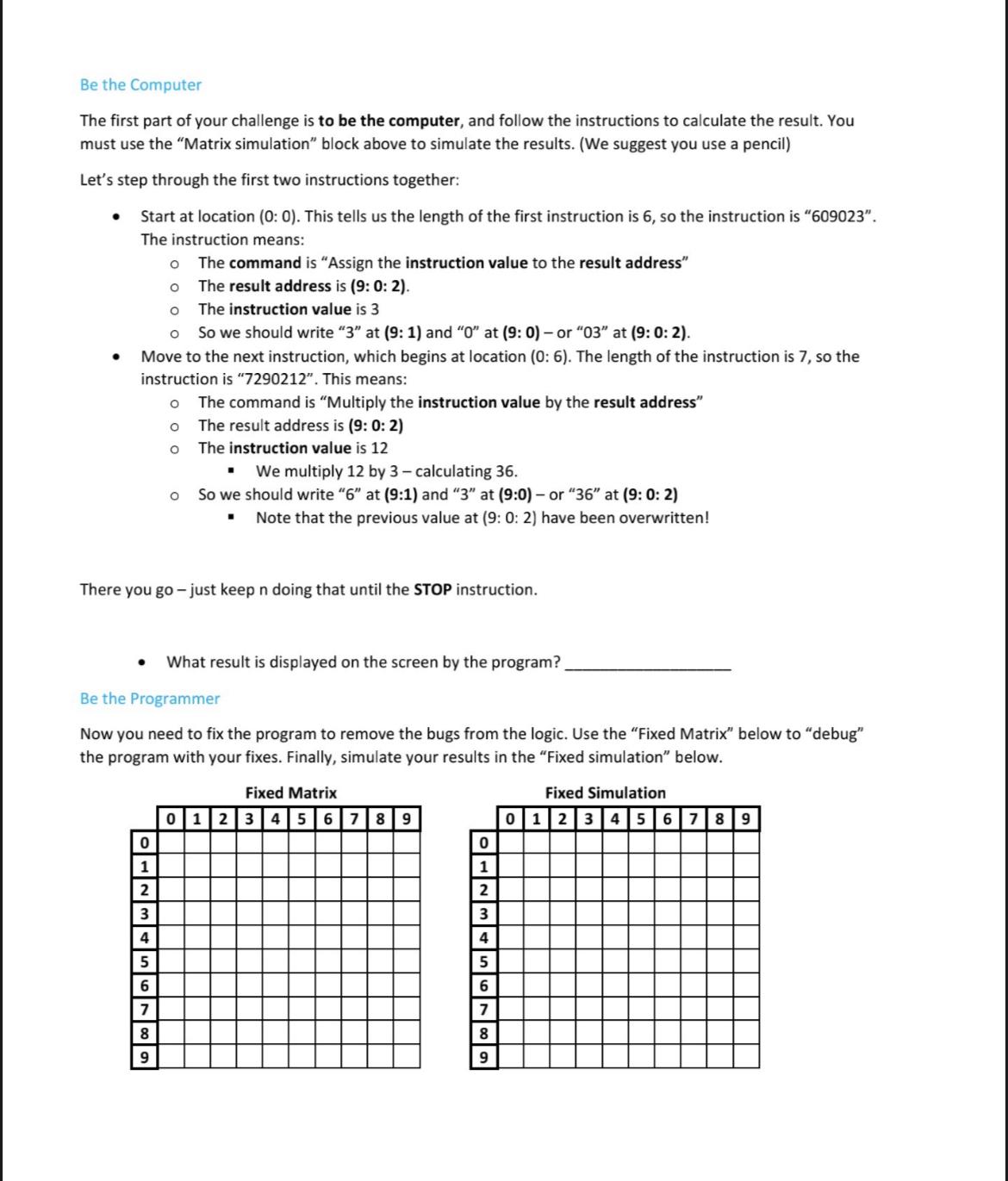
0 1 2 3 4 5 6 7 8 9 Challenge 3-The Matrix Guide: Allow 2 hours for this challenge. What is the Matrix? The Matrix 0 1 2 3 456789 0 1 2 3 4 5 6 7 8 9 Matrix Simulation 0 1 2 3456789 The matrix above shows 10 rows (0-9) and 10 columns (0-9) of number of locations. 0 Each location has an "address", which is in the format (row: column) 0 Each address can contain a value, which is number from 0 to 9. So you will see that address (1:2) contains a value of 2. The Matrix stores Values Each address in the matrix may only store a value from 0 to 9. This is not very useful. So, how do we work with larger values? When we want to retrieve a value from the matrix, or store a value in the matrix, we use an extended address. The extended address specifies the address as usual, but also specifies the length of the value (row: column: length). This allows us to store larger values by combining several consecutive locations into one extended address. Therefore extended address (1: 2: 3) contains 260. When using extended addresses we might find that we hit the end of the row and we still need more locations. In this case we "wrap" over to column 0 in the next row. Therefore the extended address (5: 8: 4) contains the value 6. The "wrap" concept works on rows too, so that you wrap from 9 back to 0 when necessary. Therefore extended address (9: 8: 4) contains the value 0060, which is equal to 60. The Matrix contains instructions The matrix appear to contain values only, but this is not true. The Matrix also contains instructions. Each instruction is stored in a series of locations, f similar to the way larger values are stored in extended addresses. For example, at extended address (0:0: 6) you will find the values 6, 0, 9, 0, 2, 3. These digits actually represent an instruction. Instructions may "wrap" like extended addresses. Instructions are formatted as follows: 1st digit: the length of instruction. Be the Computer The first part of your challenge is to be the computer, and follow the instructions to calculate the result. You must use the "Matrix simulation" block above to simulate the results. (We suggest you use a pencil) Let's step through the first two instructions together: Start at location (0:0). This tells us the length of the first instruction is 6, so the instruction is "609023". The instruction means: The command is "Assign the instruction value to the result address" The result address is (9:0: 2). The instruction value is 3 0 So we should write "3" at (9: 1) and "0" at (9: 0) - or "03" at (9:0:2). Move to the next instruction, which begins at location (0: 6). The length of the instruction is 7, so the instruction is "7290212". This means: 0 The command is "Multiply the instruction value by the result address" The result address is (9: 0:2) o The instruction value is 12 We multiply 12 by 3-calculating 36. So we should write "6" at (9:1) and "3" at (9:0) - or "36" at (9: 0: 2) Note that the previous value at (9: 0: 2) have been overwritten! There you go - just keep n doing that until the STOP instruction. What result is displayed on the screen by the program? Be the Programmer Now you need to fix the program to remove the bugs from the logic. Use the "Fixed Matrix" below to "debug" the program with your fixes. Finally, simulate your results in the "Fixed simulation" below. Fixed Simulation Fixed Matrix 0 123456789 0 0 1 2 3 456789 0 1 1 2 2 3 3 4 4 5 5 6 6 7 7 8 8 9 9 2nd digit: the command, which is one of the following: 0 = assign the instruction value to the result address. 1 = add the instruction value to the result address. O 2 = multiply the instruction value by the result address. 3 = assign the value in the remote address to result address. 4 add the value in the remote address to the result address. 5 = multiply the value in the remote address by the value in the result address 9 = STOP 6=display the value from the result address 3rd-5th digits: the result address, in the format of an extended address The value that results from the instruction is always saved at the result address. 6th to end of instruction: This portion may be used in one of two different ways The instruction value for commands that use a value. The remote address for commands that use an address. The Matrix is a Program A series instructions is a program. The matrix actually contains a program that allows the computer to perform a complex task. The first instruction begins at location 0: 0, and continues to the right. Immediately after each instruction ends, the next instruction begins. The program will follow the instructions in sequence until it reaches a STOP instruction. Remember that instructions can wrap. Changing the Matrix When we assign a value to an address, the value will be stored in the matrix, replacing whatever value, may have existed in the location previously. The computer always fills the address from right-most location in the address, moving towards the left, and it will store the whole value. Suppose we wish to store a value of 9 at address (3: 5:2). We can see that this address contains location (3:5) and (3: 6). So, starting at the right, we set (3: 6) = 9, and then (3: 5) = 0 (we must set leading zeros to guarantee accuracy). A glitch in the Matrix Suppose we wish to store a value of 678 at the same address (3: 5:2). Starting at the right, we set (3: 6) = 8, (3: 5)=7 and (3:4)=6. Did you notice that there has been an unintended change to location (3: 4)? We call this an address overflow. Also note that if we now retrieve the value from (3: 5: 3), the answer is 78, which is different from what we tried to store. So, we must always be sure that the addresses we use are large enough for the values we wish to store. Solve the Matrix The program that is in "The Matrix" at the moment will calculate the value of an invoice. There are three invoice lines, each with a quantity (1 digit) and a price (2 digits) to calculate. The program will calculate the value of each line, and then it will add the lines to calculate the total value of the invoice. We want a correct result, but the program has bugs (errors), and potential bugs. Can you find them?
Step by Step Solution
There are 3 Steps involved in it
The matrix equation can be written as follows beginpmatrix a b c d endpmatri... View full answer

Get step-by-step solutions from verified subject matter experts
 Study Help