



Question: Generating input characteristics for BJT in ORCAD i. ii. iii. 12 V1 Simulation Output for Input Characteristics I Simulation Output for Input Characteristics 1
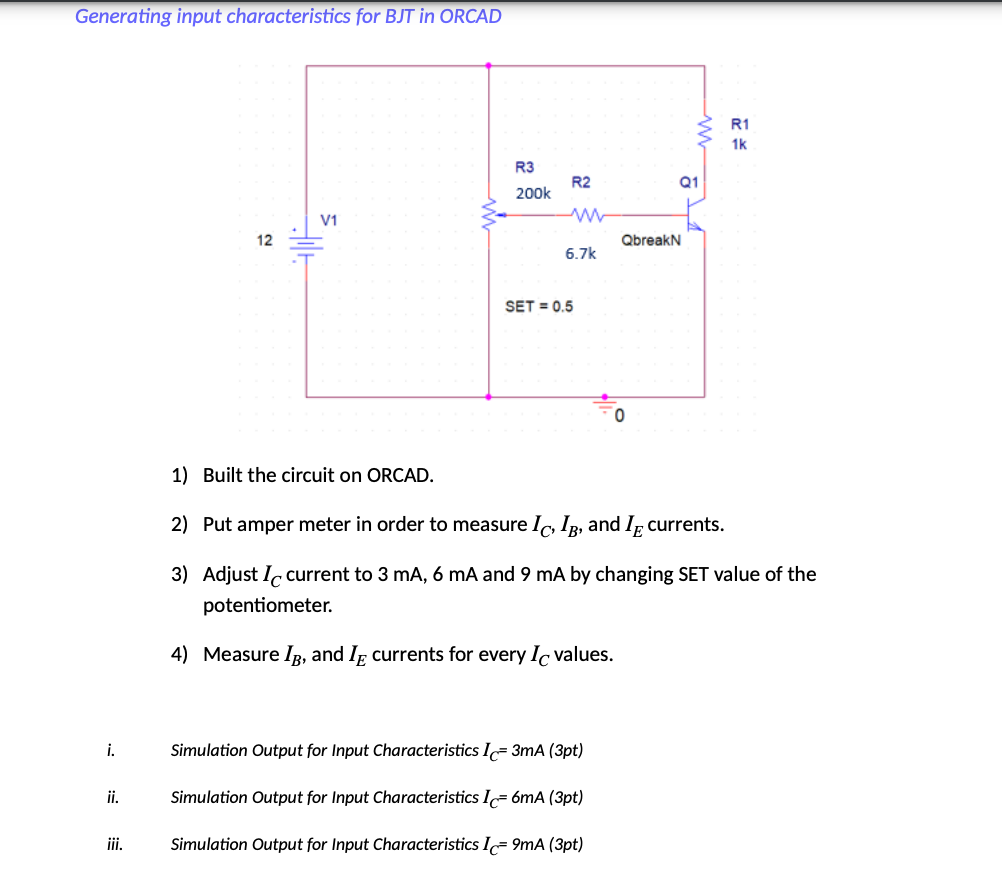
Generating input characteristics for BJT in ORCAD i. ii. iii. 12 V1 Simulation Output for Input Characteristics I Simulation Output for Input Characteristics 1 R3 200k Simulation Output for Input Characteristics I R2 ww 6.7k SET = 0.5 1) Built the circuit on ORCAD. 2) Put amper meter in order to measure Ic, IB, and I currents. 3) Adjust I current to 3 mA, 6 mA and 9 mA by changing SET value of the potentiometer. 4) Measure IB, and I currents for every Ic values. 3mA (3pt) 6mA (3pt) 9mA (3pt) www Q1 QbreakN R1 1k
Step by Step Solution
3.44 Rating (151 Votes )
There are 3 Steps involved in it
depicts a solution for generating input characteristics for a BJT in Orcad PSpice It outlines the steps and circuit schematic for simulating the input characteristics of a Bipolar Junction Transistor ... View full answer

Get step-by-step solutions from verified subject matter experts