







Question: Get your SQL file against Link: https://raw.githubusercontent.com/microsoft/sql-server-samples/master/samples/databases/northwind-pubs/instnwnd.sql Copy instnwnd.sql code and paste on your editor and then click on Execute button. Select your
Get your SQL file against Link: https://raw.githubusercontent.com/microsoft/sql-server-samples/master/samples/databases/northwind-pubs/instnwnd.sql • Copy instnwnd.sql code and paste on your editor and then click on Execute button. • Select your Database with name 'Northwind' and you are good to go for below queries.
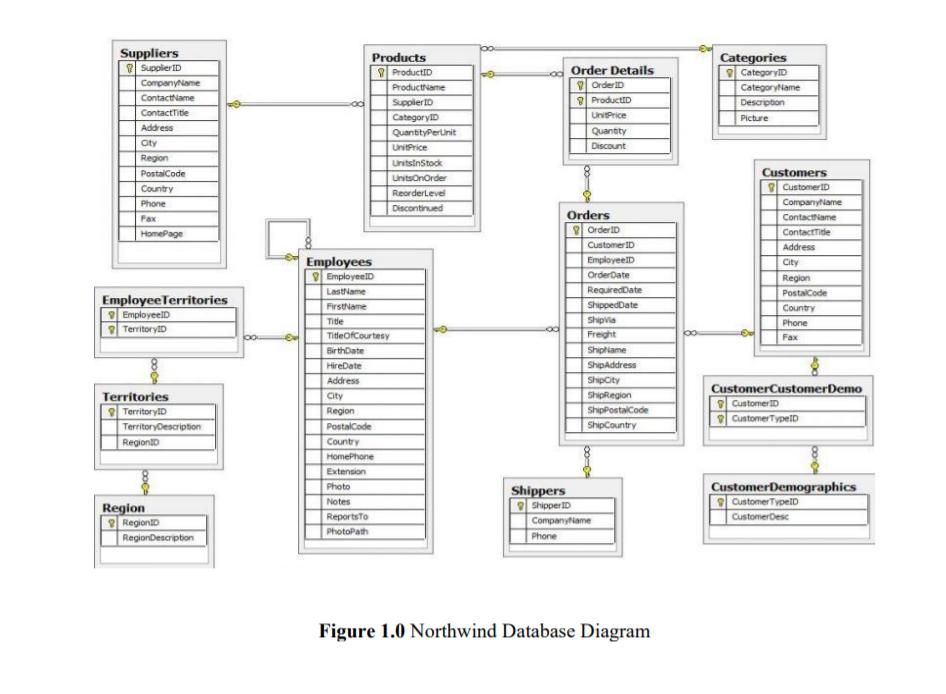
ProductName SupplierID Order Details OrderID ProductID UnitPrice Quantity Categories CategoryID CategoryName Description Picture Suppliers Supplier ID CompanyName ContactName ContactTitle Address City Products ProductID CategoryID QuantityPerUnit Region PostalCode Country Phone Fax: HomePage Employee Territories EmployeelD TerritoryID Employees EmployeelD LastName FirstName Title TitleOfCourtesy BirthDate HireDate Territories TerritoryID TerritoryDescription RegionID Region RegionID RegionDescription Address City Region PostalCode Country HomePhone Extension UnitPrice UnitsInStock UnitsOnOrder ReorderLevel Discount Discontinued Orders OrderID Customer ID EmployeeID OrderDate RequiredDate ShippedDate ShipVia Freight ShipName ShipAddress ShipCity ShipRegion ShipPostalCode ShipCountry Customers o CustomerID CompanyName ContactName ContactTide Address City Region PostalCode Country Phone Fax CustomerCustomerDemo T| CustomerID CustomerTypeID Photo Shippers Notes ShipperD ReportsTo PhotoPath CompanyName Phone Figure 1.0 Northwind Database Diagram CustomerDemographics CustomerTypeID CustomerDesc
Step by Step Solution
There are 3 Steps involved in it

Get step-by-step solutions from verified subject matter experts
 Study Help