







Question: Getting Started After starting Eclipse, create a new project called Lab21_3. Import Error.java from the assignment page. Examine at the code given in Error.java. It
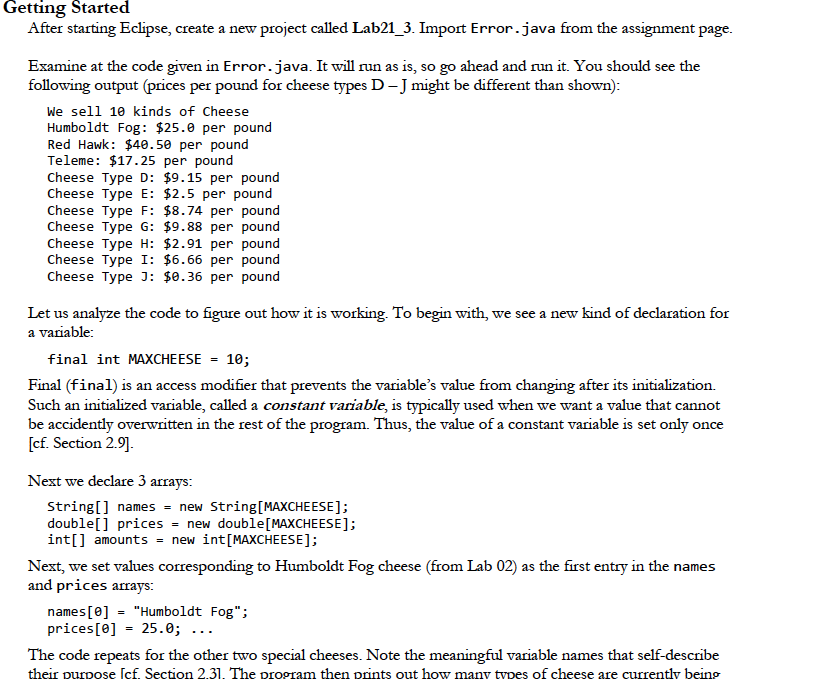
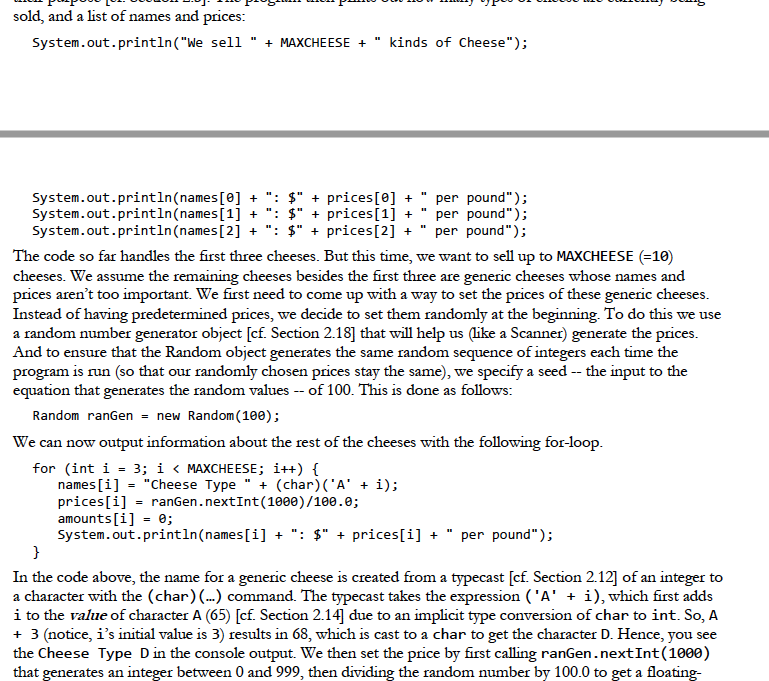
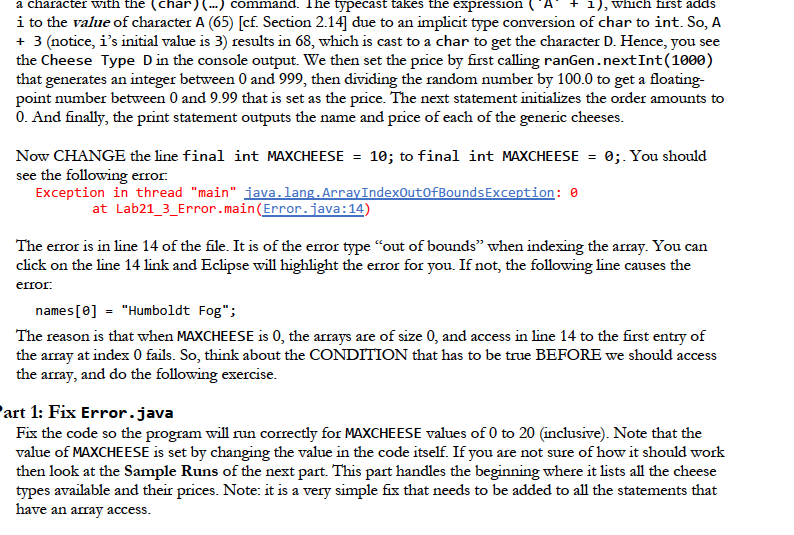
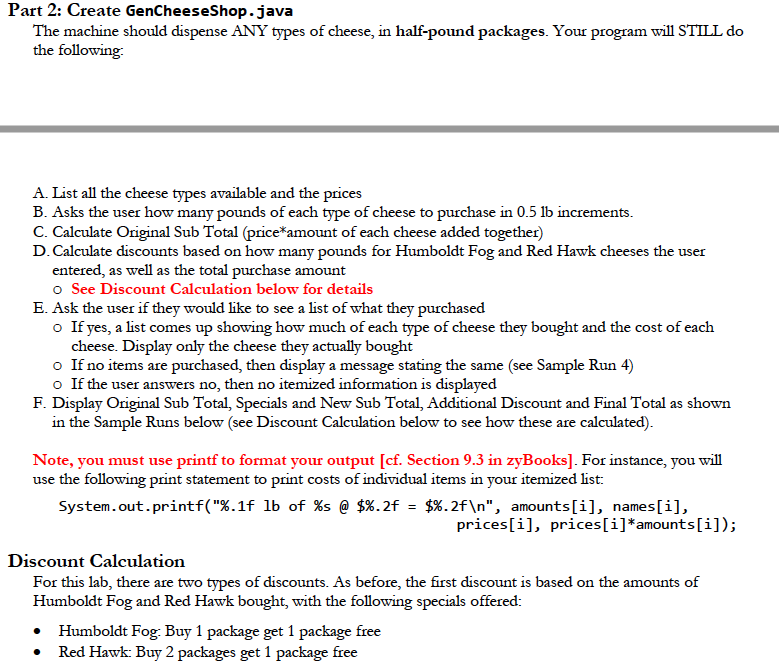
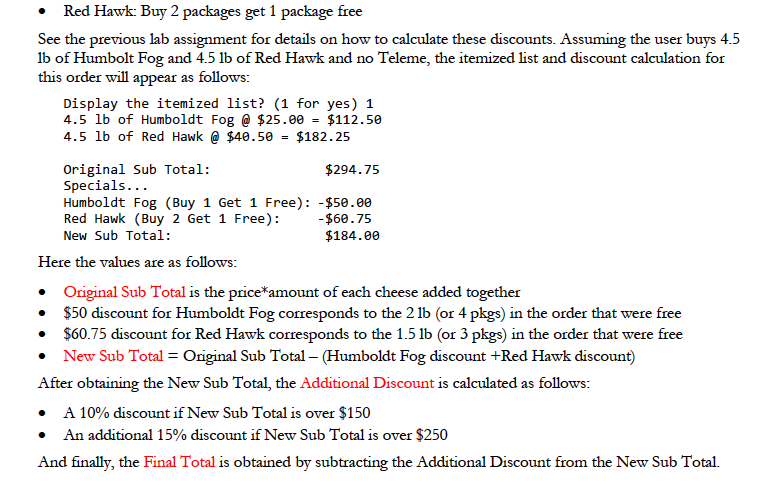
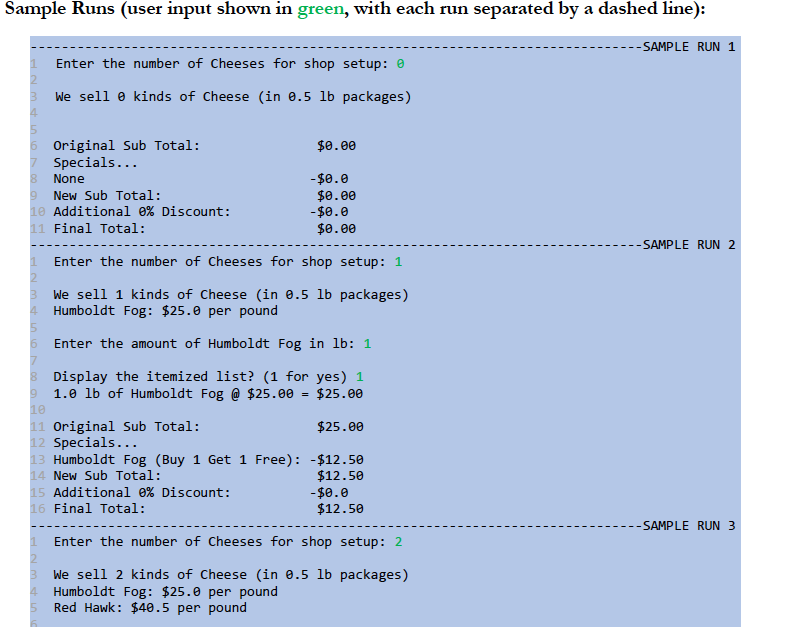
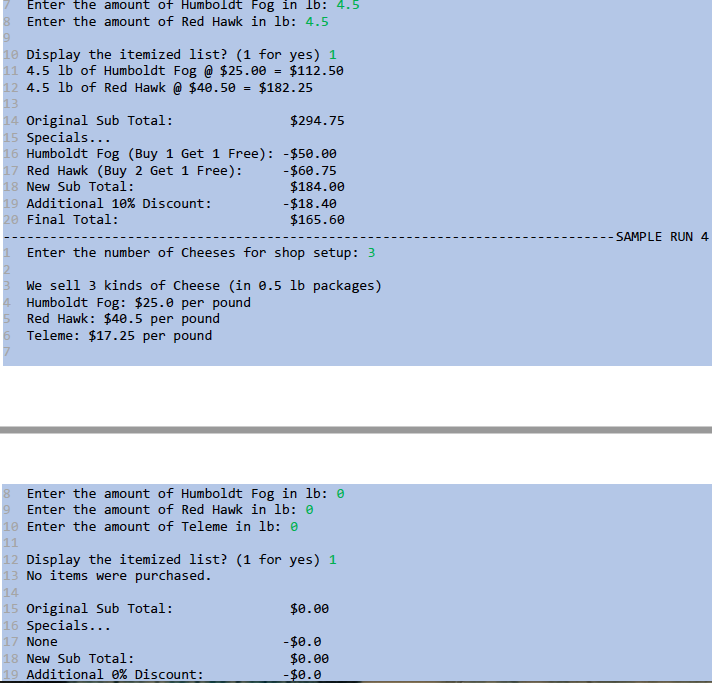
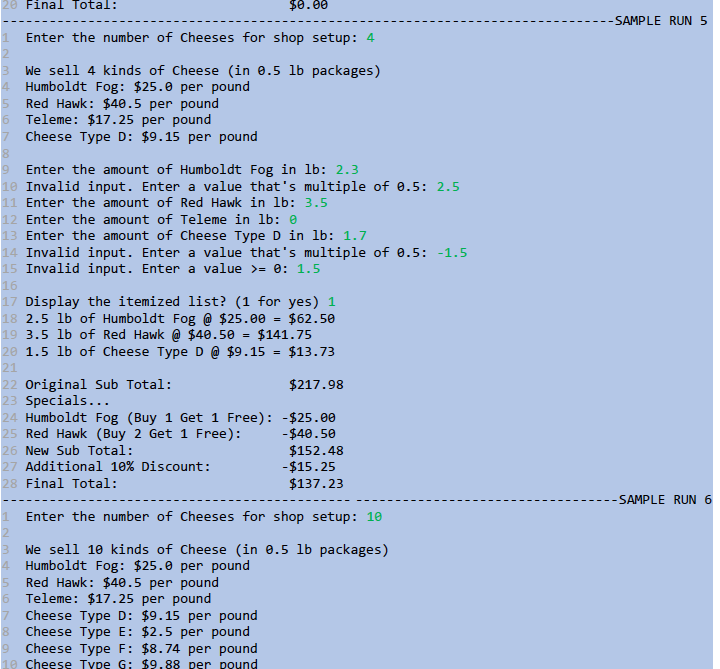
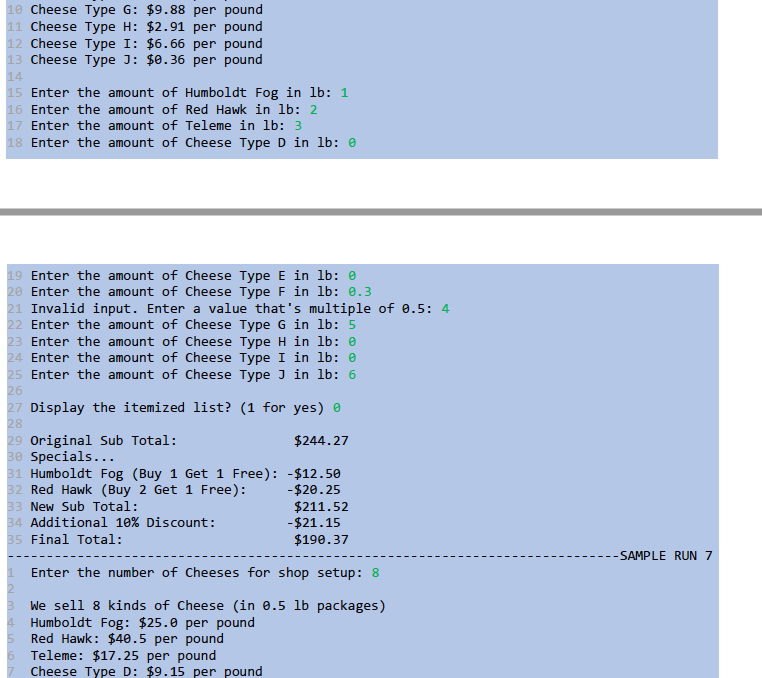
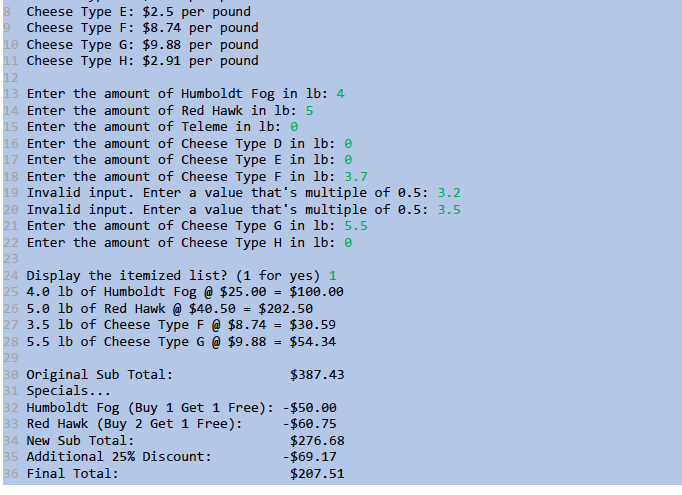
Getting Started After starting Eclipse, create a new project called Lab21_3. Import Error.java from the assignment page. Examine at the code given in Error.java. It will run as is, so go ahead and run it. You should see the following output (prices per pound for cheese types D-J might be different than shown): We sell 10 kinds of Cheese Humboldt Fog: $25.0 per pound Red Hawk: $40.50 per pound Teleme: $17.25 per pound Cheese Type D: $9.15 per pound Cheese Type E: $2.5 per pound Cheese Type F: $8.74 per pound Cheese Type G: $9.88 per pound Cheese Type H: $2.91 per pound Cheese Type I: $6.66 per pound Cheese Type 3: $0.36 per pound Let us analyze the code to figure out how it is working. To begin with, we see a new kind of declaration for a variable: final int MAXCHEESE = 10; Final (final) is an access modifier that prevents the variable's value from changing after its initialization. Such an initialized variable, called a constant variable, is typically used when we want a value that cannot be accidently overwritten in the rest of the program. Thus, the value of a constant variable is set only once [cf. Section 2.9]. Next we declare 3 arrays: String[] names = new String[MAXCHEESE]; double[] prices = new double[MAXCHEESE); int[] amounts = new int[MAXCHEESE); Next, we set values corresponding to Humboldt Fog cheese (from Lab 02) as the first entry in the names and prices arrays: names[0] = "Humboldt Fog"; prices[@] = 25.0; ... The code repeats for the other two special cheeses. Note the meaningful variable names that self-describe their purpose (sf. Section 2.31. The program then prints out how many types of cheese are currently being i Pu POVU LOL. ODOCOL D.D. 10 POSLE I PILULU 110W LEPOOL LIVE sold, and a list of names and prices: System.out.println("We sell " + MAXCHEESE + " kinds of Cheese"); System.out.println(names[@] + ": $" + prices[@] + " per pound"); System.out.println(names[1] + ":$" + prices[1] + " per pound"); System.out.println(names[2] + ": $" + prices[2] + " per pound"); The code so far handles the first three cheeses. But this time, we want to sell up to MAXCHEESE (=10) cheeses. We assume the remaining cheeses besides the first three are generic cheeses whose names and prices aren't too important. We first need to come up with a way to set the prices of these generic cheeses. Instead of having predetermined prices, we decide to set them randomly at the beginning. To do this we use a random number generator object [cf. Section 2.18] that will help us (like a Scanner) generate the prices. And to ensure that the Random object generates the same random sequence of integers each time the program is run (so that our randomly chosen prices stay the same), we specify a seed -- the input to the equation that generates the random values --of 100. This is done as follows: Random ranGen = new Random(100); We can now output information about the rest of the cheeses with the following for-loop. for (int i = 3; i = 0: 1.5 16 17 Display the itemized list? (1 for yes) 1 18 2.5 lb of Humboldt Fog @ $25.00 = $62.50 19 3.5 lb of Red Hawk @ $40.50 = $141.75 20 1.5 lb of Cheese Type D @ $9.15 = $13.73 22 Original Sub Total: $217.98 23 Specials... 24 Humboldt Fog (Buy 1 Get 1 Free): -$25.00 25 Red Hawk (Buy 2 Get 1 Free): -$40.50 26 New Sub Total: $152.48 27 Additional 10% Discount: -$15.25 28 Final Total: $137.23 -------- SAMPLE RUN 6 1 Enter the number of Cheeses for shop setup: 10 3 We sell 10 kinds of Cheese (in 0.5 lb packages) 4. Humboldt Fog: $25.0 per pound 5 Red Hawk: $40.5 per pound 6 Teleme: $17.25 per pound 7 Cheese Type D: $9.15 per pound 8 Cheese Type E: $2.5 per pound 9 Cheese Type F: $8.74 per pound 19 Cheese Type G: $9.88 per pound 18 Cheese Type G: $9.88 per pound 11 Cheese Type H: $2.91 per pound 12 Cheese Type I: $6.66 per pound 13 Cheese Type J: $0.36 per pound 15 Enter the amount of Humboldt Fog in lb: 1 16 Enter the amount of Red Hawk in lb: 2 17 Enter the amount of Teleme in lb: 3 18 Enter the amount of Cheese Type D in lb: 19 Enter the amount of Cheese Type E in lb: 0 Enter the amount of Cheese Type F in 1b: 0.3 21 Invalid input. Enter a value that's multiple of 0.5: 4 22 Enter the amount of Cheese Type G in lb: 5 23 Enter the amount of Cheese Type H in lb: 0 24 Enter the amount of Cheese Type I in lb: 0 25 Enter the amount of Cheese Type J in lb: 6 26 27 Display the itemized list? (1 for yes) o 28 29 Original Sub Total: $244.27 30 Specials... 31 Humboldt Fog (Buy 1 Get 1 Free): $12.50 32 Red Hawk (Buy 2 Get 1 Free): - $20.25 33 New Sub Total: $211.52 34 Additional 10% Discount: - $21.15 35 Final Total: $190.37 -SAMPLE RUN 7 Enter the number of Cheeses for shop setup: 8 We sell 8 kinds of Cheese (in 0.5 lb packages) Humboldt Fog: $25.0 per pound Red Hawk: $40.5 per pound Teleme: $17.25 per pound Cheese Type D: $9.15 per pound 6 8 Cheese Type E: $2.5 per pound 9 Cheese Type F: $8.74 per pound 10 Cheese Type G: $9.88 per pound 11 Cheese Type H: $2.91 per pound 12 13 Enter the amount of Humboldt Fog in lb: 4 14 Enter the amount of Red Hawk in lb: 5 15 Enter the amount of Teleme in lb: 0 16 Enter the amount of Cheese Type D in lb: 0 Enter the amount of Cheese Type E in lb: 0 18 Enter the amount of Cheese Type F in lb: 3.7 19 Invalid input. Enter a value that's multiple of 0.5: 3.2 20 Invalid input. Enter a value that's multiple of 0.5: 3.5 21 Enter the amount of Cheese Type G in lb: 5.5 22 Enter the amount of Cheese Type H in lb: 0 23 24 Display the itemized list? (1 for yes) 1 25 4.0 lb of Humboldt Fog @ $25.00 = $100.00 26 5.lb of Red Hawk @ $40.50 = $202.50 27 3.5 lb of Cheese Type F @ $8.74 = $30.59 28 5.5 lb of Cheese Type G @ $9.88 = $54.34 29 30 Original Sub Total: $387.43 31 Specials... 32 Humboldt Fog (Buy 1 Get 1 Free): $50.00 33 Red Hawk (Buy 2 Get 1 Free): -$60.75 34 New Sub Total: $276.68 35 Additional 25% Discount: - $69.17 36 Final Total: $207.51 Getting Started After starting Eclipse, create a new project called Lab21_3. Import Error.java from the assignment page. Examine at the code given in Error.java. It will run as is, so go ahead and run it. You should see the following output (prices per pound for cheese types D-J might be different than shown): We sell 10 kinds of Cheese Humboldt Fog: $25.0 per pound Red Hawk: $40.50 per pound Teleme: $17.25 per pound Cheese Type D: $9.15 per pound Cheese Type E: $2.5 per pound Cheese Type F: $8.74 per pound Cheese Type G: $9.88 per pound Cheese Type H: $2.91 per pound Cheese Type I: $6.66 per pound Cheese Type 3: $0.36 per pound Let us analyze the code to figure out how it is working. To begin with, we see a new kind of declaration for a variable: final int MAXCHEESE = 10; Final (final) is an access modifier that prevents the variable's value from changing after its initialization. Such an initialized variable, called a constant variable, is typically used when we want a value that cannot be accidently overwritten in the rest of the program. Thus, the value of a constant variable is set only once [cf. Section 2.9]. Next we declare 3 arrays: String[] names = new String[MAXCHEESE]; double[] prices = new double[MAXCHEESE); int[] amounts = new int[MAXCHEESE); Next, we set values corresponding to Humboldt Fog cheese (from Lab 02) as the first entry in the names and prices arrays: names[0] = "Humboldt Fog"; prices[@] = 25.0; ... The code repeats for the other two special cheeses. Note the meaningful variable names that self-describe their purpose (sf. Section 2.31. The program then prints out how many types of cheese are currently being i Pu POVU LOL. ODOCOL D.D. 10 POSLE I PILULU 110W LEPOOL LIVE sold, and a list of names and prices: System.out.println("We sell " + MAXCHEESE + " kinds of Cheese"); System.out.println(names[@] + ": $" + prices[@] + " per pound"); System.out.println(names[1] + ":$" + prices[1] + " per pound"); System.out.println(names[2] + ": $" + prices[2] + " per pound"); The code so far handles the first three cheeses. But this time, we want to sell up to MAXCHEESE (=10) cheeses. We assume the remaining cheeses besides the first three are generic cheeses whose names and prices aren't too important. We first need to come up with a way to set the prices of these generic cheeses. Instead of having predetermined prices, we decide to set them randomly at the beginning. To do this we use a random number generator object [cf. Section 2.18] that will help us (like a Scanner) generate the prices. And to ensure that the Random object generates the same random sequence of integers each time the program is run (so that our randomly chosen prices stay the same), we specify a seed -- the input to the equation that generates the random values --of 100. This is done as follows: Random ranGen = new Random(100); We can now output information about the rest of the cheeses with the following for-loop. for (int i = 3; i = 0: 1.5 16 17 Display the itemized list? (1 for yes) 1 18 2.5 lb of Humboldt Fog @ $25.00 = $62.50 19 3.5 lb of Red Hawk @ $40.50 = $141.75 20 1.5 lb of Cheese Type D @ $9.15 = $13.73 22 Original Sub Total: $217.98 23 Specials... 24 Humboldt Fog (Buy 1 Get 1 Free): -$25.00 25 Red Hawk (Buy 2 Get 1 Free): -$40.50 26 New Sub Total: $152.48 27 Additional 10% Discount: -$15.25 28 Final Total: $137.23 -------- SAMPLE RUN 6 1 Enter the number of Cheeses for shop setup: 10 3 We sell 10 kinds of Cheese (in 0.5 lb packages) 4. Humboldt Fog: $25.0 per pound 5 Red Hawk: $40.5 per pound 6 Teleme: $17.25 per pound 7 Cheese Type D: $9.15 per pound 8 Cheese Type E: $2.5 per pound 9 Cheese Type F: $8.74 per pound 19 Cheese Type G: $9.88 per pound 18 Cheese Type G: $9.88 per pound 11 Cheese Type H: $2.91 per pound 12 Cheese Type I: $6.66 per pound 13 Cheese Type J: $0.36 per pound 15 Enter the amount of Humboldt Fog in lb: 1 16 Enter the amount of Red Hawk in lb: 2 17 Enter the amount of Teleme in lb: 3 18 Enter the amount of Cheese Type D in lb: 19 Enter the amount of Cheese Type E in lb: 0 Enter the amount of Cheese Type F in 1b: 0.3 21 Invalid input. Enter a value that's multiple of 0.5: 4 22 Enter the amount of Cheese Type G in lb: 5 23 Enter the amount of Cheese Type H in lb: 0 24 Enter the amount of Cheese Type I in lb: 0 25 Enter the amount of Cheese Type J in lb: 6 26 27 Display the itemized list? (1 for yes) o 28 29 Original Sub Total: $244.27 30 Specials... 31 Humboldt Fog (Buy 1 Get 1 Free): $12.50 32 Red Hawk (Buy 2 Get 1 Free): - $20.25 33 New Sub Total: $211.52 34 Additional 10% Discount: - $21.15 35 Final Total: $190.37 -SAMPLE RUN 7 Enter the number of Cheeses for shop setup: 8 We sell 8 kinds of Cheese (in 0.5 lb packages) Humboldt Fog: $25.0 per pound Red Hawk: $40.5 per pound Teleme: $17.25 per pound Cheese Type D: $9.15 per pound 6 8 Cheese Type E: $2.5 per pound 9 Cheese Type F: $8.74 per pound 10 Cheese Type G: $9.88 per pound 11 Cheese Type H: $2.91 per pound 12 13 Enter the amount of Humboldt Fog in lb: 4 14 Enter the amount of Red Hawk in lb: 5 15 Enter the amount of Teleme in lb: 0 16 Enter the amount of Cheese Type D in lb: 0 Enter the amount of Cheese Type E in lb: 0 18 Enter the amount of Cheese Type F in lb: 3.7 19 Invalid input. Enter a value that's multiple of 0.5: 3.2 20 Invalid input. Enter a value that's multiple of 0.5: 3.5 21 Enter the amount of Cheese Type G in lb: 5.5 22 Enter the amount of Cheese Type H in lb: 0 23 24 Display the itemized list? (1 for yes) 1 25 4.0 lb of Humboldt Fog @ $25.00 = $100.00 26 5.lb of Red Hawk @ $40.50 = $202.50 27 3.5 lb of Cheese Type F @ $8.74 = $30.59 28 5.5 lb of Cheese Type G @ $9.88 = $54.34 29 30 Original Sub Total: $387.43 31 Specials... 32 Humboldt Fog (Buy 1 Get 1 Free): $50.00 33 Red Hawk (Buy 2 Get 1 Free): -$60.75 34 New Sub Total: $276.68 35 Additional 25% Discount: - $69.17 36 Final Total: $207.51
Step by Step Solution
There are 3 Steps involved in it

Get step-by-step solutions from verified subject matter experts
 Study Help