







Question: Give me answer in python language and it should run in google colab. The image used is zoneplate.png . For consistency scale the intensity range
Give me answer in python language and it should run in google colab.
The image used is zoneplate.png For consistency scale the
intensity range of this image to using MATLAB function
imdouble' or function 'intScalinge with the default
setting. To simplify experimenting, do the filtering without
padding. Hint: To separate frequency bands requires filters
with sharp cutoffs, so use Butterworth filter transfer
functions with n throughout.
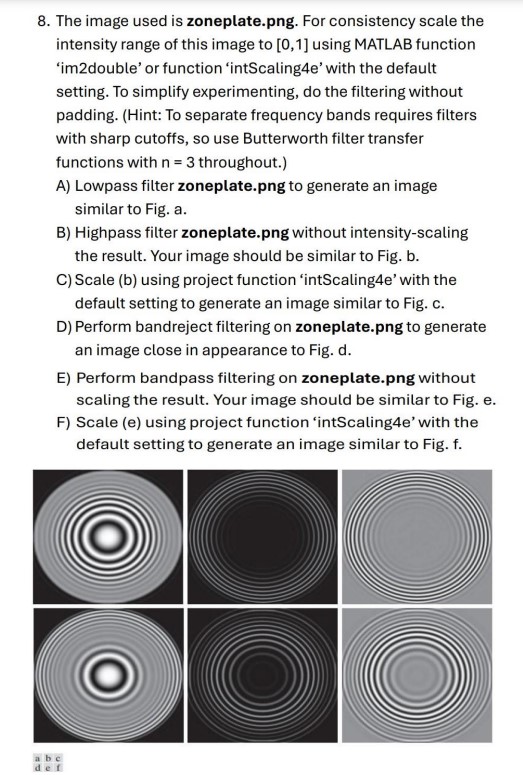
A Lowpass filter zoneplate.png to generate an image
similar to Fig. a
B Highpass filter zoneplate.png without intensityscaling
the result. Your image should be similar to Fig. b
C Scale b using project function 'intScalinge with the
default setting to generate an image similar to Fig. c
D Perform bandreject filtering on zoneplate.png to generate
an image close in appearance to Fig. d
E Perform bandpass filtering on zoneplate.png without
scaling the result. Your image should be similar to Fig. e
F Scale e using project function 'intScalinge with the
default setting to generate an image similar to Fig. f
Step by Step Solution
There are 3 Steps involved in it
1 Expert Approved Answer
Step: 1 Unlock

Question Has Been Solved by an Expert!
Get step-by-step solutions from verified subject matter experts
Step: 2 Unlock
Step: 3 Unlock
 Study Help