







Question: Give the Mathematica commands that solve the following problem. The goal of this exercise is to approximate the function that converts a 900Hz sawtooth wave
Give the Mathematica commands that solve the following problem.
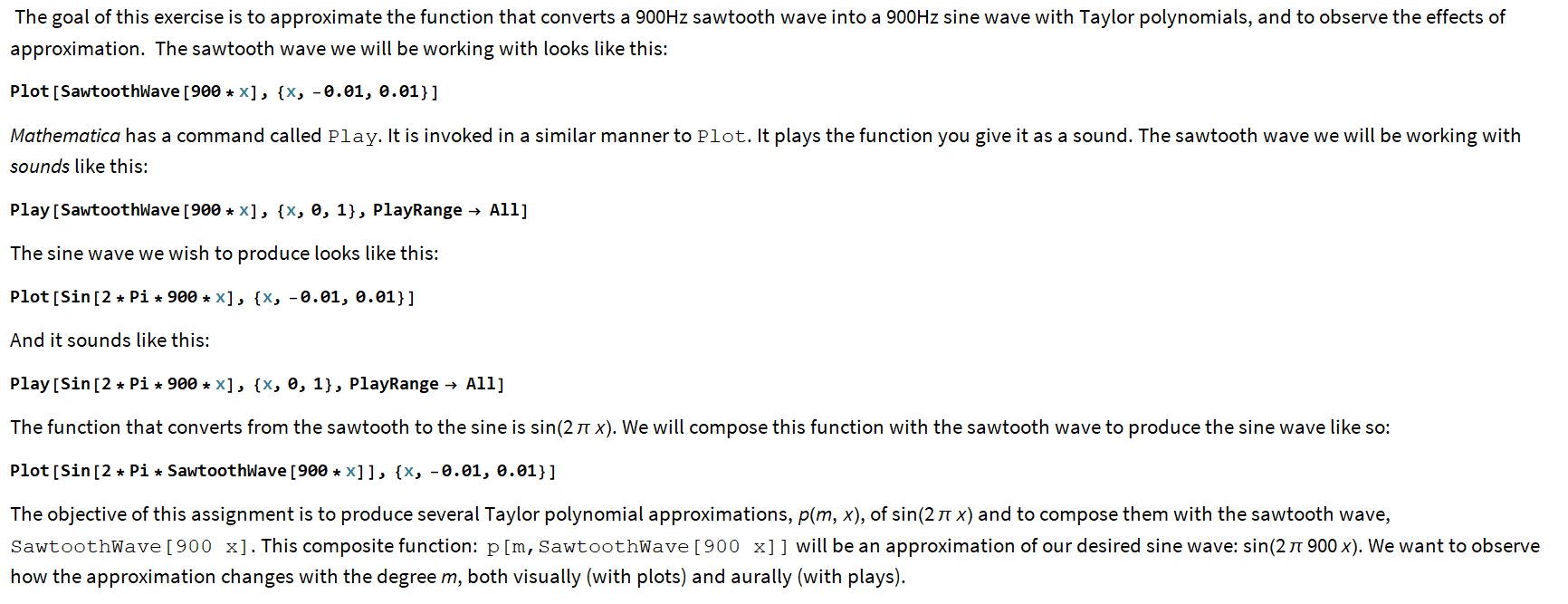
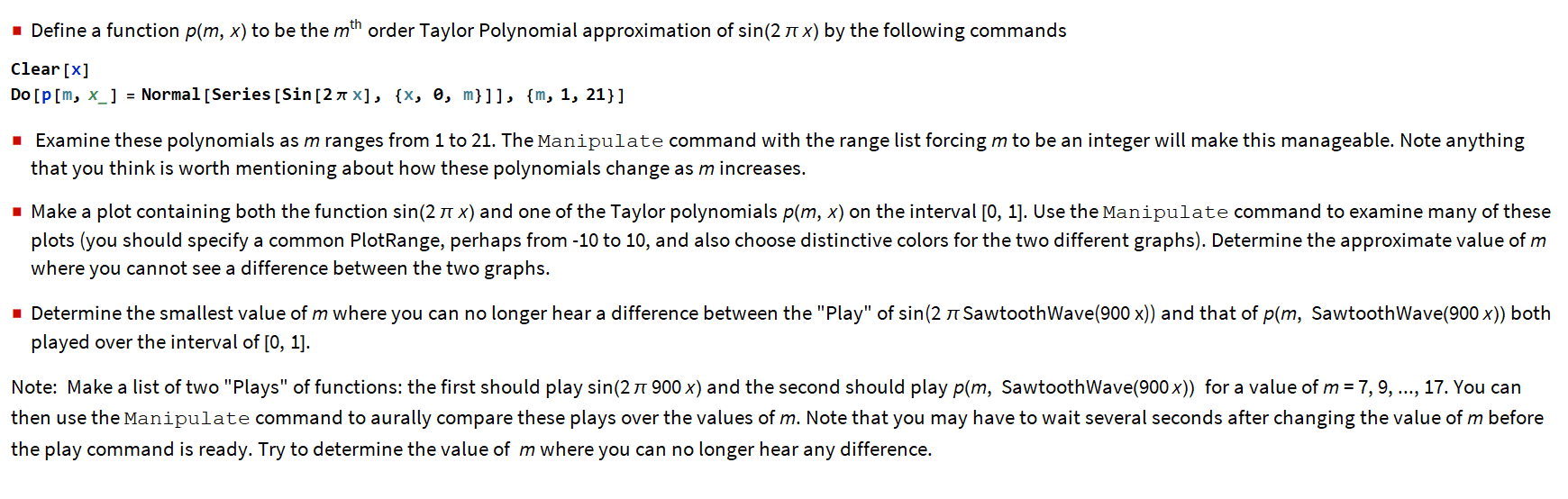
The goal of this exercise is to approximate the function that converts a 900Hz sawtooth wave into a 900Hz sine wave with Taylor polynomials, and to observe the effects of approximation. The sawtooth wave we will be working with looks like this: Plot [SawtoothWave [900 * X], {X, -0.01, 0.01}] Mathematica has a command called Play. It is invoked in a similar manner to Plot. It plays the function you give it as a sound. The sawtooth wave we will be working with sounds like this: Play [SawtoothWave [900 + X], {X, 0, 1}, PlayRange All] The sine wave we wish to produce looks like this: Plot [Sin [2 * Pi + 900 * X], {X, -0.01, 0.01}] And it sounds like this: Play [Sin [2 * Pi + 900 *X], {X, 0, 1}, PlayRange All] The function that converts from the sawtooth to the sine is sin(21 x). We will compose this function with the sawtooth wave to produce the sine wave like so: Plot [Sin [2 * Pi * SawtoothWave [900 *x]], {X, -0.01, 0.01}] The objective of this assignment is to produce several Taylor polynomial approximations, plm, x), of sin(210 x) and to compose them with the sawtooth wave, SawtoothWave [ 900 x]. This composite function: p[m, SawtoothWave [ 900 x]] will be an approximation of our desired sine wave: sin(21 900 x). We want to observe how the approximation changes with the degree m, both visually (with plots) and aurally (with plays). Define a function p(m, x) to be the mth order Taylor Polynomial approximation of sin(21x) by the following commands clear [x] DO [p[m, x_] = Normal [Series [Sin [2 2 X], {X, 0, m}]], {m, 1, 21}] Examine these polynomials as m ranges from 1 to 21. The Manipulate command with the range list forcing m to be an integer will make this manageable. Note anything that you think is worth mentioning about how these polynomials change as m increases. Make a plot containing both the function sin(210 x) and one of the Taylor polynomials p(m, x) on the interval [0, 1]. Use the Manipulate command to examine many of these plots (you should specify a common PlotRange, perhaps from -10 to 10, and also choose distinctive colors for the two different graphs). Determine the approximate value of m where you cannot see a difference between the two graphs. Determine the smallest value of m where you can no longer hear a difference between the "Play" of sin(2 SawtoothWave(900 x)) and that of p(m, SawtoothWave(900 x)) both played over the interval of [0, 1]. Note: Make a list of two "Plays" of functions: the first should play sin(2 900 x) and the second should play pam, SawtoothWave(900x)) for a value of m = 7, 9, ..., 17. You can then use the Manipulate command to aurally compare these plays over the values of m. Note that you may have to wait several seconds after changing the value of m before the play command is ready. Try to determine the value of m where you can no longer hear any difference. The goal of this exercise is to approximate the function that converts a 900Hz sawtooth wave into a 900Hz sine wave with Taylor polynomials, and to observe the effects of approximation. The sawtooth wave we will be working with looks like this: Plot [SawtoothWave [900 * X], {X, -0.01, 0.01}] Mathematica has a command called Play. It is invoked in a similar manner to Plot. It plays the function you give it as a sound. The sawtooth wave we will be working with sounds like this: Play [SawtoothWave [900 + X], {X, 0, 1}, PlayRange All] The sine wave we wish to produce looks like this: Plot [Sin [2 * Pi + 900 * X], {X, -0.01, 0.01}] And it sounds like this: Play [Sin [2 * Pi + 900 *X], {X, 0, 1}, PlayRange All] The function that converts from the sawtooth to the sine is sin(21 x). We will compose this function with the sawtooth wave to produce the sine wave like so: Plot [Sin [2 * Pi * SawtoothWave [900 *x]], {X, -0.01, 0.01}] The objective of this assignment is to produce several Taylor polynomial approximations, plm, x), of sin(210 x) and to compose them with the sawtooth wave, SawtoothWave [ 900 x]. This composite function: p[m, SawtoothWave [ 900 x]] will be an approximation of our desired sine wave: sin(21 900 x). We want to observe how the approximation changes with the degree m, both visually (with plots) and aurally (with plays). Define a function p(m, x) to be the mth order Taylor Polynomial approximation of sin(21x) by the following commands clear [x] DO [p[m, x_] = Normal [Series [Sin [2 2 X], {X, 0, m}]], {m, 1, 21}] Examine these polynomials as m ranges from 1 to 21. The Manipulate command with the range list forcing m to be an integer will make this manageable. Note anything that you think is worth mentioning about how these polynomials change as m increases. Make a plot containing both the function sin(210 x) and one of the Taylor polynomials p(m, x) on the interval [0, 1]. Use the Manipulate command to examine many of these plots (you should specify a common PlotRange, perhaps from -10 to 10, and also choose distinctive colors for the two different graphs). Determine the approximate value of m where you cannot see a difference between the two graphs. Determine the smallest value of m where you can no longer hear a difference between the "Play" of sin(2 SawtoothWave(900 x)) and that of p(m, SawtoothWave(900 x)) both played over the interval of [0, 1]. Note: Make a list of two "Plays" of functions: the first should play sin(2 900 x) and the second should play pam, SawtoothWave(900x)) for a value of m = 7, 9, ..., 17. You can then use the Manipulate command to aurally compare these plays over the values of m. Note that you may have to wait several seconds after changing the value of m before the play command is ready. Try to determine the value of m where you can no longer hear any difference
Step by Step Solution
There are 3 Steps involved in it

Get step-by-step solutions from verified subject matter experts
 Study Help