







Question: Given Code: class SpeedingFineCalculator: pass def main(): sep = -*80 print(sep) print(Welcome to the Speeding Fine Calculator in Funnyville.) print(sep) ## Uncomment client code and
 Given Code:
class SpeedingFineCalculator: pass
def main():
sep = "-"*80 print(sep) print("Welcome to the Speeding Fine Calculator in Funnyville.") print(sep) ## Uncomment client code and make sure it works. ## print("Current MinimumFine = ${0}".format(SpeedingFineCalculator.minimumFine)) ## print("Current penalty for each one mph over the limit = ${0}".format(SpeedingFineCalculator.penaltyPerMPH)) ## print("Current penalty for going more than 50 mph over the limit = ${0}".format(SpeedingFineCalculator.penalty50BeyondLimit)) ## print(sep) ## ## spFineCalc = SpeedingFineCalculator() ## ans = 'y' ## while (ans == 'y'): ## try: ## limit = int(input("Please enter the speed limit: ")) ## spFineCalc.speedLimit = limit ## speed = int(input("Please enter the clocked speed: ")) ## fine = spFineCalc.calculateSpeedingFine(speed) ## print("Speeding fine for speed of "+str(speed) + " is $"+ str(fine)) ## except Exception as e: ## print("Something went wrong ", e) ## print(sep) ## ans = input("Continue?(y) ").lower() if __name__ == "__main__": main()
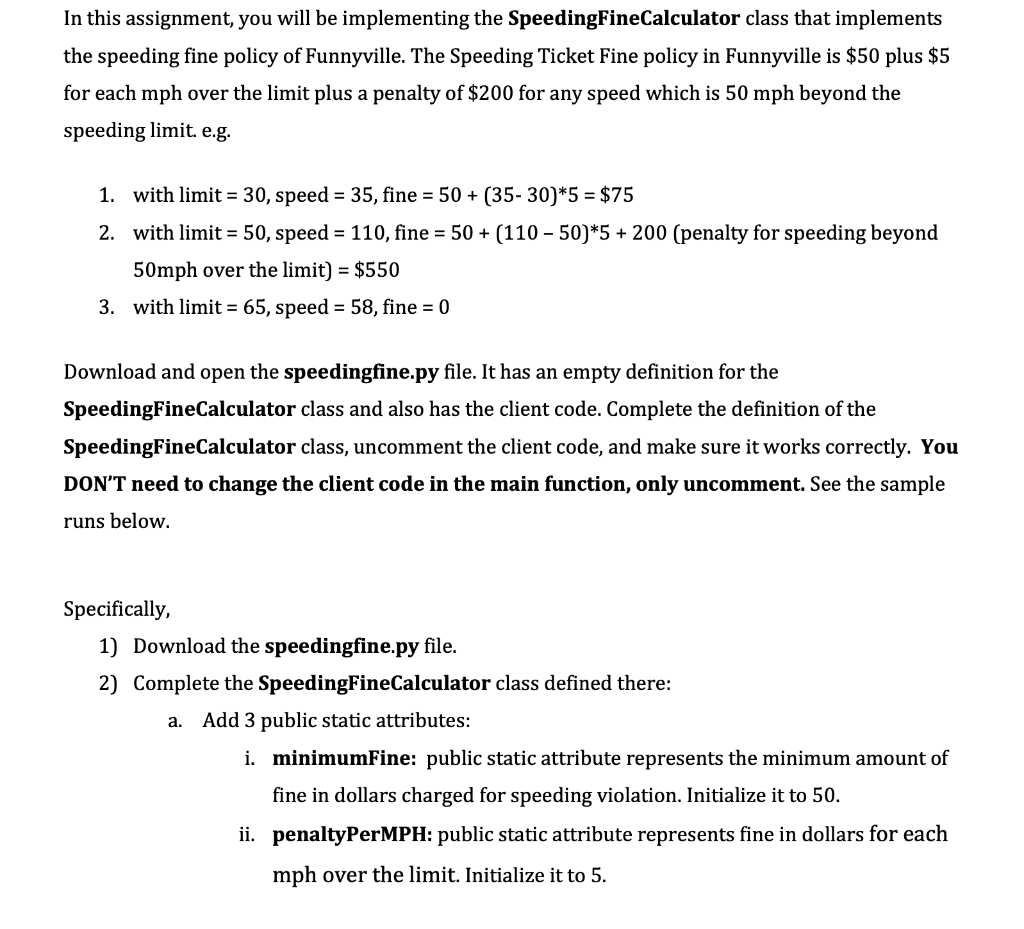
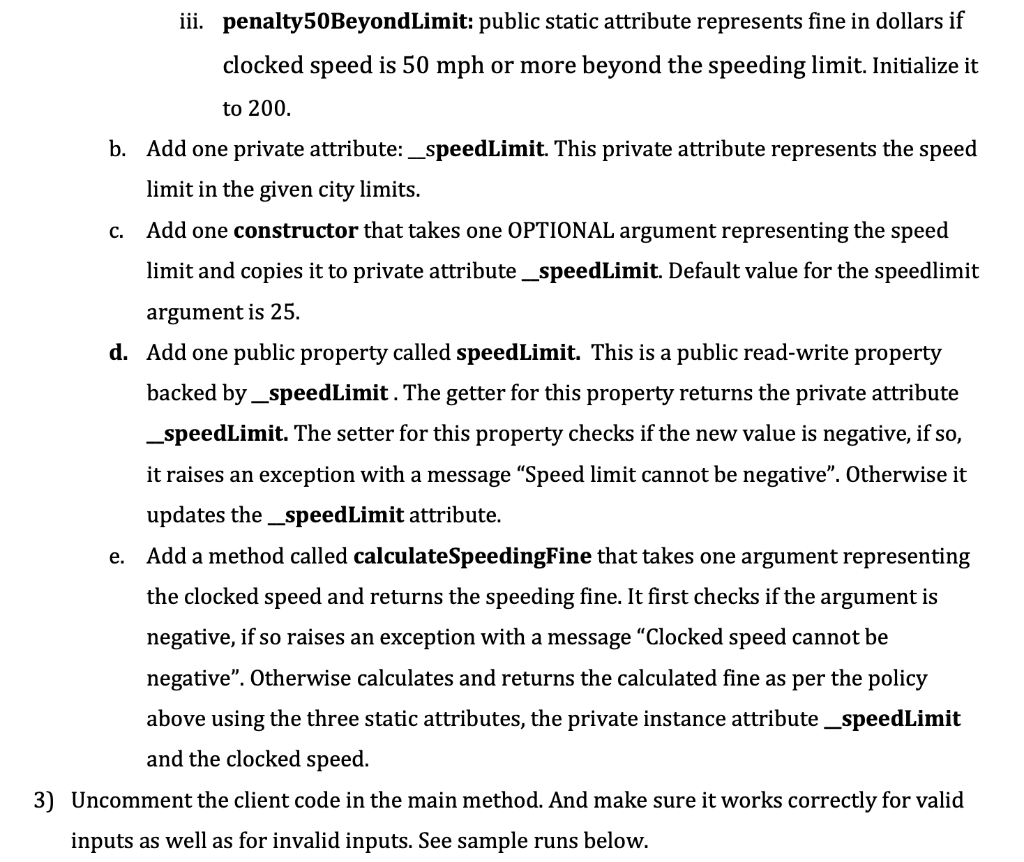
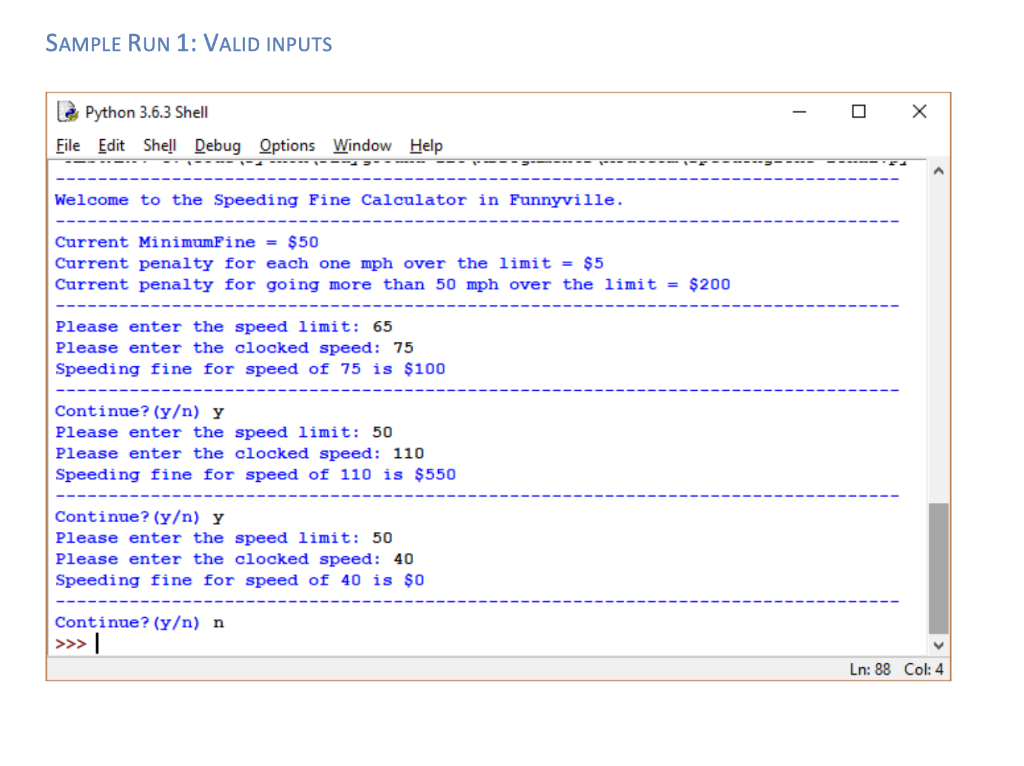
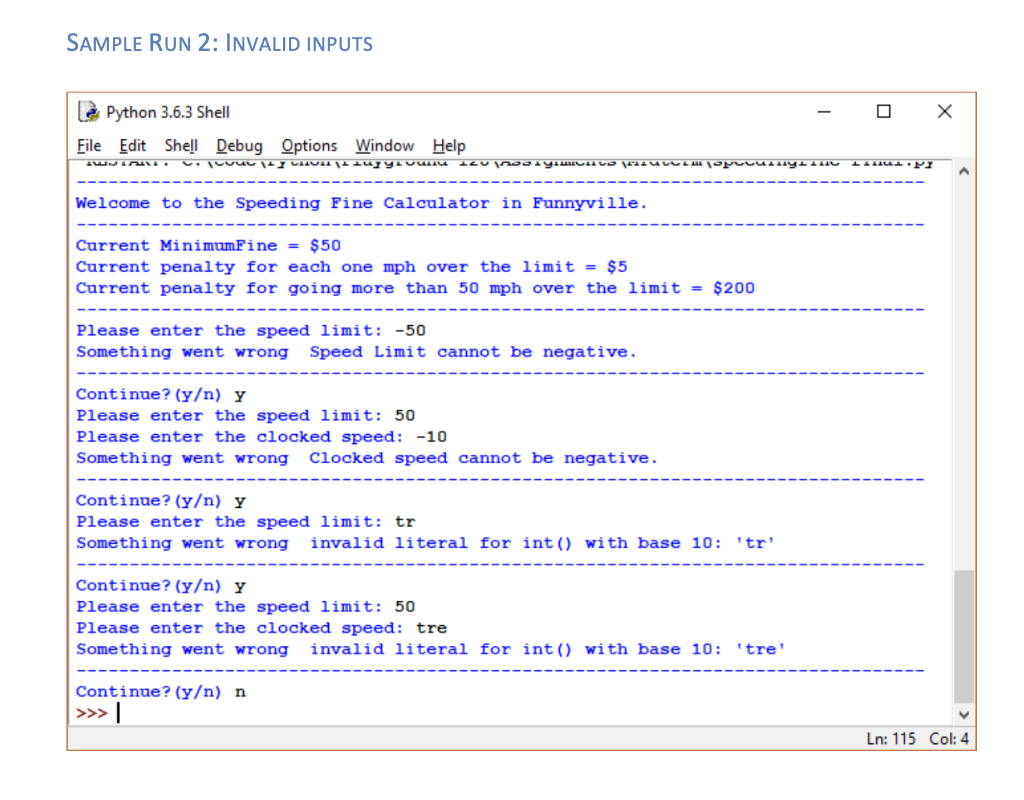
In this assignment, you will be implementing the SpeedingFineCalculator class that implements the speeding fine policy of Funnyville. The Speeding Ticket Fine policy in Funnyville is $50 plus $5 for each mph over the limit plus a penalty of $200 for any speed which is 50 mph beyond the speeding limit. e.g. 1. with limit = 30, speed = 35, fine = 50 + (35- 30)*5 = $75 2. with limit = 50, speed = 110, fine = 50 + (110 - 50)*5 + 200 (penalty for speeding beyond 50mph over the limit) = $550 3. with limit = 65, speed = 58, fine = 0 Download and open the speedingfine.py file. It has an empty definition for the SpeedingFineCalculator class and also has the client code. Complete the definition of the SpeedingFineCalculator class, uncomment the client code, and make sure it works correctly. You DON'T need to change the client code in the main function, only uncomment. See the sample runs below. Specifically, 1) Download the speedingfine.py file. 2) Complete the SpeedingFineCalculator class defined there: a. Add 3 public static attributes: i. minimumFine: public static attribute represents the minimum amount of fine in dollars charged for speeding violation. Initialize it to 50. ii. penaltyPerMPH: public static attribute represents fine in dollars for each mph over the limit. Initialize it to 5. iii. penalty50BeyondLimit: public static attribute represents fine in dollars if clocked speed is 50 mph or more beyond the speeding limit. Initialize it to 200. b. Add one private attribute: _speedLimit. This private attribute represents the speed limit in the given city limits. c. Add one constructor that takes one OPTIONAL argument representing the speed limit and copies it to private attribute_speedLimit. Default value for the speedlimit argument is 25. d. Add one public property called speedLimit. This is a public read-write property backed by _speedLimit. The getter for this property returns the private attribute _speedLimit. The setter for this property checks if the new value is negative, if so, it raises an exception with a message Speed limit cannot be negative. Otherwise it updates the _speedLimit attribute. Add a method called calculateSpeedingFine that takes one argument representing the clocked speed and returns the speeding fine. It first checks if the argument is negative, if so raises an exception with a message Clocked speed cannot be negative. Otherwise calculates and returns the calculated fine as per the policy above using the three static attributes, the private instance attribute_speedLimit and the clocked speed. 3) Uncomment the client code in the main method. And make sure it works correctly for valid inputs as well as for invalid inputs. See sample runs below. e. SAMPLE RUN 1: VALID INPUTS L Python 3.6.3 Shell File Edit Shell Debug Options Window Help Welcome to the Speeding Fine Calculator in Funnyville. Current MinimumFine = $50 Current penalty for each one mph over the limit = $5 Current penalty for going more than 50 mph over the limit = $200 Please enter the speed limit: 65 Please enter the clocked speed: 75 Speeding fine for speed of 75 is $100 Continue? (y) y Please enter the speed limit: 50 Please enter the clocked speed: 110 Speeding fine for speed of 110 is $550 Continue? (y) y Please enter the speed limit: 50 Please enter the clocked speed: 40 Speeding fine for speed of 40 is $0 Continue? (y) n >>> Ln: 88 Col: 4 SAMPLE RUN 2: INVALID INPUTS Le Python 3.6.3 Shell File Edit Shell Debug Options Window Help JL. CICULUI IULIUZYULL ILU 219 at Welcome to the Speeding Fine Calculator in Funnyville. Current MinimumFine = $50 Current penalty for each one mph over the limit = $5 Current penalty for going more than 50 mph over the limit = $200 Please enter the speed limit: -50 Something went wrong Speed Limit cannot be negative. Continue? (y) y Please enter the speed limit: 50 Please enter the clocked speed: -10 Something went wrong clocked speed cannot be negative. Continue? (y) y Please enter the speed limit: tr Something went wrong invalid literal for int() with base 10: 'tr' Continue? (y) Y Please enter the speed limit: 50 Please enter the clocked speed: tre Something went wrong invalid literal for int() with base 10: 'tre! Continue? (y) n >>> | Ln: 115 Col: 4
Step by Step Solution
There are 3 Steps involved in it

Get step-by-step solutions from verified subject matter experts
 Study Help