







Question: Given code: utils.c (for reference DON'T Modify), utils.h (DON't Modify) and main_template.c (Write Code HERE) --> UTILS.C [DO NOT MODIFY] pasting image cause Chegg character
![main_template.c (Write Code HERE) --> UTILS.C [DO NOT MODIFY] pasting image cause](https://dsd5zvtm8ll6.cloudfront.net/si.experts.images/questions/2024/09/66f51f2c9a9e0_33166f51f2bf3cd4.jpg)
![Chegg character limit >:( --> UTILS.h [DO NOT MODIFY] pasting image cause](https://dsd5zvtm8ll6.cloudfront.net/si.experts.images/questions/2024/09/66f51f2d85ba9_33266f51f2cdeffc.jpg)
![Chegg character limit :( --> main_template.c [DO CODING HERE!!!] /* description: a](https://dsd5zvtm8ll6.cloudfront.net/si.experts.images/questions/2024/09/66f51f2e7773f_33366f51f2dccfb1.jpg)
Given code: utils.c (for reference DON'T Modify), utils.h (DON't Modify) and main_template.c (Write Code HERE)
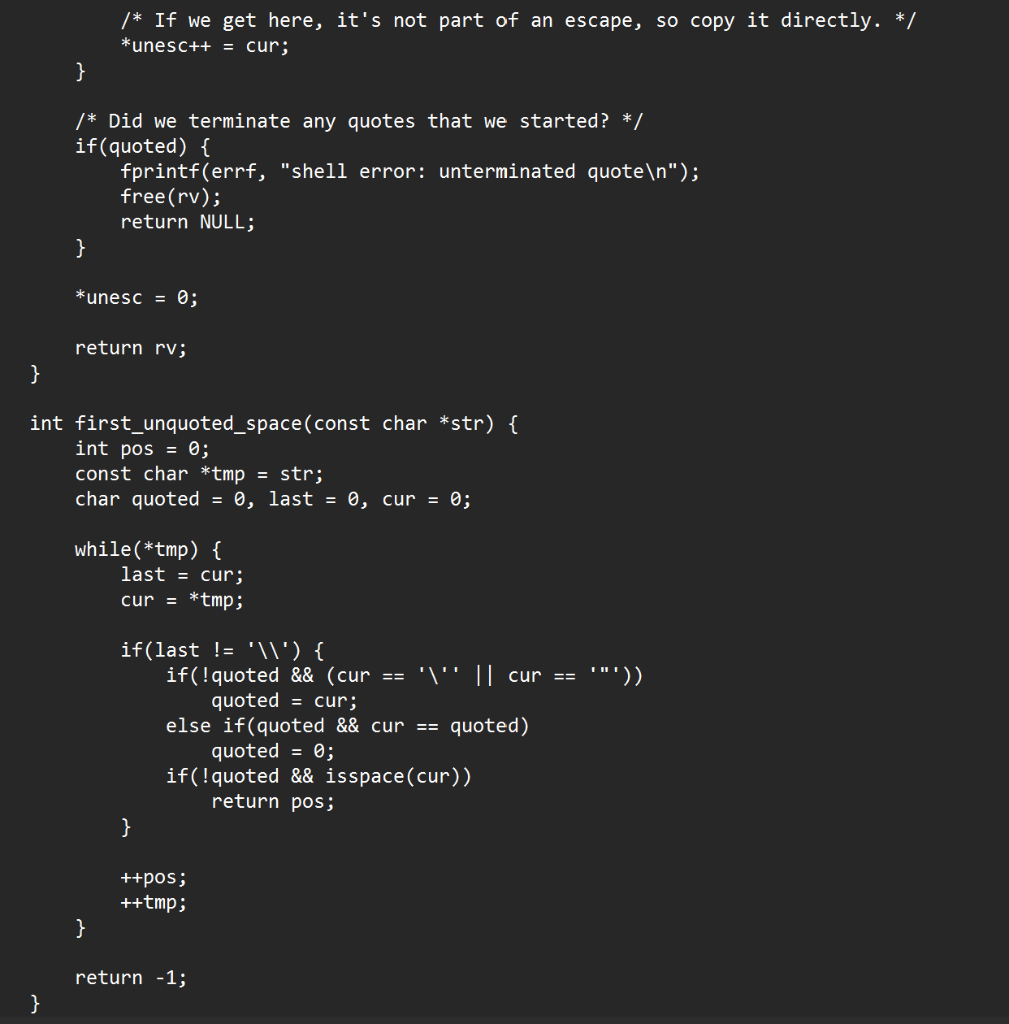
--> UTILS.C [DO NOT MODIFY] pasting image cause Chegg character limit >:(
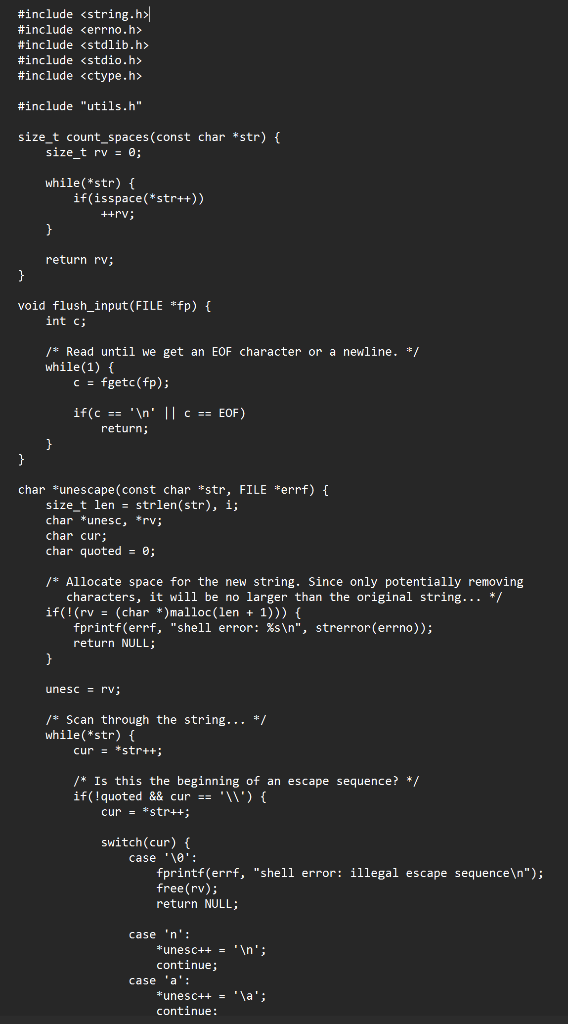
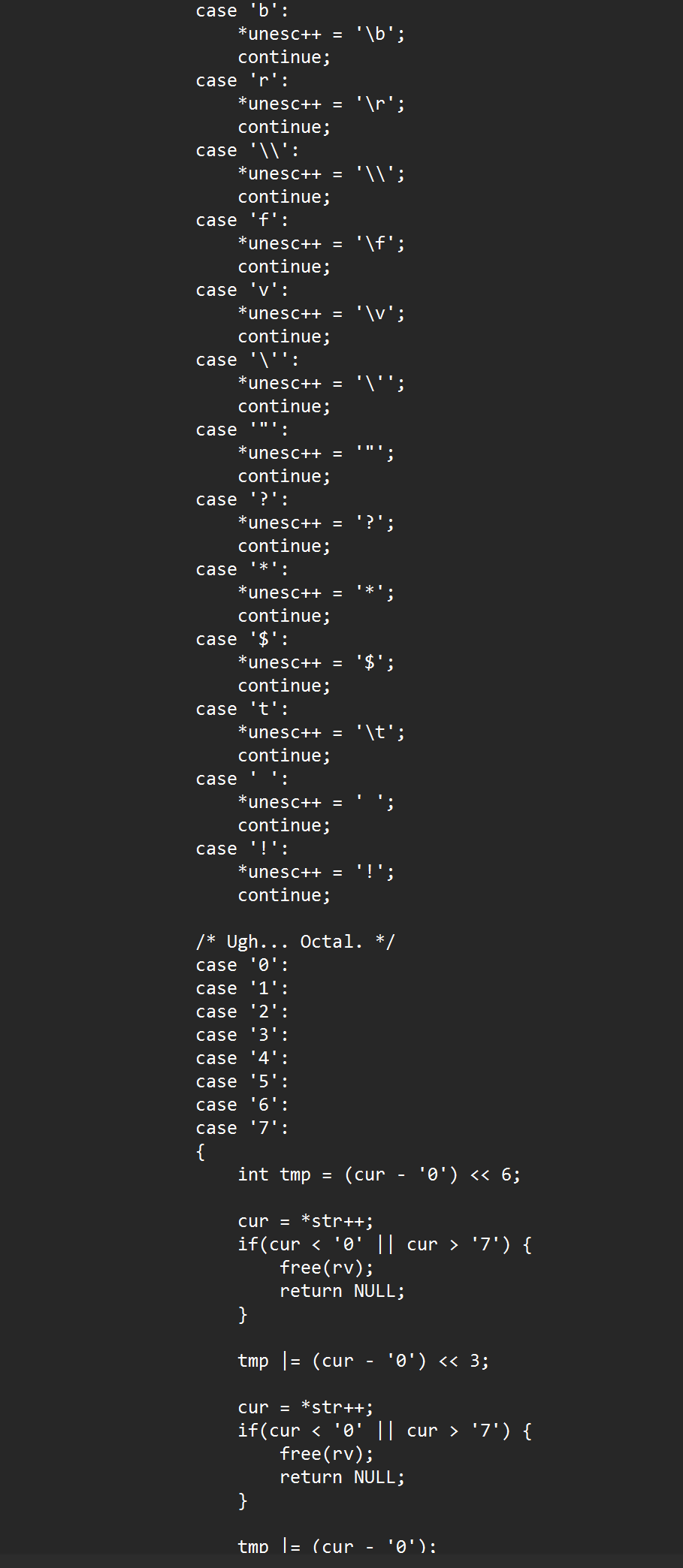
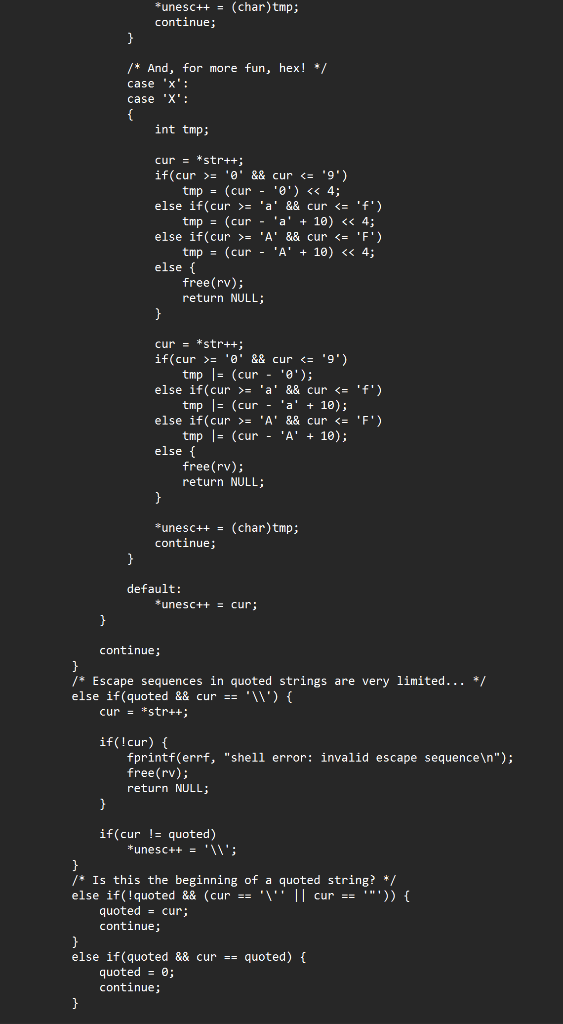
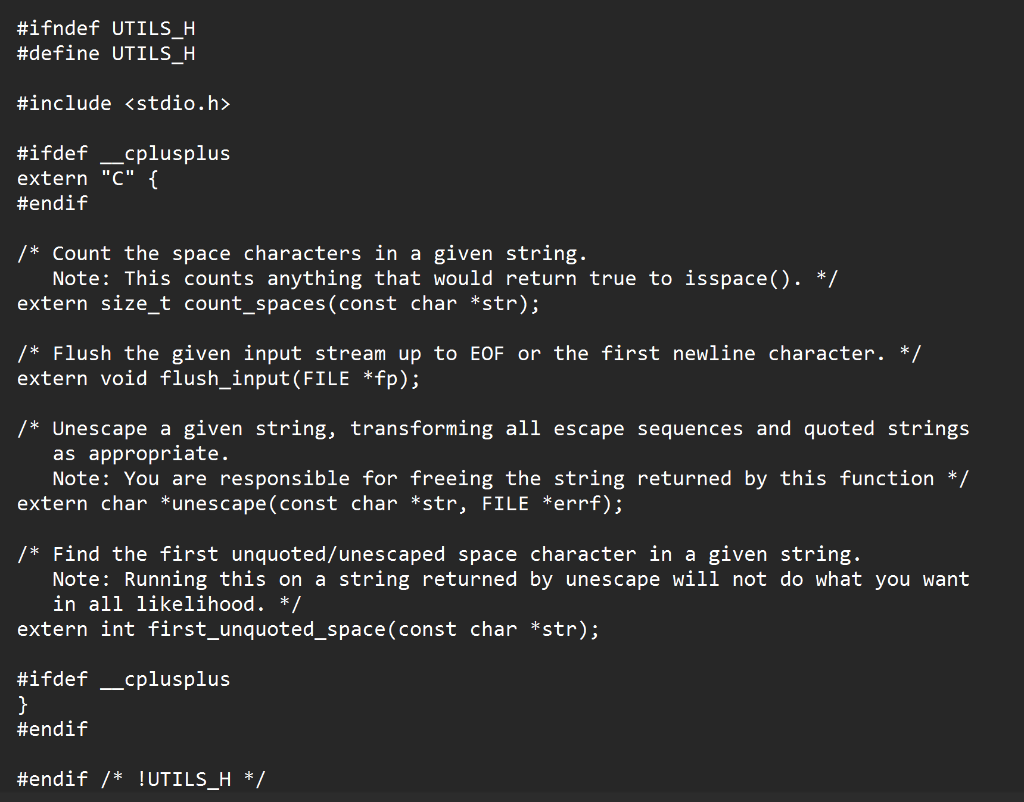
--> UTILS.h [DO NOT MODIFY] pasting image cause Chegg character limit :(
--> main_template.c [DO CODING HERE!!!]
/* description: a simple linux shell designed to perform basic linux commands */
#include
/* In this project, you are going to implement a number of functions to create a simple linux shell interface to perform basic linux commands */
/* DEFINE THE FUNCTION PROTOTYPES user_prompt_loop() get_user_command() parse_command() execute_command() */
int main(int argc, char **argv) { /* Write the main function that checks the number of argument passed to ensure no command-line arguments are passed; if the number of argument is greater than 1 then exit the shell with a message to stderr and return value of 1 otherwise call the user_prompt_loop() function to get user input repeatedly until the user enters the "exit" command. */
/* ENTER YOUR CODE HERE */ }
/* user_prompt_loop(): Get the user input using a loop until the user exits, prompting the user for a command. Gets command and sends it to a parser, then compares the first element to the two different commands ("/proc", and "exit"). If it's none of the commands, send it to the execute_command() function. If the user decides to exit, then exit 0 or exit with the user given value. */
/*user_prompt_loop()*/ { // initialize variables
/* loop: 1. prompt the user to type command by printing >> 2. get the user input using get_user_command() function 3. parse the user input using parse_command() function Example: user input: "ls -la" parsed output: ["ls", "-la", NULL] 4. compare the first element of the parsed output to "/proc"and "exit" 5. if the first element is "/proc" then you have the open the /proc file system to read from it i) concat the full command: Ex: user input >>/proc /process_id_no/status concated output: /proc/process_id_no/status ii) read from the file line by line. you may user fopen() and getline() functions iii) display the following information according to the user input from /proc a) Get the cpu information if the input is /proc/cpuinfo - Cpu Mhz - Cache size - Cpu cores - Address sizes b) Get the number of currently running processes from /proc/loadavg c) Get how many seconds your box has been up, and how many seconds it has been idle from /proc/uptime d) Get the following information from /proc/process_id_no/status - the vm size of the virtual memory allocated the vbox - the most memory used vmpeak - the process state - the parent pid - the number of threads - number of voluntary context switches - number of involuntary context switches e) display the list of environment variables from /proc/process_id_no/environ f) display the performance information if the user input is /proc/process_id_no/sched 6. if the first element is "exit" the use the exit() function to terminate the program 7. otherwise pass the parsed command to execute_command() function 8. free the allocated memory using the free() function */
/* Functions you may need: get_user_command(), parse_command(), execute_command(), strcmp(), strcat(), strlen(), strncmp(), fopen(), fclose(), getline(), isdigit(), atoi(), fgetc(), or any other useful functions */
/* ENTER YOUR CODE HERE */ }
/* get_user_command(): Take input of arbitrary size from the user and return to the user_prompt_loop() */
/*get_user_command()*/ { /* Functions you may need: malloc(), realloc(), getline(), fgetc(), or any other similar functions */
/* ENTER YOUR CODE HERE */ }
/* parse_command(): Take command grabbed from the user and parse appropriately. Example: user input: "ls -la" parsed output: ["ls", "-la", NULL] Example: user input: "echo hello world " parsed output: ["echo", "hello", "world", NULL] */
/*parse_command()*/ { /* Functions you may need: malloc(), realloc(), free(), strlen(), first_unquoted_space(), unescape() */
/* ENTER YOUR CODE HERE */ }
/* execute_command(): Execute the parsed command if the commands are neither /proc nor exit; fork a process and execute the parsed command inside the child process */
/*execute_command()*/ { /* Functions you may need: fork(), execvp(), waitpid(), and any other useful function */
/* ENTER YOUR CODE HERE */ }
/* --- END, Thank you! --- */
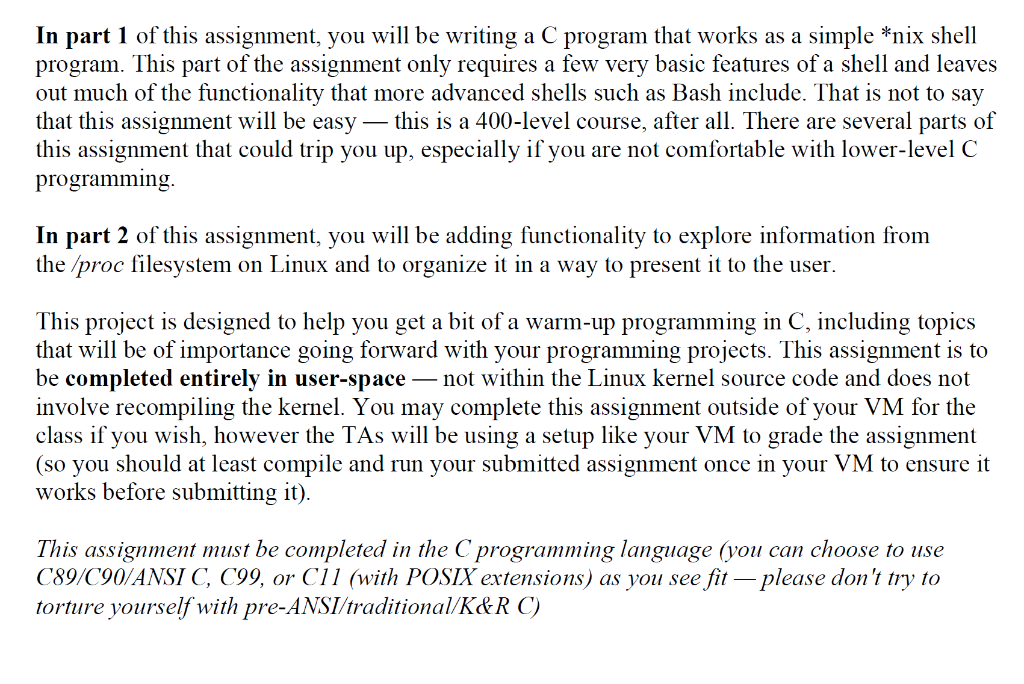
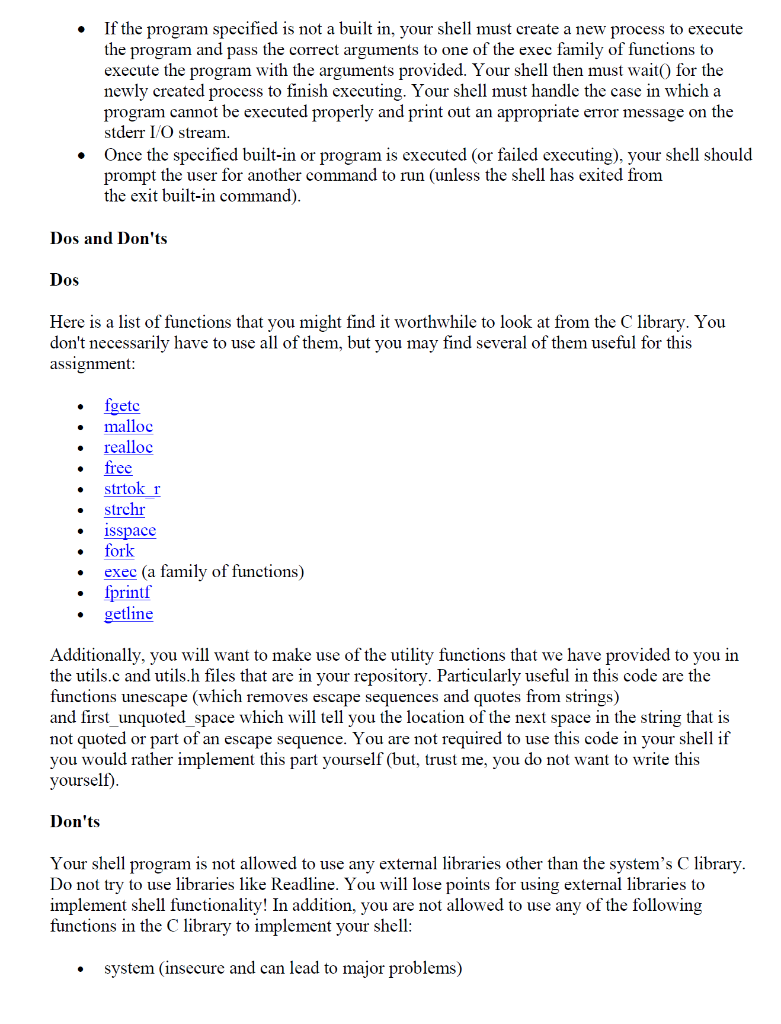
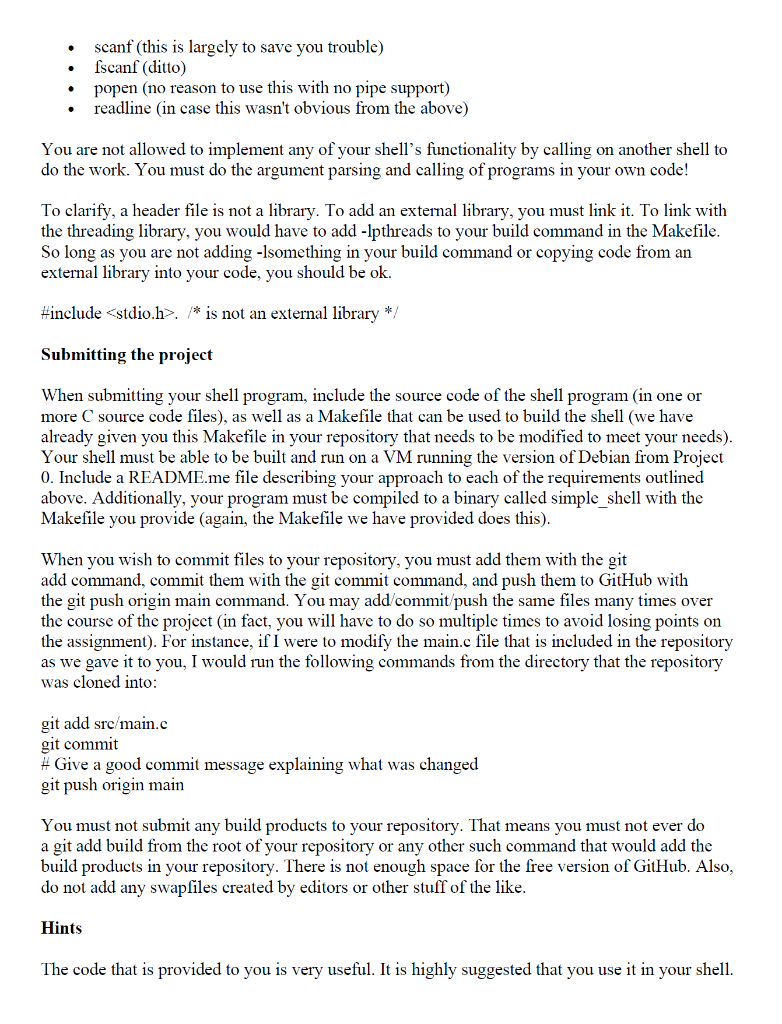
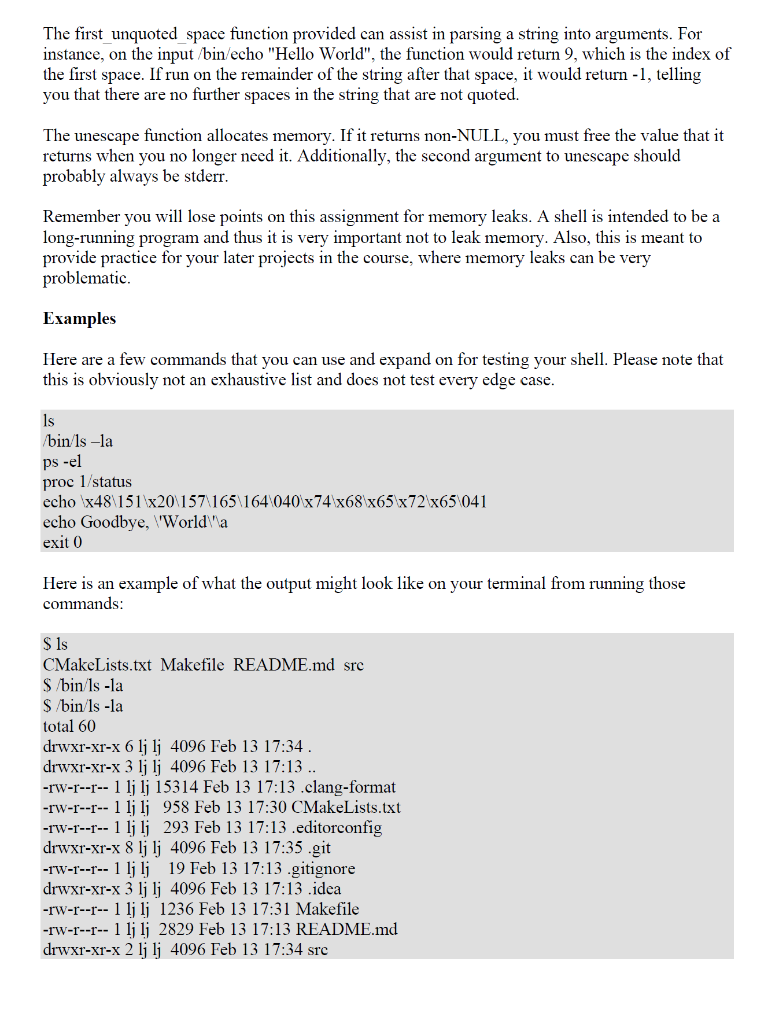
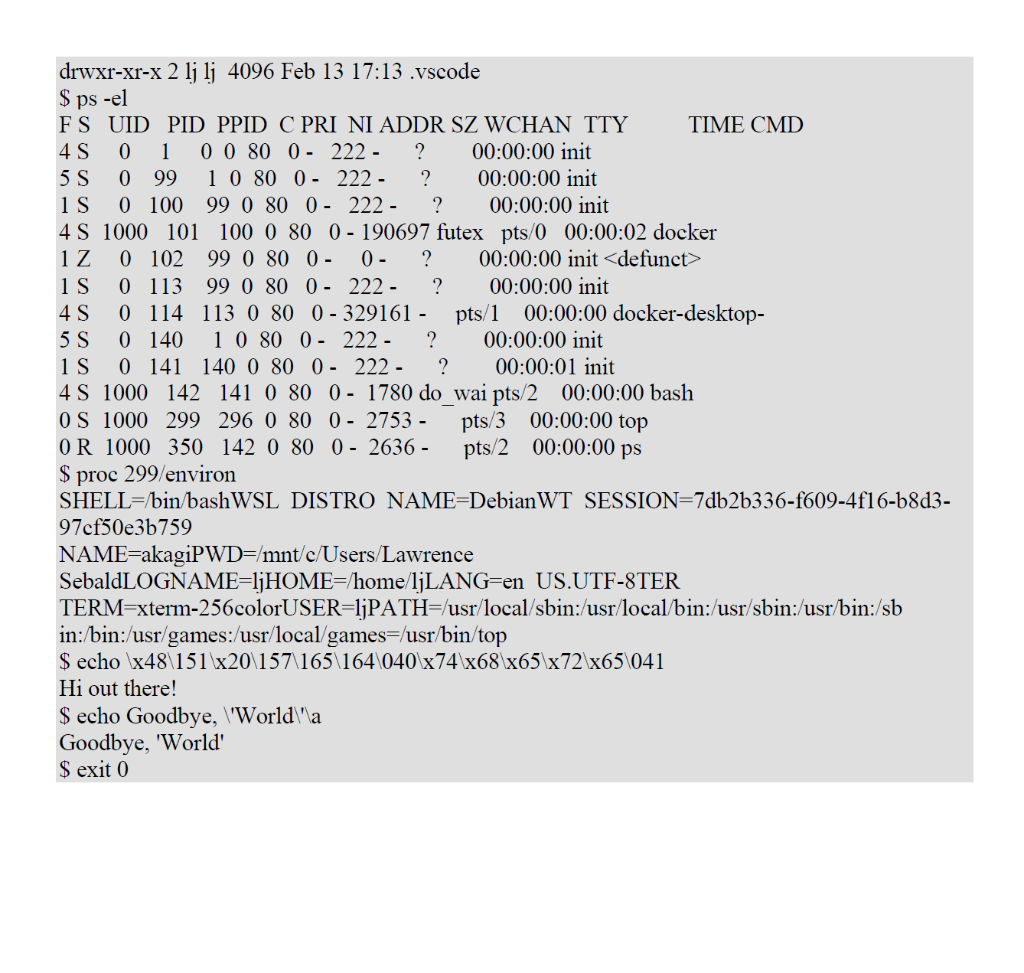
In part 1 of this assignment, you will be writing a C program that works as a simple nix shell program. This part of the assignment only requires a few very basic features of a shell and leaves out much of the functionality that more advanced shells such as Bash include. That is not to say that this assignment will be easy - this is a 400-level course, after all. There are several parts of this assignment that could trip you up, especially if you are not comfortable with lower-level C programming. In part 2 of this assignment, you will be adding functionality to explore information from the /proc filesystem on Linux and to organize it in a way to present it to the user. This project is designed to help you get a bit of a warm-up programming in C, including topics that will be of importance going forward with your programming projects. This assignment is to be completed entirely in user-space - not within the Linux kernel source code and does not involve recompiling the kernel. You may complete this assignment outside of your VM for the class if you wish, however the TAs will be using a setup like your VM to grade the assignment (so you should at least compile and run your submitted assignment once in your VM to ensure it works before submitting it). This assignment must be completed in the C programming language (you can choose to use C89/C90/ANSI C, C99, or C11 (with POSIX extensions) as you see fit - please don't try to torture yourself with pre-ANSI/traditional/K\&R C ) For this assignment, you will only need to support a few very basic features of a full-fledged *nix shell. Specifically, you will need to have support for the following: 1. If run with no arguments, the shell shall present the user with a prompt at which they can enter commands. Upon the completion of a command, it shall prompt the user for a new command. This is what Linux does. Press enter, if no arguments, it simply returns a command prompt. 2. If run with any arguments, the shell shall print an error message to stderr explaining that it does not accept any command line arguments and exit with an error return code. You might want to look up stderr here: https://www.computerhope.com/jargon/s/stderr.htm 3. The shell shall accept command input of arbitrary length (meaning you cannot set a hard limit on command length, and you will be using malloc). 4. The shell shall parse command-line arguments from| the user's input and pass them along to the program that the user requests to be started. The command to be called will be either specified as an absolute path to a program binary (like /bin/ls ), as the name of a program that resides in a directory in the user's $PATH environment variable (like gcc), or as a relative path (for instance, if we are in the /usr directory, we could type bin/gcc as a command to run /usr/bin/gcc. In addition, your argument parsing code must properly handle escape sequences and quoting. That is to say that the input /bin/echo Hello WWorld should be parsed into two pieces - the program name /bin/echo and one argument to that program containing the string "Hello World" with an actual newline character in place of the space (and no quotes). We have utilities that can assist with this to be discussed later. 5. The shell shall support a built-in exit command. This command shall accept zero or one argument. If provided with zero arguments, the shell shall exit with a normal exit status (that is to say, it will exit with a status of 0 ). If provided with one argument, it shall attempt to parse the argument as an integer. If this parsing fails, the command must be ignored, and the shell must prompt for another command as normal. If the parsing succeeds, the shell shall exit with a status of whatever integer the argument parses as. In either case of the shell exiting, it MUST clean up all memory it has allocated before exiting, along with ensuring that any child processes it has created have exited. 6. The shell shall not leak memory after it is done with it. The Valgrind program can be your friend while debugging this program (unlike projects that are done in the kernel). We will also be using Valgrind to test your implementation. You can find examples of multiple commands that can be used to test your code at the bottom of the page. This list is not exhaustive, so add your own tests. You are not expected to support any of the following features: - Seripting control features (like if statements or loops). - Reading input from a file (like a shell script). - Support for pipes (including stdin/stdout redirection). - Built-in functionality that is often part of a shell (such as implementations of common commands like cd ), other than what is outlined above for exit and in the second part of this document. - Changing the current working directory in the shell. - Running programs in the background or resuming backgrounded processes. Part 2 One of the features of UNIX/Linux is the abstraction of I/O. This means that if you are writing data to a file or writing data to the network, or looking at data in the kernel, they are all treated as a file they all use the same system calls like open( ),read(), write( ), close( (../ proc is a virtual file system in Linux. Most of the files in /proc appear to have zero length; however, some of the files have data. You can view them using the cat command or an editor. The reason is they are not like a file with data contained on a disk, but pointers into kernel memory. Thus, they are not taking up real space on disk. Most files are read only, but others you can modify, and these will let you change the kernel's characteristics on the fly. Read the article at the following URL to learn more about the /proc virtual filesystem: https://www.linux.comews/discover-possibilities-proc-directory/. In part 2 of this assignment, you will explore some of the information available in the /proc filesystem. To create a process to use in this assignment, from another terminal run the top command in the background (type: "top \&" without the quotes to do so) and use the pid from this process for your exploration. The ampersand will run the process in the background. You are required to add functionality to your shell program that reads information from the /proc filesystem and display it on the normal stdout of the shell. This command shall accept a single command line argument that will be the name of the file from the /proc filesystem that the user wishes to read information from. Only a small subset of the files in /proc shall be available for use with this command, as detailed below. Files from the /proc filesystem that your code shall support reading information from are as follows: - cpuinfo - displays various CPU characteristics such as the CPU speed in MHz, cache size, CPU core count, address sizes, etc. - loadavg - displays the number of running processes and information about how much CPU time is being used currently (and over a couple different ranges). - pid/status (with pid being a process ID running currently on the system) - displays various characteristics of the running process, including how much memory it is using, the owner of the process, its state, etc. - pid/environ (with pid being a process ID running currently on the system) - displays information about the environment variables known by the specified process. - pid/sched (with pid referencing a process ID running currently on the system) - displays information about scheduling characteristics of the process specified. You may support more files in the /proc filesystem than those we have required here, but you MUST at least support the ones we have required. The proc command shall be implemented by opening the file specified within the /proc filesystem, reading all input from the file, and printing the information to stdout, followed by a newline character. Your shell then shall prompt for a new command, as usual. You are not required to parse the information you read from the files in /proc prior to presenting it to the user. You output can look identical and you receive full credit. The requirement is you must open the file and print it to stdout. To sum up what you are expected to implement in this project: - Present the user with some sort of prompt at which the user may enter a command to execute. Traditionally, the dollar sign " $ " has been used. - Parse the input string and execute the program the user is attempting to call from its arguments and build an appropriate argument array which can be used to execute the program. - Determine if the program specified is a built-in to the shell such as (proc, or exit) and handle those functions without creating a new process or attempting to execute another program (except as might be required for proc). - If the program specified is not a built in, your shell must create a new process to execute the program and pass the correct arguments to one of the exec family of functions to execute the program with the arguments provided. Your shell then must wait () for the newly created process to finish executing. Your shell must handle the case in which a program cannot be executed properly and print out an appropriate error message on the stderr I/O stream. - Once the specified built-in or program is executed (or failed executing), your shell should prompt the user for another command to run (unless the shell has exited from the exit built-in command). Dos and Don'ts Dos Here is a list of functions that you might find it worthwhile to look at from the C library. You don't necessarily have to use all of them, but you may find several of them useful for this assignment: - fgetc - malloc - realloc - free - strtok r - strchr - isspace - fork - exec (a family of functions) - fprintf - getline Additionally, you will want to make use of the utility functions that we have provided to you in the utils.c and utils.h files that are in your repository. Particularly useful in this code are the functions unescape (which removes escape sequences and quotes from strings) and first_unquoted_space which will tell you the location of the next space in the string that is not quoted or part of an escape sequence. You are not required to use this code in your shell if you would rather implement this part yourself (but, trust me, you do not want to write this yourself). Don'ts Your shell program is not allowed to use any external libraries other than the system's C library. Do not try to use libraries like Readline. You will lose points for using external libraries to implement shell functionality! In addition, you are not allowed to use any of the following functions in the C library to implement your shell: - system (insecure and can lead to major problems) - scanf (this is largely to save you trouble) - fscanf (ditto) - popen (no reason to use this with no pipe support) - readline (in case this wasn't obvious from the above) You are not allowed to implement any of your shell's functionality by calling on another shell to do the work. You must do the argument parsing and calling of programs in your own code! To clarify, a header file is not a library. To add an external library, you must link it. To link with the threading library, you would have to add -lpthreads to your build command in the Makefile. So long as you are not adding -lsomething in your build command or copying code from an external library into your code, you should be ok. \#include ./ is not an external library / Submitting the project When submitting your shell program, include the source code of the shell program (in one or more C source code files), as well as a Makefile that can be used to build the shell (we have already given you this Makefile in your repository that needs to be modified to meet your needs). Your shell must be able to be built and run on a VM running the version of Debian from Project 0 . Include a README.me file describing your approach to each of the requirements outlined above. Additionally, your program must be compiled to a binary called simple_shell with the Makefile you provide (again, the Makefile we have provided does this). When you wish to commit files to your repository, you must add them with the git add command, commit them with the git commit command, and push them to GitHub with the git push origin main command. You may add/commit/push the same files many times over the course of the project (in fact, you will have to do so multiple times to avoid losing points on the assignment). For instance, if I were to modify the main.c file that is included in the repository as we gave it to you, I would run the following commands from the directory that the repository was cloned into: git add sre/main.c git commit \# Give a good commit message explaining what was changed git push origin main You must not submit any build products to your repository. That means you must not ever do a git add build from the root of your repository or any other such command that would add the build products in your repository. There is not enough space for the free version of GitHub. Also, do not add any swapfiles created by editors or other stuff of the like. Hints The code that is provided to you is very useful. It is highly suggested that you use it in your shell. The first_unquoted_space function provided can assist in parsing a string into arguments. For instance, on the input / bin/echo "Hello World", the function would return 9, which is the index of the first space. If run on the remainder of the string after that space, it would return -1, telling you that there are no further spaces in the string that are not quoted. The unescape function allocates memory. If it returns non-NULL, you must free the value that it returns when you no longer need it. Additionally, the second argument to unescape should probably always be stderr. Remember you will lose points on this assignment for memory leaks. A shell is intended to be a long-running program and thus it is very important not to leak memory. Also, this is meant to provide practice for your later projects in the course, where memory leaks can be very problematic. Examples Here are a few commands that you can use and expand on for testing your shell. Please note that this is obviously not an exhaustive list and does not test every edge case. ls bin/s -la ps -el proc 1/ status echo x48\151x20\157\165\164\040\74\686572\65\041 echo Goodbye, 'World \ "a exit 0 Here is an example of what the output might look like on your terminal from running those commands: $ ls CMakeLists.txt Makefile README.md sre S/bin/s -la $/ bin / s - la total 60 drwxr-xr-x 6 lj lj 4096 Feb 13 17:34 . drwxr-xr-x 3 lj lj 4096 Feb 13 17:13 .. -rw-r--r-- 1 lj lj 15314 Feb 13 17:13 .clang-format -rw-r--r-- 1 li li 958 Feb 13 17:30 CMakeLists.txt -rw-r--r-- 1 lj lj 293 Feb 13 17:13 .editorconfig drwxr-xr-x 8 lj lj 4096 Feb 13 17:35 .git -rw-r--r-- 1 lj lj 19 Feb 13 17:13 .gitignore drwxr-xr-x 3 lj lj 4096 Feb 13 17:13 .idea -rw-r--r-- 1 li lj 1236 Feb 13 17:31 Makefile -rw-r--r-- 1 li li 2829 Feb 13 17:13 README.md drwxr-xr-x 2 lj lj 4096 Feb 13 17:34 sre S ps -el F S UID PID PPID C PRI NI ADDR SZ WCHAN TTY TIME CMD 4S0100800222? ? 00:00:00 init 5S09910800222?00:00:00 init 1S0100990800222?00:00:00init 4S10001011000800190697 futex pts/000:00:02 docker 1Z01029908000?00:00:00 init 1S01139908002222 ? 00:00:00 init 4S01141130800329161pts/100:00:00 docker-desktop- 5S0140108800222 - ? 000:00:00 init 1S01411400800222 - ? 00:00:01 init 4 S 100014214108001780 do_wai pts/200:00:00 bash 0 S 100029929608002753pts/300:00:00 top 0R100035014208002636pts/200:00:00ps S proc 299 /environ SHELL = bin/bashWSL DISTRO NAME=DebianWT SESSION =7db2b336f6094f16b8d3 97cf55e3b759 NAME = akagiPWD =/mnt/c/Users/ Lawrence SebaldLOGNAME =ljjHOME=/ home /ljLANG= en US.UTF-8TER TERM=xterm-256colorUSER=ljPATH =/ usr/local/sbin:/usr/local/bin:/usr/sbin:/usr/bin:/sb in:/bin:/usr/games:/usr/local/games =/usr/bin/ top S echo \x48\151\x20\157\165\164\040\x74\x68\x65\x72\x65\041 Hi out there! S echo Goodbye, ''World \/a Goodbye, 'World' In part 1 of this assignment, you will be writing a C program that works as a simple nix shell program. This part of the assignment only requires a few very basic features of a shell and leaves out much of the functionality that more advanced shells such as Bash include. That is not to say that this assignment will be easy - this is a 400-level course, after all. There are several parts of this assignment that could trip you up, especially if you are not comfortable with lower-level C programming. In part 2 of this assignment, you will be adding functionality to explore information from the /proc filesystem on Linux and to organize it in a way to present it to the user. This project is designed to help you get a bit of a warm-up programming in C, including topics that will be of importance going forward with your programming projects. This assignment is to be completed entirely in user-space - not within the Linux kernel source code and does not involve recompiling the kernel. You may complete this assignment outside of your VM for the class if you wish, however the TAs will be using a setup like your VM to grade the assignment (so you should at least compile and run your submitted assignment once in your VM to ensure it works before submitting it). This assignment must be completed in the C programming language (you can choose to use C89/C90/ANSI C, C99, or C11 (with POSIX extensions) as you see fit - please don't try to torture yourself with pre-ANSI/traditional/K\&R C ) For this assignment, you will only need to support a few very basic features of a full-fledged *nix shell. Specifically, you will need to have support for the following: 1. If run with no arguments, the shell shall present the user with a prompt at which they can enter commands. Upon the completion of a command, it shall prompt the user for a new command. This is what Linux does. Press enter, if no arguments, it simply returns a command prompt. 2. If run with any arguments, the shell shall print an error message to stderr explaining that it does not accept any command line arguments and exit with an error return code. You might want to look up stderr here: https://www.computerhope.com/jargon/s/stderr.htm 3. The shell shall accept command input of arbitrary length (meaning you cannot set a hard limit on command length, and you will be using malloc). 4. The shell shall parse command-line arguments from| the user's input and pass them along to the program that the user requests to be started. The command to be called will be either specified as an absolute path to a program binary (like /bin/ls ), as the name of a program that resides in a directory in the user's $PATH environment variable (like gcc), or as a relative path (for instance, if we are in the /usr directory, we could type bin/gcc as a command to run /usr/bin/gcc. In addition, your argument parsing code must properly handle escape sequences and quoting. That is to say that the input /bin/echo Hello WWorld should be parsed into two pieces - the program name /bin/echo and one argument to that program containing the string "Hello World" with an actual newline character in place of the space (and no quotes). We have utilities that can assist with this to be discussed later. 5. The shell shall support a built-in exit command. This command shall accept zero or one argument. If provided with zero arguments, the shell shall exit with a normal exit status (that is to say, it will exit with a status of 0 ). If provided with one argument, it shall attempt to parse the argument as an integer. If this parsing fails, the command must be ignored, and the shell must prompt for another command as normal. If the parsing succeeds, the shell shall exit with a status of whatever integer the argument parses as. In either case of the shell exiting, it MUST clean up all memory it has allocated before exiting, along with ensuring that any child processes it has created have exited. 6. The shell shall not leak memory after it is done with it. The Valgrind program can be your friend while debugging this program (unlike projects that are done in the kernel). We will also be using Valgrind to test your implementation. You can find examples of multiple commands that can be used to test your code at the bottom of the page. This list is not exhaustive, so add your own tests. You are not expected to support any of the following features: - Seripting control features (like if statements or loops). - Reading input from a file (like a shell script). - Support for pipes (including stdin/stdout redirection). - Built-in functionality that is often part of a shell (such as implementations of common commands like cd ), other than what is outlined above for exit and in the second part of this document. - Changing the current working directory in the shell. - Running programs in the background or resuming backgrounded processes. Part 2 One of the features of UNIX/Linux is the abstraction of I/O. This means that if you are writing data to a file or writing data to the network, or looking at data in the kernel, they are all treated as a file they all use the same system calls like open( ),read(), write( ), close( (../ proc is a virtual file system in Linux. Most of the files in /proc appear to have zero length; however, some of the files have data. You can view them using the cat command or an editor. The reason is they are not like a file with data contained on a disk, but pointers into kernel memory. Thus, they are not taking up real space on disk. Most files are read only, but others you can modify, and these will let you change the kernel's characteristics on the fly. Read the article at the following URL to learn more about the /proc virtual filesystem: https://www.linux.comews/discover-possibilities-proc-directory/. In part 2 of this assignment, you will explore some of the information available in the /proc filesystem. To create a process to use in this assignment, from another terminal run the top command in the background (type: "top \&" without the quotes to do so) and use the pid from this process for your exploration. The ampersand will run the process in the background. You are required to add functionality to your shell program that reads information from the /proc filesystem and display it on the normal stdout of the shell. This command shall accept a single command line argument that will be the name of the file from the /proc filesystem that the user wishes to read information from. Only a small subset of the files in /proc shall be available for use with this command, as detailed below. Files from the /proc filesystem that your code shall support reading information from are as follows: - cpuinfo - displays various CPU characteristics such as the CPU speed in MHz, cache size, CPU core count, address sizes, etc. - loadavg - displays the number of running processes and information about how much CPU time is being used currently (and over a couple different ranges). - pid/status (with pid being a process ID running currently on the system) - displays various characteristics of the running process, including how much memory it is using, the owner of the process, its state, etc. - pid/environ (with pid being a process ID running currently on the system) - displays information about the environment variables known by the specified process. - pid/sched (with pid referencing a process ID running currently on the system) - displays information about scheduling characteristics of the process specified. You may support more files in the /proc filesystem than those we have required here, but you MUST at least support the ones we have required. The proc command shall be implemented by opening the file specified within the /proc filesystem, reading all input from the file, and printing the information to stdout, followed by a newline character. Your shell then shall prompt for a new command, as usual. You are not required to parse the information you read from the files in /proc prior to presenting it to the user. You output can look identical and you receive full credit. The requirement is you must open the file and print it to stdout. To sum up what you are expected to implement in this project: - Present the user with some sort of prompt at which the user may enter a command to execute. Traditionally, the dollar sign " $ " has been used. - Parse the input string and execute the program the user is attempting to call from its arguments and build an appropriate argument array which can be used to execute the program. - Determine if the program specified is a built-in to the shell such as (proc, or exit) and handle those functions without creating a new process or attempting to execute another program (except as might be required for proc). - If the program specified is not a built in, your shell must create a new process to execute the program and pass the correct arguments to one of the exec family of functions to execute the program with the arguments provided. Your shell then must wait () for the newly created process to finish executing. Your shell must handle the case in which a program cannot be executed properly and print out an appropriate error message on the stderr I/O stream. - Once the specified built-in or program is executed (or failed executing), your shell should prompt the user for another command to run (unless the shell has exited from the exit built-in command). Dos and Don'ts Dos Here is a list of functions that you might find it worthwhile to look at from the C library. You don't necessarily have to use all of them, but you may find several of them useful for this assignment: - fgetc - malloc - realloc - free - strtok r - strchr - isspace - fork - exec (a family of functions) - fprintf - getline Additionally, you will want to make use of the utility functions that we have provided to you in the utils.c and utils.h files that are in your repository. Particularly useful in this code are the functions unescape (which removes escape sequences and quotes from strings) and first_unquoted_space which will tell you the location of the next space in the string that is not quoted or part of an escape sequence. You are not required to use this code in your shell if you would rather implement this part yourself (but, trust me, you do not want to write this yourself). Don'ts Your shell program is not allowed to use any external libraries other than the system's C library. Do not try to use libraries like Readline. You will lose points for using external libraries to implement shell functionality! In addition, you are not allowed to use any of the following functions in the C library to implement your shell: - system (insecure and can lead to major problems) - scanf (this is largely to save you trouble) - fscanf (ditto) - popen (no reason to use this with no pipe support) - readline (in case this wasn't obvious from the above) You are not allowed to implement any of your shell's functionality by calling on another shell to do the work. You must do the argument parsing and calling of programs in your own code! To clarify, a header file is not a library. To add an external library, you must link it. To link with the threading library, you would have to add -lpthreads to your build command in the Makefile. So long as you are not adding -lsomething in your build command or copying code from an external library into your code, you should be ok. \#include ./ is not an external library / Submitting the project When submitting your shell program, include the source code of the shell program (in one or more C source code files), as well as a Makefile that can be used to build the shell (we have already given you this Makefile in your repository that needs to be modified to meet your needs). Your shell must be able to be built and run on a VM running the version of Debian from Project 0 . Include a README.me file describing your approach to each of the requirements outlined above. Additionally, your program must be compiled to a binary called simple_shell with the Makefile you provide (again, the Makefile we have provided does this). When you wish to commit files to your repository, you must add them with the git add command, commit them with the git commit command, and push them to GitHub with the git push origin main command. You may add/commit/push the same files many times over the course of the project (in fact, you will have to do so multiple times to avoid losing points on the assignment). For instance, if I were to modify the main.c file that is included in the repository as we gave it to you, I would run the following commands from the directory that the repository was cloned into: git add sre/main.c git commit \# Give a good commit message explaining what was changed git push origin main You must not submit any build products to your repository. That means you must not ever do a git add build from the root of your repository or any other such command that would add the build products in your repository. There is not enough space for the free version of GitHub. Also, do not add any swapfiles created by editors or other stuff of the like. Hints The code that is provided to you is very useful. It is highly suggested that you use it in your shell. The first_unquoted_space function provided can assist in parsing a string into arguments. For instance, on the input / bin/echo "Hello World", the function would return 9, which is the index of the first space. If run on the remainder of the string after that space, it would return -1, telling you that there are no further spaces in the string that are not quoted. The unescape function allocates memory. If it returns non-NULL, you must free the value that it returns when you no longer need it. Additionally, the second argument to unescape should probably always be stderr. Remember you will lose points on this assignment for memory leaks. A shell is intended to be a long-running program and thus it is very important not to leak memory. Also, this is meant to provide practice for your later projects in the course, where memory leaks can be very problematic. Examples Here are a few commands that you can use and expand on for testing your shell. Please note that this is obviously not an exhaustive list and does not test every edge case. ls bin/s -la ps -el proc 1/ status echo x48\151x20\157\165\164\040\74\686572\65\041 echo Goodbye, 'World \ "a exit 0 Here is an example of what the output might look like on your terminal from running those commands: $ ls CMakeLists.txt Makefile README.md sre S/bin/s -la $/ bin / s - la total 60 drwxr-xr-x 6 lj lj 4096 Feb 13 17:34 . drwxr-xr-x 3 lj lj 4096 Feb 13 17:13 .. -rw-r--r-- 1 lj lj 15314 Feb 13 17:13 .clang-format -rw-r--r-- 1 li li 958 Feb 13 17:30 CMakeLists.txt -rw-r--r-- 1 lj lj 293 Feb 13 17:13 .editorconfig drwxr-xr-x 8 lj lj 4096 Feb 13 17:35 .git -rw-r--r-- 1 lj lj 19 Feb 13 17:13 .gitignore drwxr-xr-x 3 lj lj 4096 Feb 13 17:13 .idea -rw-r--r-- 1 li lj 1236 Feb 13 17:31 Makefile -rw-r--r-- 1 li li 2829 Feb 13 17:13 README.md drwxr-xr-x 2 lj lj 4096 Feb 13 17:34 sre S ps -el F S UID PID PPID C PRI NI ADDR SZ WCHAN TTY TIME CMD 4S0100800222? ? 00:00:00 init 5S09910800222?00:00:00 init 1S0100990800222?00:00:00init 4S10001011000800190697 futex pts/000:00:02 docker 1Z01029908000?00:00:00 init 1S01139908002222 ? 00:00:00 init 4S01141130800329161pts/100:00:00 docker-desktop- 5S0140108800222 - ? 000:00:00 init 1S01411400800222 - ? 00:00:01 init 4 S 100014214108001780 do_wai pts/200:00:00 bash 0 S 100029929608002753pts/300:00:00 top 0R100035014208002636pts/200:00:00ps S proc 299 /environ SHELL = bin/bashWSL DISTRO NAME=DebianWT SESSION =7db2b336f6094f16b8d3 97cf55e3b759 NAME = akagiPWD =/mnt/c/Users/ Lawrence SebaldLOGNAME =ljjHOME=/ home /ljLANG= en US.UTF-8TER TERM=xterm-256colorUSER=ljPATH =/ usr/local/sbin:/usr/local/bin:/usr/sbin:/usr/bin:/sb in:/bin:/usr/games:/usr/local/games =/usr/bin/ top S echo \x48\151\x20\157\165\164\040\x74\x68\x65\x72\x65\041 Hi out there! S echo Goodbye, ''World \/a Goodbye, 'World
Step by Step Solution
There are 3 Steps involved in it

Get step-by-step solutions from verified subject matter experts
 Study Help