







Question: Given string userInput on one line and integer strIndex on a second line, output Matching if the character at index strIndex of userInput is 'e'.
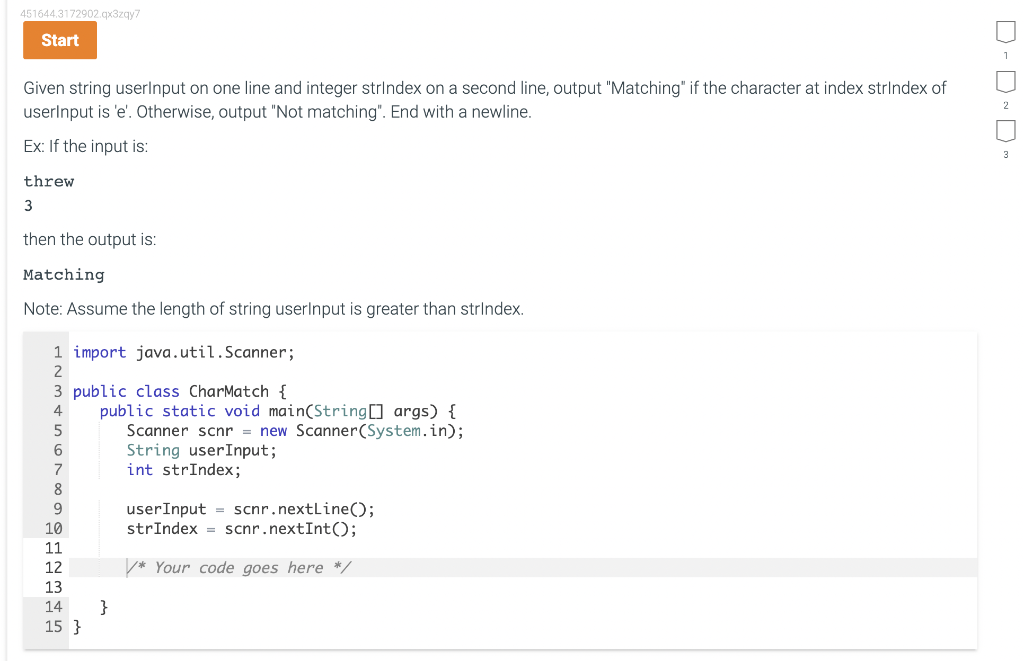 Given string userInput on one line and integer strIndex on a second line, output "Matching" if the character at index strIndex of userInput is 'e'. Otherwise, output "Not matching". End with a newline. Ex: If the input is: threw 3 then the output is: Matching Note: Assume the length of string userInput is greater than strIndex. import java.util.Scanner; public class CharMatch { public static void main(String[] args) { Scanner scnr = new Scanner(System.in); String userInput; int strIndex; userInput = scnr.nextLine(); strIndex = scnr.nextInt(); /* Your code goes here */ } }
Given string userInput on one line and integer strIndex on a second line, output "Matching" if the character at index strIndex of userlnput is 'e'. Otherwise, output "Not matching". End with a newline. Ex: If the input is: threw 3 then the output is: Matching Note: Assume the length of string userInput is greater than strindex. \begin{tabular}{r|r} 1 & import java.util. Scanner; \\ 2 & \\ 3 & public class CharMatch \{ \\ 4 & public static void main(String[] args) \{ \\ 5 & Scanner scnr = new Scanner(System.in); \\ 6 & String userInput; \\ 7 & int strIndex; \\ 8 & \\ 9 & userInput = scnr.nextLine(); \\ 10 & strIndex = scnr.nextInt (); \\ 11 & \\ 12 & / Your code goes here / \\ 13 & \\ 14 & \} \end{tabular}
Step by Step Solution
There are 3 Steps involved in it

Get step-by-step solutions from verified subject matter experts
 Study Help