







Question: Given the following SAS program: answer the following questions: 1. What does the input buffer look like during the first iteration of the DATA step?
Given the following SAS program:
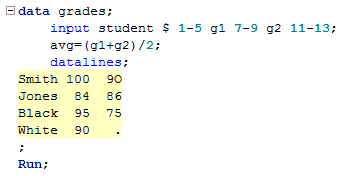
answer the following questions:
1. What does the input buffer look like during the first iteration of the DATA step?
2. What does the program data vector look like at the beginning of the first iteration of the DATA step?
3. What does the program data vector look like at the end of the first iteration of the DATA step?
4. What does the grades data set look like at the end of the first iteration of the DATA step?
5. What does the input buffer look like during the second iteration of the DATA step?
6. What does the program data vector look like at the beginning of the second iteration of the DATA step?
7. What does the program data vector look like at the end of the second iteration of the DATA step?
8. What is the largest value the automatic variable _N_ takes on in the process of executing this program?
9. What does the grades data set look like after this DATA step is fully executed?
10. Would you expect any errors, warnings, or notes to be displayed in the log window upon executing this program? If so, describe them briefly.
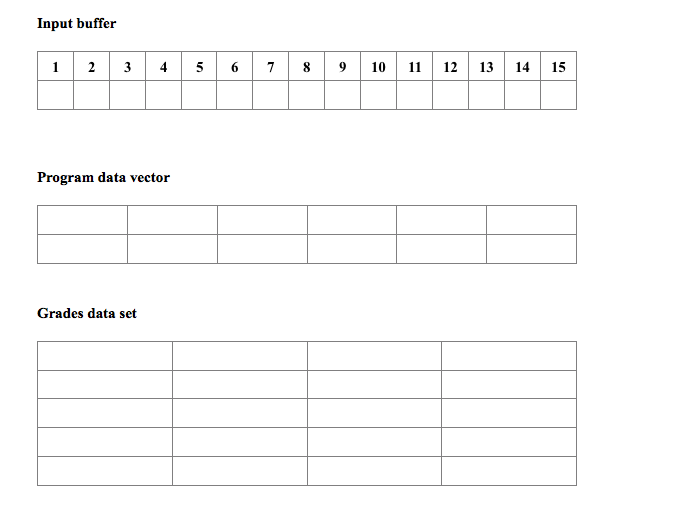
Two hopefully helpful comments: (1) Make sure you notice that the 9O in the first record of the raw data contains the letter O rather than the number 0, and (2) if you find it helpful, you can use the tables contained in this Word document
 for your input buffer, program data vector and grades data set.
El data grades input student 1-5 gl 7-9 g2 11-13 avg (g1+g2) /2: data lin e8 Smith 100 90 Jones 84 86 Black 95 75 White 90 El data grades input student 1-5 gl 7-9 g2 11-13 avg (g1+g2) /2: data lin e8 Smith 100 90 Jones 84 86 Black 95 75 White 90
Step by Step Solution
There are 3 Steps involved in it

Get step-by-step solutions from verified subject matter experts
 Study Help