







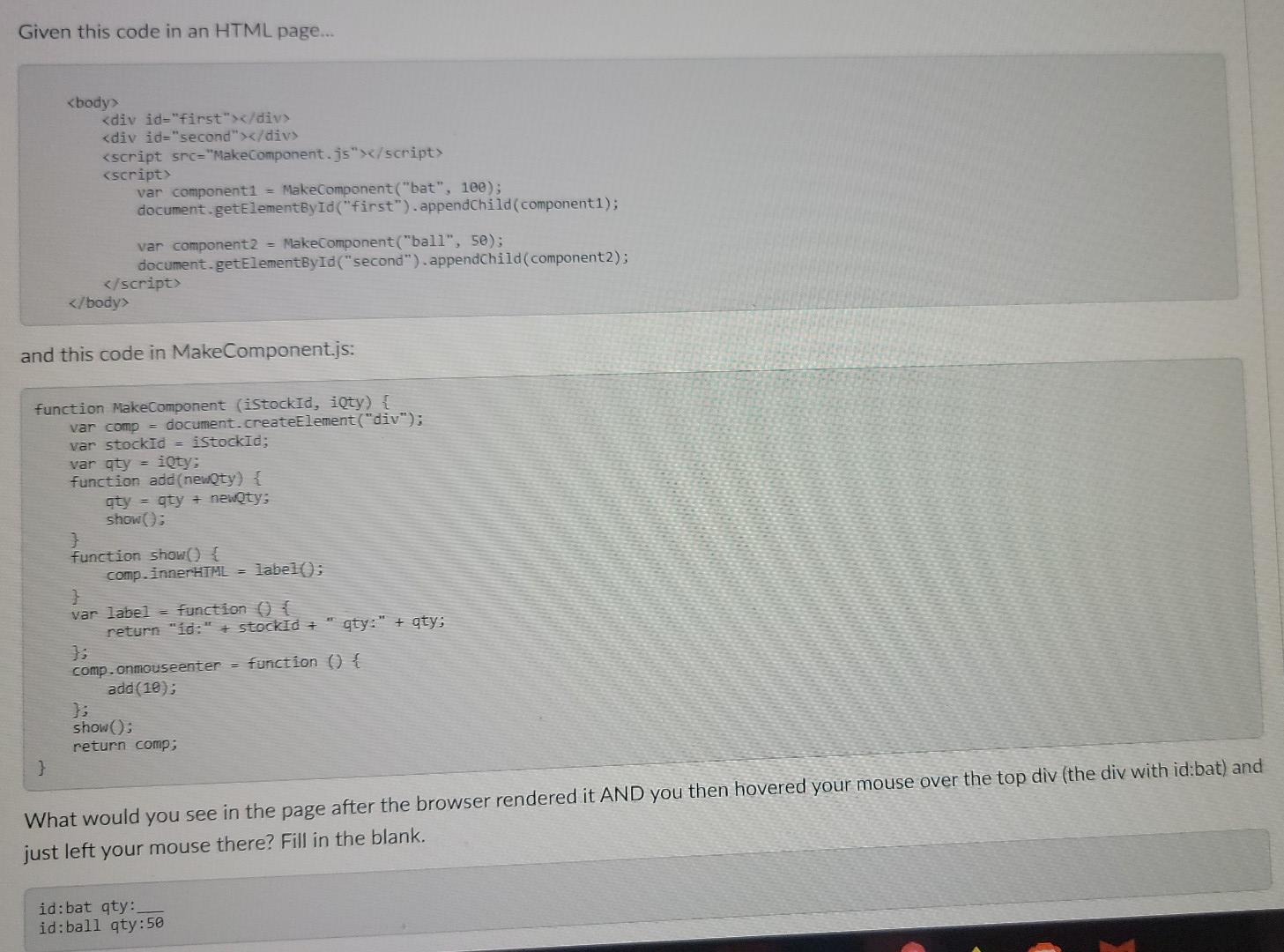
Question: Given this code in an HTML page... var componenti = MakeComponent(bat, 100); document.getElementById(first).appendChild(componenti); var component2 = MakeComponent(ball, 50); document.getElementById(second).appendChild(component2); and this code in MakeComponent.js: function
Given this code in an HTML page...
and this code in MakeComponent.js: function MakeComponent (iStockId, iQty) { var comp = document.createElement("div"); var stockid = iStockid; var qty = iQty: function add(newQty) { qty = qty = newQty: show(); function show() { comp.innerHTML = label(); } var label = function () { return "id:" + stockId + "gty:" + aty: 1: comp.onmouseenter = function () { add(10); }; show(); return comp; } What would you see in the page after the browser rendered it AND you then hovered your mouse over the top div (the div with id:bat) and just left your mouse there? Fill in the blank. id:bat qty: id:ball qty:50
Step by Step Solution
There are 3 Steps involved in it

Get step-by-step solutions from verified subject matter experts
 Study Help