







Question: giving code: // Assignment #: 12 // Name: your name // StudentID: your id // Lecture: your lecture time // Description: The Assignment 12 class
giving code:
// Assignment #: 12 // Name: your name // StudentID: your id // Lecture: your lecture time // Description: The Assignment 12 class creates a controlpanel and // adds it as its Applet content and also sets its size. import javax.swing.*; public class Assignment12 extends JApplet { private final int WIDTH = 650; private final int HEIGHT = 340; public void init() { ControlPanel panel = new ControlPanel(WIDTH,HEIGHT); getContentPane().add(panel); setSize(WIDTH,HEIGHT); } } -----------------------------------------------------------
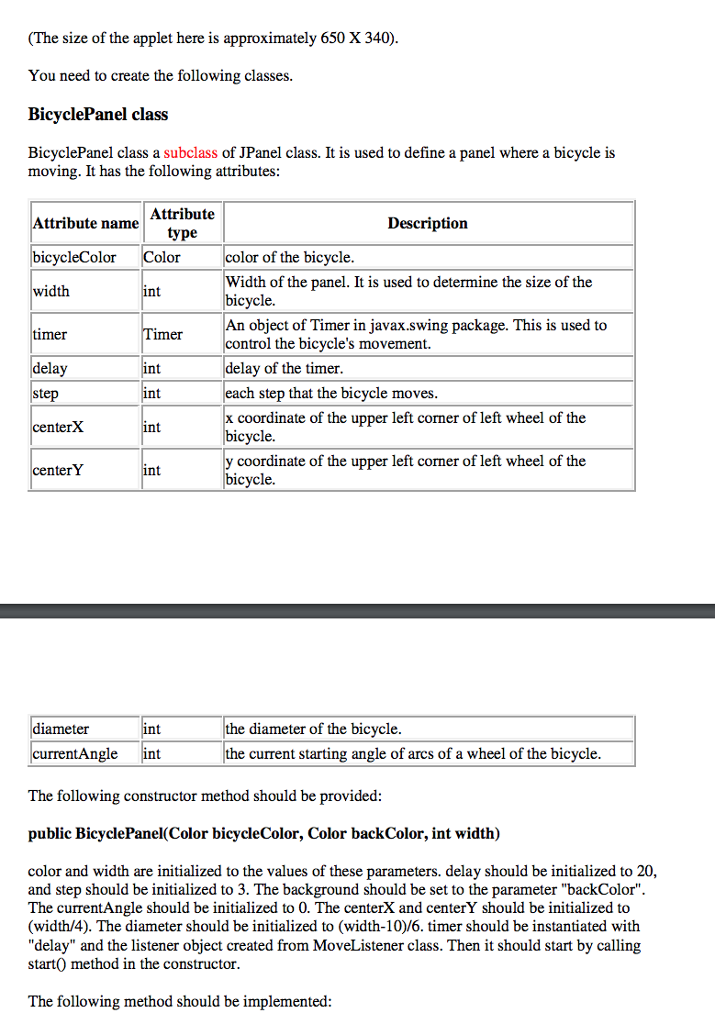
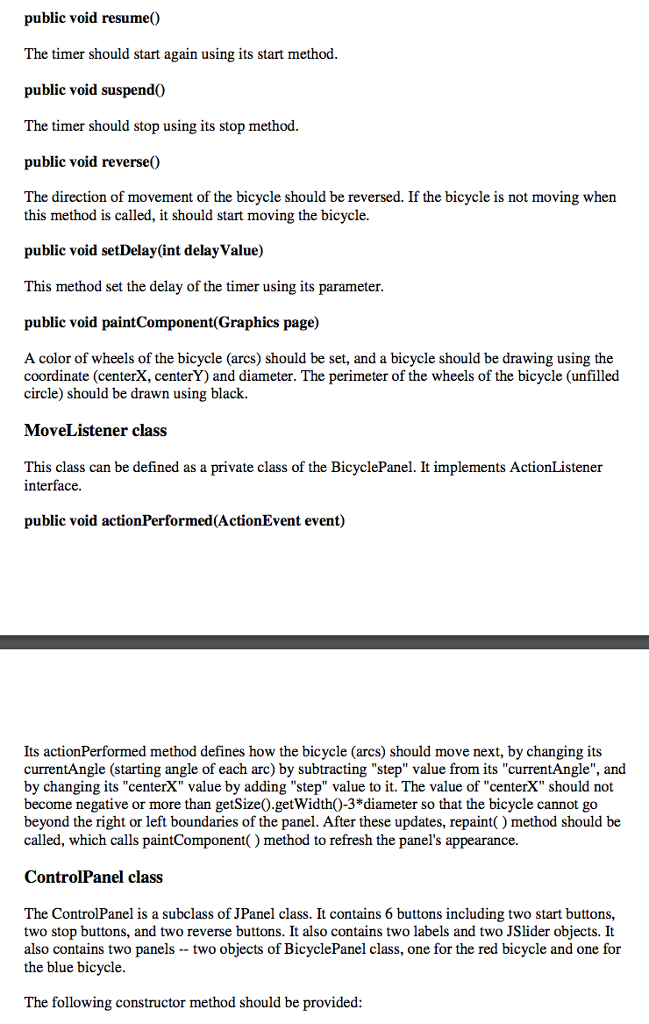
// Assignment #: 12 // Name: your name // StudentID: your id // Lecture: your lecture // Description: The BicyclePanel class draws a bicycle in a //panel and moves it using javax.swing.Timer import javax.swing.*; import java.awt.*; import java.awt.event.*; import javax.swing.event.*; public class BicyclePanel extends JPanel { private int width; //parameter to draw a bicycle private int centerX, centerY, diameter; private Color bicycleColor, backgroundColor; private int currentAngle; //how much currentAngle changes for each tick of Timer private int step; private Timer timer; //delay of Timer private int delay; //The constructor initializes parameters for the bicycle, //and start the timer public BicyclePanel(Color bicycleColor, Color backColor, int width) { /**************** to be completed ******************/ } /****************several methods to be completed***********/ //paintComponent method draws a bicycle by drawing two //wheels and links between them //This method is given to you, and you do not need to modify //it public void paintComponent(Graphics page) { super.paintComponent(page); //set background color setBackground(backgroundColor); //left wheel page.setColor(bicycleColor); page.fillArc(centerX, centerY, diameter, diameter, currentAngle, 90); page.fillArc(centerX, centerY, diameter, diameter, currentAngle+180, 90); page.setColor(Color.black); page.drawOval(centerX, centerY, diameter, diameter); //right wheel page.setColor(bicycleColor); page.fillArc(centerX+2*diameter, centerY, diameter, diameter, currentAngle, 90); page.fillArc(centerX+2*diameter, centerY, diameter, diameter, currentAngle+180, 90); page.setColor(Color.black); page.drawOval(centerX+2*diameter, centerY, diameter, diameter); //link two wheels page.setColor(bicycleColor); int seatLeftX = centerX+diameter-10; int seatLeftY = centerY-20; int seatRightX = centerX+2*diameter+10; int seatRightY = centerY-20; page.drawLine(seatLeftX, seatLeftY, seatRightX, seatRightY); page.drawLine(seatLeftX, seatLeftY, centerX+diameter/2, centerY+diameter/2); page.drawLine(seatRightX, seatRightY, centerX+(diameter*5)/2, centerY+diameter/2); page.drawLine(centerX+(diameter*3)/2, centerY+diameter/2, seatLeftX-10, seatLeftY-10); page.drawLine(centerX+(diameter*3)/2, centerY+diameter/2, seatRightX+10, seatRightY-10); page.drawLine(seatLeftX-20, seatLeftY-10, seatLeftX-10, seatLeftY-10); page.drawLine(seatRightX+20, seatRightY-10, seatRightX+10, seatRightY-10); } //MoveListener defined an action to be taken for each //tick of the Timer. private class MoveListener implements ActionListener { public void actionPerformed(ActionEvent event) { /*************to be completed****************/ } } } -----------------------------------------------------------------------------------------
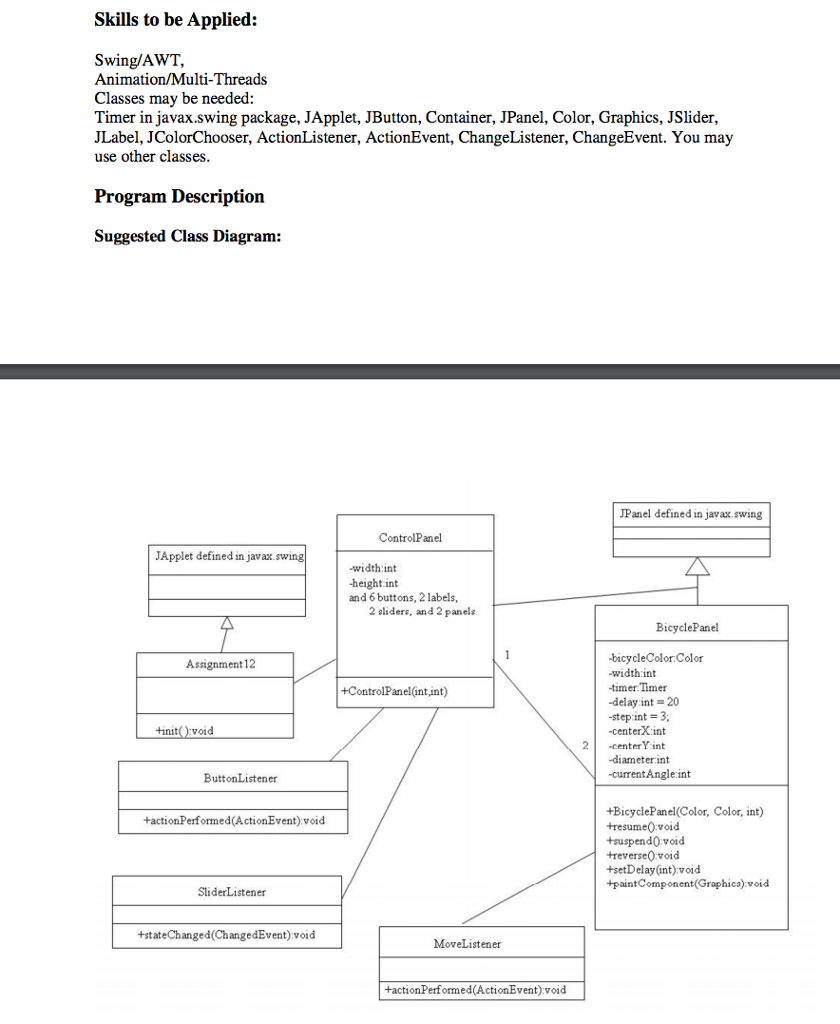
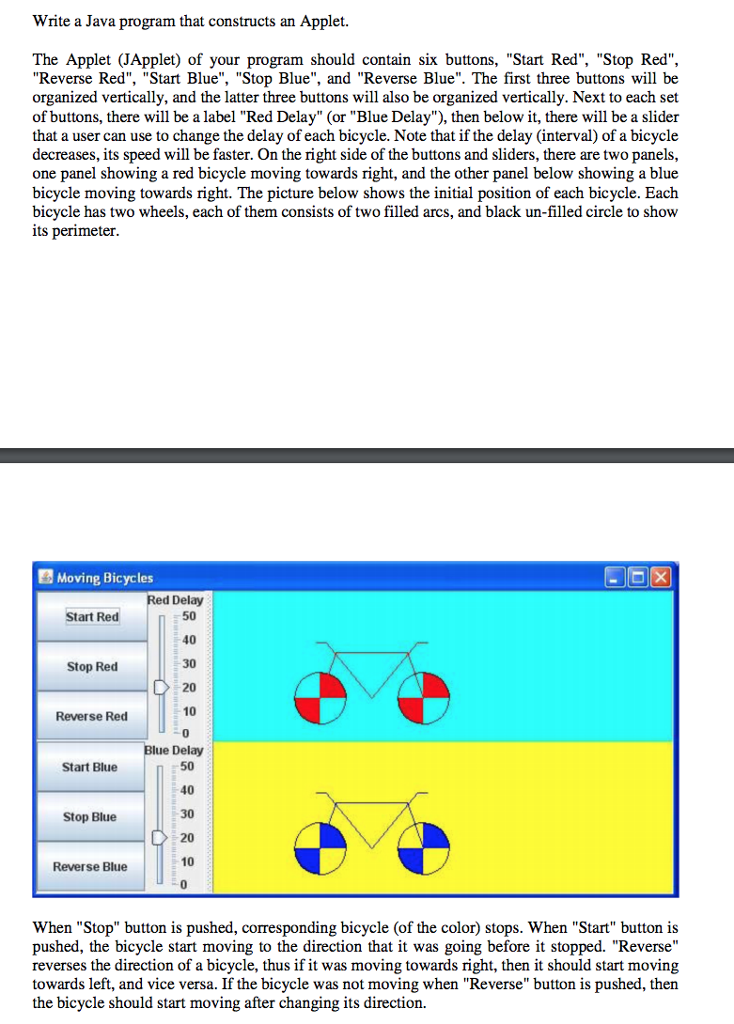
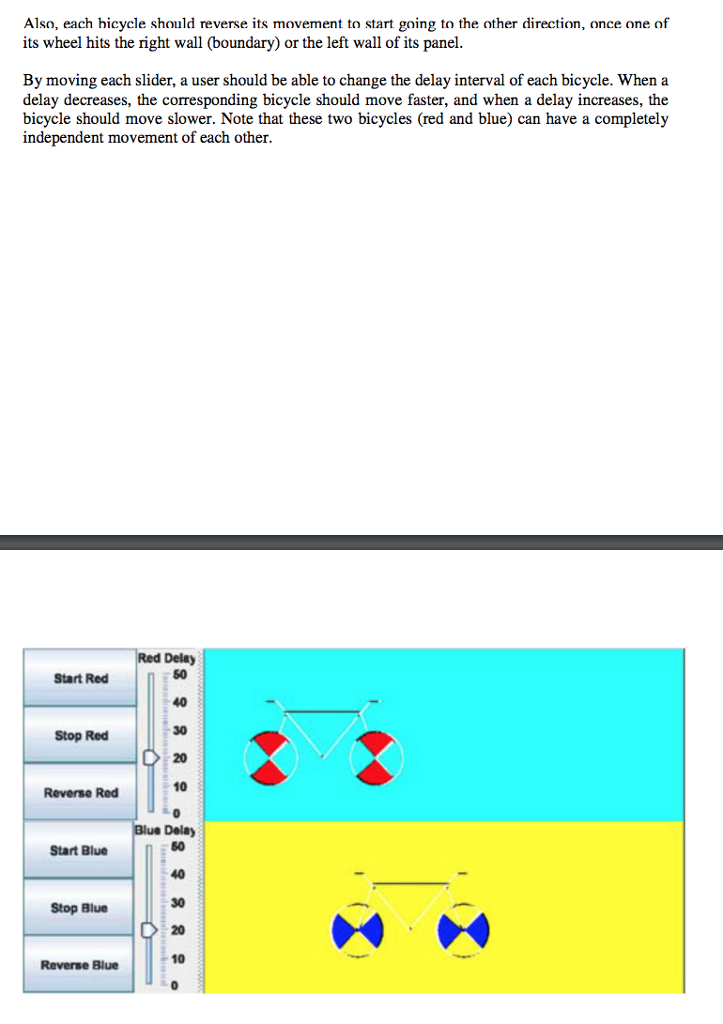
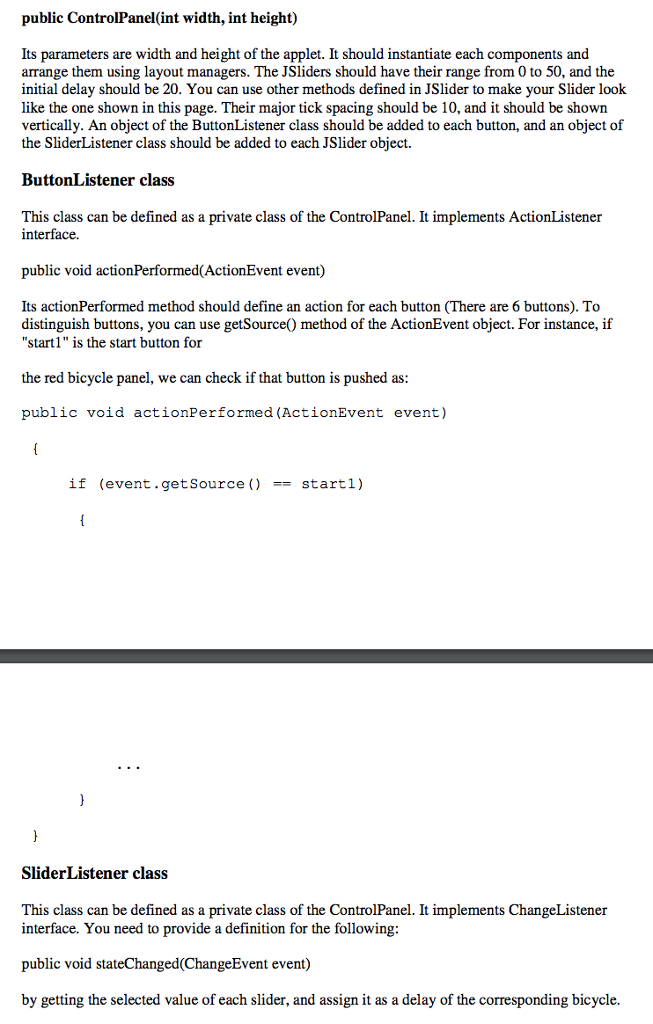
// Assignment #: 12 // Name: // StudentID: // Lecture: // Description: Displays options for user to change direction //and speed of two different bicycles. import javax.swing.*; import java.awt.*; import java.awt.event.*; import javax.swing.event.*; public class ControlPanel extends JPanel { //1 for the red bicycle control, 2 for the blue bicycle //control private BicyclePanel bicycle1, bicycle2; private JPanel leftPanel, rightPanel; private int width, height; private JButton startRed, stopRed, reverseRed, startBlue, stopBlue, reverseBlue; private JSlider redSlider, blueSlider; //The constructor creates 6 buttons, 2 sliders, and 2 //bicycle panels and organize them using layouts. public ControlPanel(int width, int height) { this.width = width; this.height = height; //create 2 bicycle panels and arrange them using //GridLayout bicycle1 = new BicyclePanel(Color.red, Color.cyan, width/2); bicycle2 = new BicyclePanel(Color.blue, Color.yellow, width/2); //put bicycles into right side of applet rightPanel = new JPanel(); rightPanel.setLayout(new GridLayout(2,1)); rightPanel.add(bicycle1); rightPanel.add(bicycle2); /****************to be completed*****************/ //put buttons and sliders into left side of applet leftPanel = new JPanel(); leftPanel.setLayout(new GridLayout(2,1)); /****************to be completed*****************/ //organize the left panel and right panel using //SplitPane setLayout(new BorderLayout()); leftPanel.setPreferredSize(new Dimension(width, 120)); JSplitPane sp = new JSplitPane(JSplitPane.HORIZONTAL_SPLIT, leftPanel, rightPanel); add(sp); setPreferredSize(new Dimension(width,height)); }//end of constructor //this method first determines which button was pressed and //then perform correct action private class ButtonListener implements ActionListener { public void actionPerformed(ActionEvent event) { /**************to be completed****************/ } } //end of ButtonListener //this method determines which slider was changed and then //change the speed of correct bicycle private class SliderListener implements ChangeListener { public void stateChanged(ChangeEvent event) { /**************to be completed****************/ } } //end of SliderListener } //end of ControlPanel Skills to be Applied: Swing/AWT, Animation/Multi-Threads Classes may be needed: Timer in javax.swing package, JApplet, JButton, Container, JPanel, Color, Graphics, JSlider, JLabel, JColorChooser, ActionListener, ActionEvent, ChangeListener, ChangeEvent. You may use other classes Program Description Suggested Class Diagram: Panel defined in javax swing ControlPanel JApplet defined in jav ax -width int -height int and 6 buttons, 2 labels, 2 sliders, and 2 panels BicyclePanel bicycleColor Color width int timer Timer -delay int 20 step int 3; Assignment 12 +ControlPanelGint int) void -centerX int 2-centerY int -diameterint currentAngle int ButtonListener +BicyclePanel(Color, Color, int) tresumevoid +suspend0 void treverse0 void +setDelay(int) void paintComponent (Graphica):void tactionPerformed (ActionEvent) void SliderListener +stateChanged(ChangedEvent) void MoveListener tactionPerformed(ActionEvnt)void
Step by Step Solution
There are 3 Steps involved in it

Get step-by-step solutions from verified subject matter experts
 Study Help