







Question: GLCM Try it yourself! Use GLCM to extract features from the given image below and then plot the extracted features to see the correlation and
GLCM Try it yourself!
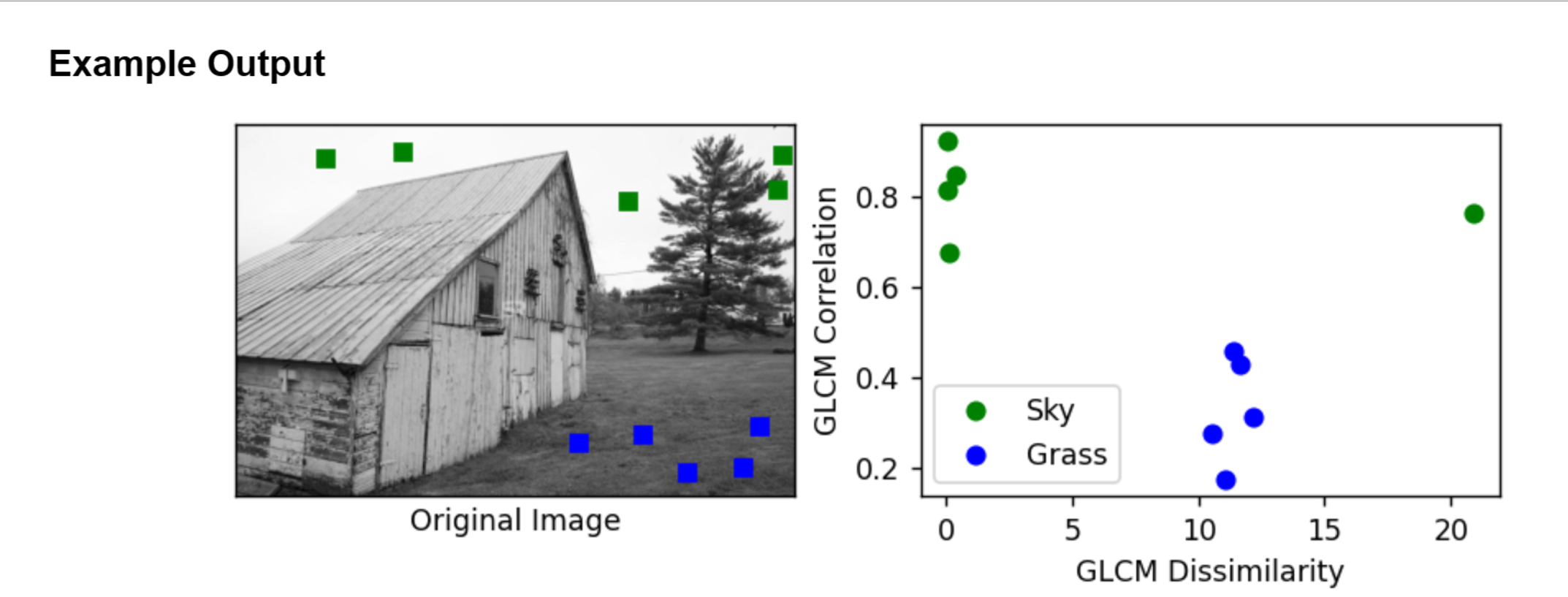
Use GLCM to extract features from the given image below and then plot the extracted features to see the correlation and dissimilarity of different image region.
In this task you need to extract partches x from the sky area and the partches from the grass area. Plot these patches to see the correlation and dissimilarity.
Use the image barnjpg from the images folder.Example Output
Original Image
Step by Step Solution
There are 3 Steps involved in it
1 Expert Approved Answer
Step: 1 Unlock

To complete this task we will use the Gray Level Cooccurrence Matrix GLCM to extract features and then visualize these features Heres a stepbystep gui... View full answer
Question Has Been Solved by an Expert!
Get step-by-step solutions from verified subject matter experts
Step: 2 Unlock
Step: 3 Unlock
 Study Help