







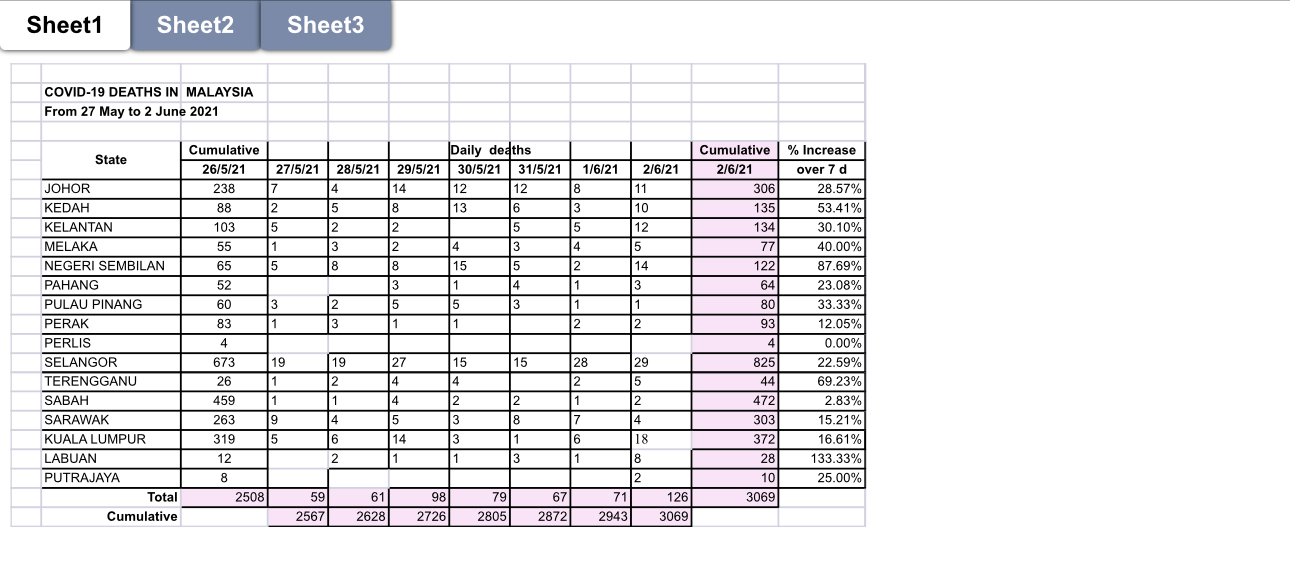
Question: Go to Spreadsheet Data 1 1 ( page 9 3 ) . ( a ) Prepare the data and complete any blanks where necessary. (
Go to Spreadsheet Data page
a Prepare the data and complete any blanks where necessary.
b Using Microsoft Excel, prepare a map chart and a twoaxis chart based on the data.
c Customise both charts according to your preference. Both charts ought to be presentable and understandable at the same time.
d All of the above must be saved in a workbook named XE
e Present your work to your teacher for inspection upon completion.
Sheet
Sheet
Sheet
Step by Step Solution
There are 3 Steps involved in it
1 Expert Approved Answer
Step: 1 Unlock

Question Has Been Solved by an Expert!
Get step-by-step solutions from verified subject matter experts
Step: 2 Unlock
Step: 3 Unlock
 Study Help