







Question: Go to SQL Developer. Add a WHERE clause to your subquery in step 13 to filter the fee types used by the SUM. Use a
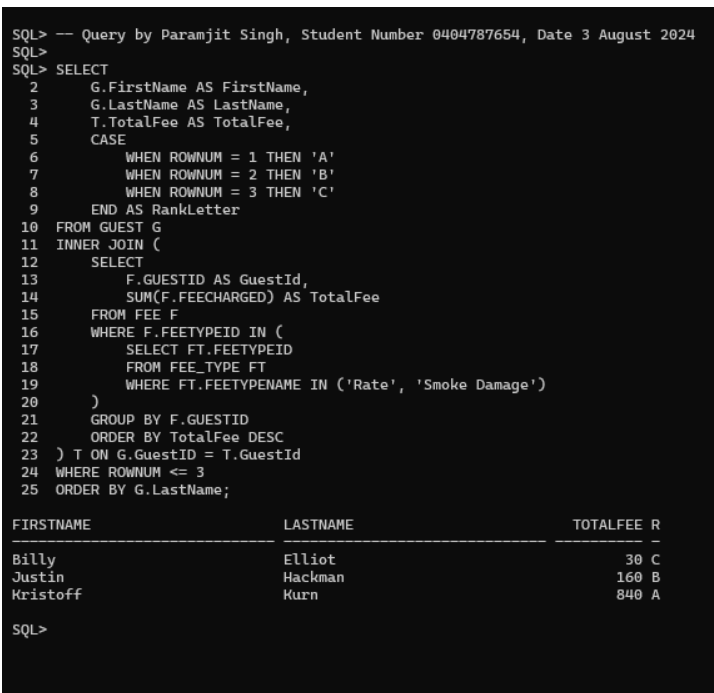
Go to SQL Developer. Add a WHERE clause to your subquery in step 13 to filter the fee types used by the SUM. Use a SELECT... FROM FEE_TYPE WHERE... within the IN operator to do this. Include only fee types named rate and smoke damage. (Oracle is case sensitive. Your values must match what is in your FEE_TYPE table.) Refer to W3Schools - SQL IN Operator for examples. The query should return the following results.FIRSTNAME LASTNAME TOTALFEE RANKLETTERBilly Elliot 30 CJustin Hackman 160 BKristoff Kurn 840 AIn your SELECT, make table names UPPER_CASE and column names ProperCase. If you haven't already, add a comment before the query that includes your name, student number, and today's date.In SQLPLUS run CST2355_A1_FORMAT.SQL using the @ command. Clear your screen. Copy and paste into SQLPLUS to run your script.Provide a screenshot from SQLPLUS of your comment, SELECT statement, and its formatted output results.
Step by Step Solution
There are 3 Steps involved in it

Get step-by-step solutions from verified subject matter experts
 Study Help