







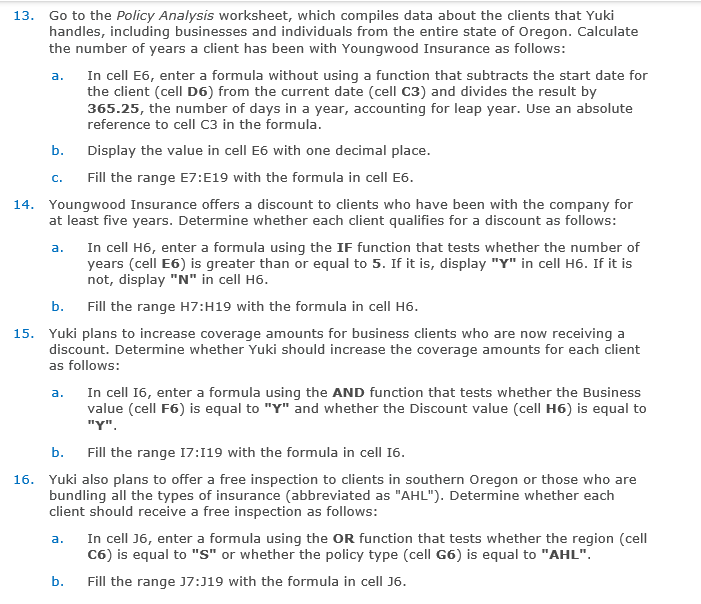
Question: Go to the Policy Analysis worksheet, which compiles data about the clients that Yuki handles, including businesses and individuals from the entire state of Oregon.
Go to the Policy Analysis worksheet, which compiles data about the clients that Yuki
handles, including businesses and individuals from the entire state of Oregon. Calculate
the number of years a client has been with Youngwood Insurance as follows:
a In cell E enter a formula without using a function that subtracts the start date for
the client cell D from the current date cell C and divides the result by
the number of days in a year, accounting for leap year. Use an absolute
reference to cell C in the formula.
b Display the value in cell E with one decimal place.
c Fill the range E:E with the formula in cell E
Youngwood Insurance offers a discount to clients who have been with the company for
at least five years. Determine whether each client qualifies for a discount as follows:
a In cell H enter a formula using the IF function that tests whether the number of
years cell E is greater than or equal to If it is display Y in cell H If it is
not, display N in cell H
b Fill the range : with the formula in cell
Yuki plans to increase coverage amounts for business clients who are now receiving a
discount. Determine whether Yuki should increase the coverage amounts for each client
as follows:
a In cell I enter a formula using the AND function that tests whether the Business
value cell F is equal to Y and whether the Discount value cell H is equal to
Y
b Fill the range I:I with the formula in cell I
Yuki also plans to offer a free inspection to clients in southern Oregon or those who are
bundling all the types of insurance abbreviated as "AHL" Determine whether each
client should receive a free inspection as follows:
a In cell J enter a formula using the OR function that tests whether the region cell
C is equal to S or whether the policy type cell G is equal to "AHL".
b Fill the range : with the formula in cell
Step by Step Solution
There are 3 Steps involved in it
1 Expert Approved Answer
Step: 1 Unlock

Question Has Been Solved by an Expert!
Get step-by-step solutions from verified subject matter experts
Step: 2 Unlock
Step: 3 Unlock
 Study Help