







Question: Goal : Your assignment is to write a C++ program to read in a list of phone call records from a file into a call
Goal: Your assignment is to write a C++ program to read in a list of phone call records from a file into a call database. Your program will then allow the user to enter a prefix for a phone number in E164 format. Your program will list out all calls to phone number which have that prefix. The assignment introduces you to building a program using multiple files, implementing an ADT, C++ structs, and using unit test programs.
Call Database Interface: You will use an ADT for the call database. In a software development team, developers will agree ahead of time on component interfaces (e.g. an ADT interface), so they can work in parallel. If someone doesnt follow the agreement, there will be a build errors and an angry development manager. We too are going to agree on a common definition for call database interface. You must use the definitions describe below exactly as specified.
The first part defines the CALL ADT, which stores one call record:
// Stores raw information about one call
struct Call {
string start;
string end;
string phone;
};
// Get Duration of call as an int
unsigned int GetCallDuration(const Call& call);
// Get formatted start time of call
string GetCallStart(const Call& call);
// Get formatted end time of call
string GetCallEnd(const Call& call);
// Get country code of call
string GetCallCountryCode(const Call& call);
// Get phone number of call
string GetCallPhoneNumber(const Call& call);
It should not take you long to implement the interface functions relating to Call. Why? Because you wrote the logic for all of them in Lab 1. The only difference is that you have to use the specified names for the functions, and the parameter is a Call data structure rather than a string parameter.
The second part defines the CallDb ADT, which stores a list of call records:
// Maximum number calls in call database
const int MAXCALLS = 15;
// Call database
struct CallDb {
Call callLog[MAXCALLS]; // Stores calls in database
unsigned int numCalls; // Number of calls stored
};
// Initializes call database to have store no calls
void InitCallDB(CallDb& calldb);
// Load database with calls stored in a file
unsigned int LoadCallDB(CallDb& calldb, istream& fin);
// Get count of call records
unsigned int GetCountCallDB(const CallDb& calldb);
// Retrieve call records
bool GetCallInCallDB(const CallDb& calldb, unsigned int index, Call& call);
// Return first index >= of call w/ matching E164 prefix, or -1
int FindByE164PrefixInCallDB(const CallDb& calldb, unsigned int startIndex, const string& prefix);
You will need to write these five brand new functions:
1) InitCallDB initializes the call database to have zero Call records. This is a one liner.
2) LoadCallDB reads call records from an open ifstream (istream to be general) until there is no more data or an error occurs. This function uses a loop. On each iteration, it will read the three fields as strings, call the validate functions you wrote in Lab 1, and if the data passes validation and there is room left in the array, fill in the first unused Call record with the data you read. This function will return the count of records that failed validation or which would not fit in the array because there was no room left. NOTE: the type of the second parameter is actually istream. Using this type instead of ifstream makes writing a unit test program easier.
3) GetCountCallDB returns the number of call records in the database at the current time. This is another one line.
4) GetCallInCallDB checks whether the specified index is within range of the Call records currently stored in the callLog array. If it is not in range the function returns false. Otherwise it will return true and set the call reference parameter to the Call record at the specified index in the callLog array.
5) FindByE164PrefixInCallDB will scan the database of call records looking for the first record at or after the specified index with E.164 field having the specified prefix. It returns the index of the first record it finds, or else -1 if it cant find one.
Filenames you must use: Your main program will be built from 5 source files:
CallAnalysis.cpp main program
CallDb.h header file for call database ADT (struct CallDb and its interface functions declaration)
CallDb.cpp implementation of call database ADT
Call.h header file for the Call ADT (struct Call and its interface functions declaration)
Call.cpp implementation of Call ADT
Getting Started: Developers often set some milestones where they do a partial implementation of their changes, and stabilize the code, and then continue onto the next milestone. I think it would help you if you schedule 3 milestones for this assignment.
Milestone 0: Create Call.h, CallDb.h, Call.cpp and CallDb.cpp. Copy in the definition of the ADT into CallDB.h and Call.h. Add stubs for the five interface functions in CalllDb.cpp and the 5 interface functions in Call.cpp. Download Lab3UnitTest.cpp. Try compiling using the command CL /EHsc Lab3UnitTest.cpp CallDb.cpp Call.cpp
Milestone 1: First implement GetCallDuration, GetCallStart, GetCallEnd, GetCallCountryCode, and GetCallPhoneNumber. This should not take long since you can adapt the code you wrote in Lab 1. Move the validation functions you wrote to CallDb.cpp as well. These functions are not part of the ADT interface, but they are internal functions that your ADT implementation will use.
Next implement InitCallDB, GetCountCallDB, and GetCallInCallDB. The first two are one line, the third takes a bit more code, but still is quite simple. Now its time to write LoadCallDB so you can read data into the call database. Finally implement FindByE164PrefixInCallDB.
Now try compiling and running unit test program. If the program terminates with an assert, look for the line number of the assert. It should refer to a line in Lab3UnitTest.cpp. Check what is wrong, and fix your code. When it finally passes the unit test, then your ADT implementation is probably right.
Milestone 2: Now its time to take your main program from Lab 1 and try to update it to run against your ADT. You will want to have a main program and an additional function for printing the record that match a specified E.164 prefix. This print function will take the call database as a reference parameter and a string parameter specifying the prefix to match on.
Heres an outline of what your main program should do:
1) Open the file
2) Print message and exit if file couldnt be successfully opened
3) Initialize your call database
4) Load the records from the file into the call database
5) Close your file
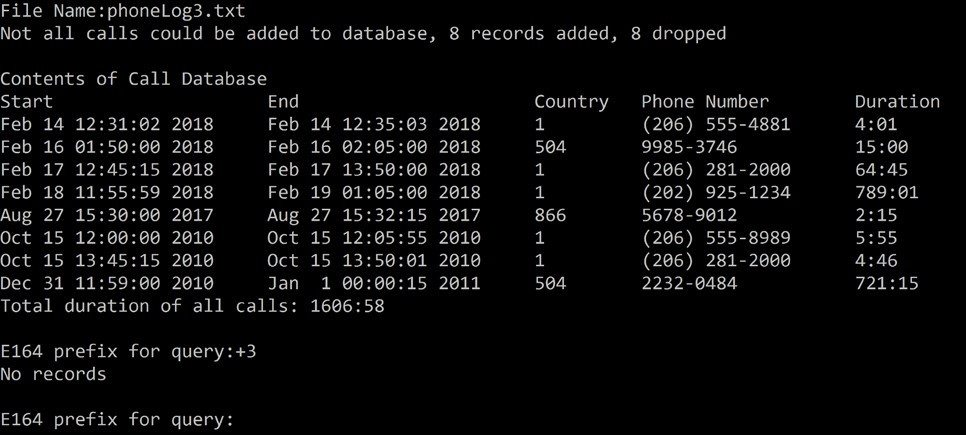
6) Print a message indicating how many records were added, and how many dropped (if any were dropped)
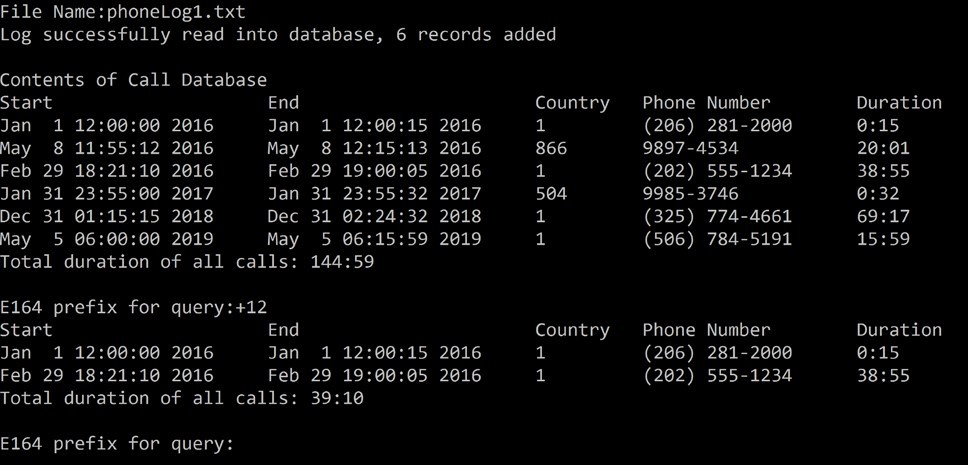
7) Print out records in the call database, this time output minutes and seconds, if a call took 111 seconds you should display 1:51
8) Go into a loop, where you
a. prompt the user to enter a E.164 prefix to query on
b. print out the records that match the query
9) If the user simply hits ENTER to specify the query string, your program terminates.
NOTE: you will use your print function to print out all the records in the call database in step 7), and also when you print the records that match the query in 8a). In addition to printing the records, it will also sum up the duration of all the call records it displays (minutes and seconds), and print a line that indicates the total duration.
---------------------------------------------------------------------------------------------------------------------------------------------------------------------
The following screenshots illustrate the operation of the program (CallAnalysis.cpp):
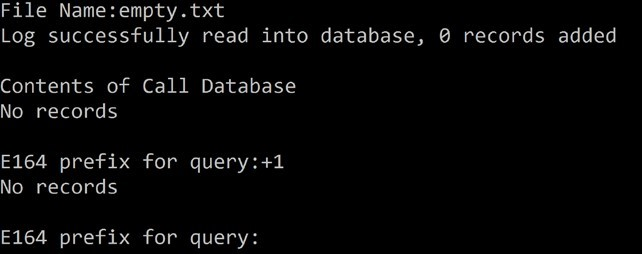
Empty File:
File with 6 records, all correctly formatted:
File with eight incorrectly formatted records (and 8 no good records):
Nonexistent file:

Program Style
Please refer to the Lab 1 assignment document for appropriate style.
In addition, there are some more style rules for working with ADTs:
1) You must not access the ADT in any other way than calling the interface functions defined in the .h file.
2) You must change the ADT definition in anyway. Adding new ADT interface functions is not allowed, and will prevent the compilation of the Unit Test.
3) You must not make a single change to the Unit Test file.
Finally, always pass structs as reference parameters to avoid needless copying of information onto the stack.
Submitting your code
As described earlier, your solution will consist of three files: CallAnalysis.cpp, Call.h, Call.cpp, CallDb.h, and CallDb.cpp. You must use these filenames.
Before submitting,
1) Create a new directory
2) Copy the five files you have written to this new directory
3) Bring up a Developer Command Prompt for VS 2017 window.
4) Use cd to position yourself into this directory
5) Run the command cl /EHsc CallAnalysis.cpp CallDb.cpp Call.cpp
6) Make sure it compiles with no warnings and errors, and links. CallAnalysis.exe should be created.
7) Download the test files empty.txt, phoneLog1.txt, phoneLog2.txt, and phoneLog3.txt, into this directory
8) Run your program on all four files, do some queries. Make sure the results look right and match the screenshots. Your program will be run and the results visually compared with what is expected.
9) Next, download Lab3UnitTest.cpp to this new directory
10) Run the command cl /EHsc Lab3UnitTestcpp CallDb.cpp Call.cpp
11) Make sure it compiles with no warnings and errors, and links. Lab3UnitTest.exe should be created.
12) Run Lab3UnitTest.exe
13) It the program terminates with an assert, look at code at the indicated line number in Lab3UnitTest.cpp and figure out what doesnt match. If your output is wrong, then it should the character at which the expected output and your output differ, as what part of the text is different.
When you are able to pass all these tests, submit CallAnalysis.cpp, Call.h, Call.cpp, CallDb.h, and CallDb.cpp. Submit these three files and no other files.
Grading
Correctness is essential. Make sure your solution builds as specified above and correctly handles all the input files described earlier in this document. In addition, the unit test must pass all tests.
Even if your solution operates correctly, points will be taken off for:
Not following the design described above
Not adhering to style guidelines described above
Using techniques not presented in class
Programming error not caught by other testing
File Name:empty.txt Log successfully read into database, 0 records added Contents of Call Database No records E164 prefix for query: +1 No records E164 prefix for query: File Name:empty.txt Log successfully read into database, 0 records added Contents of Call Database No records E164 prefix for query: +1 No records E164 prefix for query
Step by Step Solution
There are 3 Steps involved in it

Get step-by-step solutions from verified subject matter experts
 Study Help