







Question: Goals Practice graphic programming Practice designing programs (e.g., list, loop, creating random variables) Practice creating random variables Description Write code to implement graphic-based game. The
Goals
- Practice graphic programming
- Practice designing programs (e.g., list, loop, creating random variables)
- Practice creating random variables
Description
Write code to implement graphic-based game. The video below shows how to play the game. First, as players click to start a game, 10 random numbers will be shown and randomly placed. The task is to click numbers in increasing order as fast as possible. If players click the proper number (i.e., smallest number shown), the number being clicked will disappear. Then, "Good" message will show and the remaining count will decrease. Otherwise, the message will say "Oops" (i.e., click the wrong number or random places). After all the numbers are finished, a "Clear" message will come along with how many seconds have been spent. See below for details.
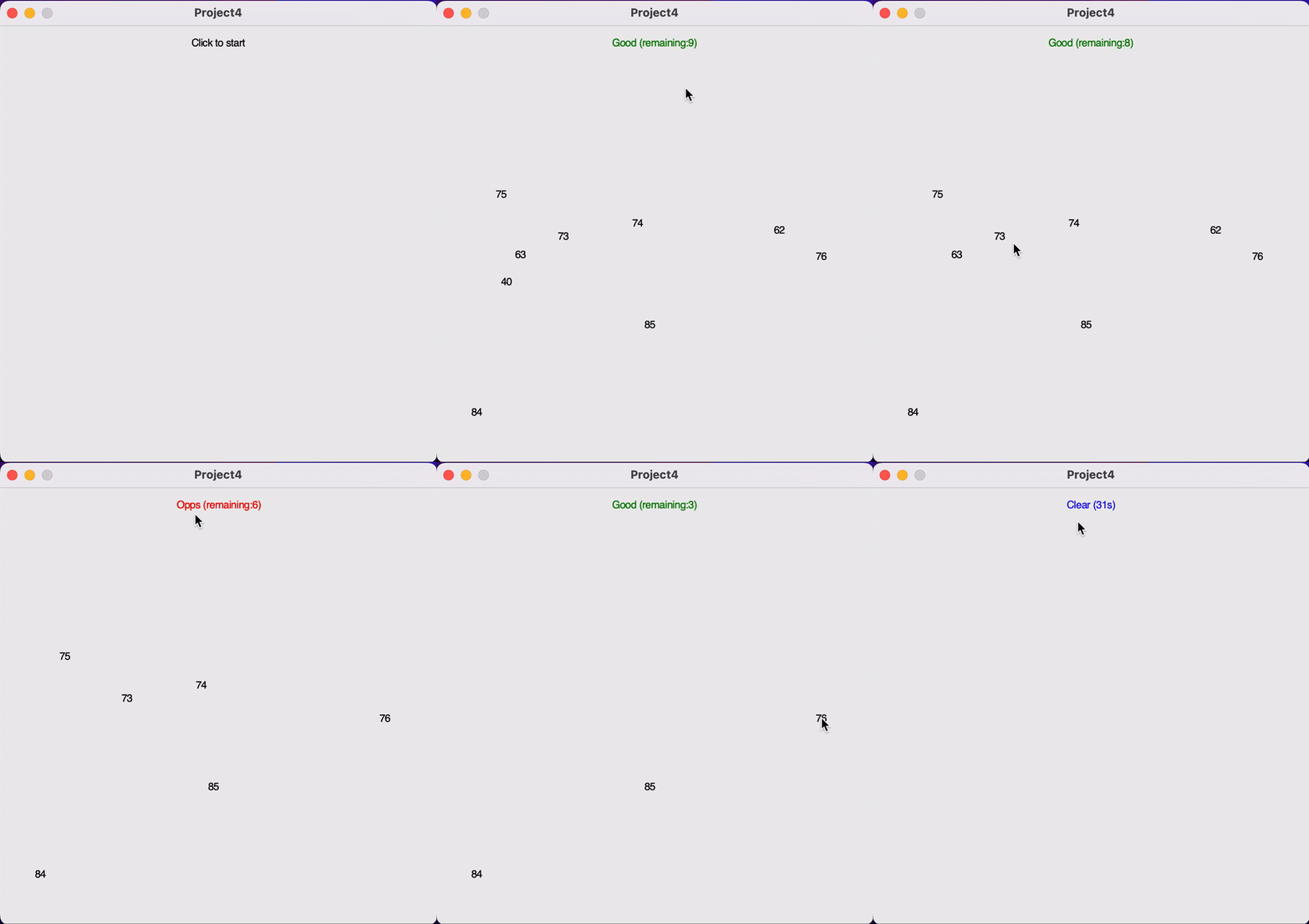
The following tasks summarize the project requirements:
- Task 1: Create window sized 500 x 500 (pixels) and titled "Project4"
- Task 2: Text "Click to start" on (250, 20) and wait until the player clicks the screen.
- Task 3: Right after the start (i.e., click event), create and scatter 10 random variables at random locations on the window. Below are detailed conditions.
- Use "Text" objects to show numbers.
- All numbers should be from 0 to 100.
- Duplicated numbers are not allowed. Numbers must be unique.
- Objects' locations should be randomly decided. However, a center of any number's Text Object must not lie in any area within 20 pixels from four sides. That is, x of objects should be in [20, 480] and y should be in [20, 480].
- It is OK that two (or more) numbers accidentally overlap on the screen.
- Task 4: Text the game instruction saying "Click numbers in increasing order" with blue color. Simply changing the Text object created in "Task 2" will work.
- Task 5: Repeat following steps until any number remains;
- If a player clicks the correct number (i.e., smallest), (i) remove the "Text" object clicked, (ii) show "Good (remaining:xx)" in green color (change the Text object from task 2).
- If a player clicks wrong, show "Oops (remaining:xx)" in red color (change the Text object from task 2).
- Task 6: Show "Clear (xxxs)" and wait for another click event so that the screen will survive.
- Measure the seconds being spent from Task 3.
- You need not consider very small errors. That is, it is all OK to place your time measuring code before or after some computation/configuration codes (e.g., drawings). This task is to measure how long it takes to complete mission by human players. Computer's task is tiny enough to be neglected.
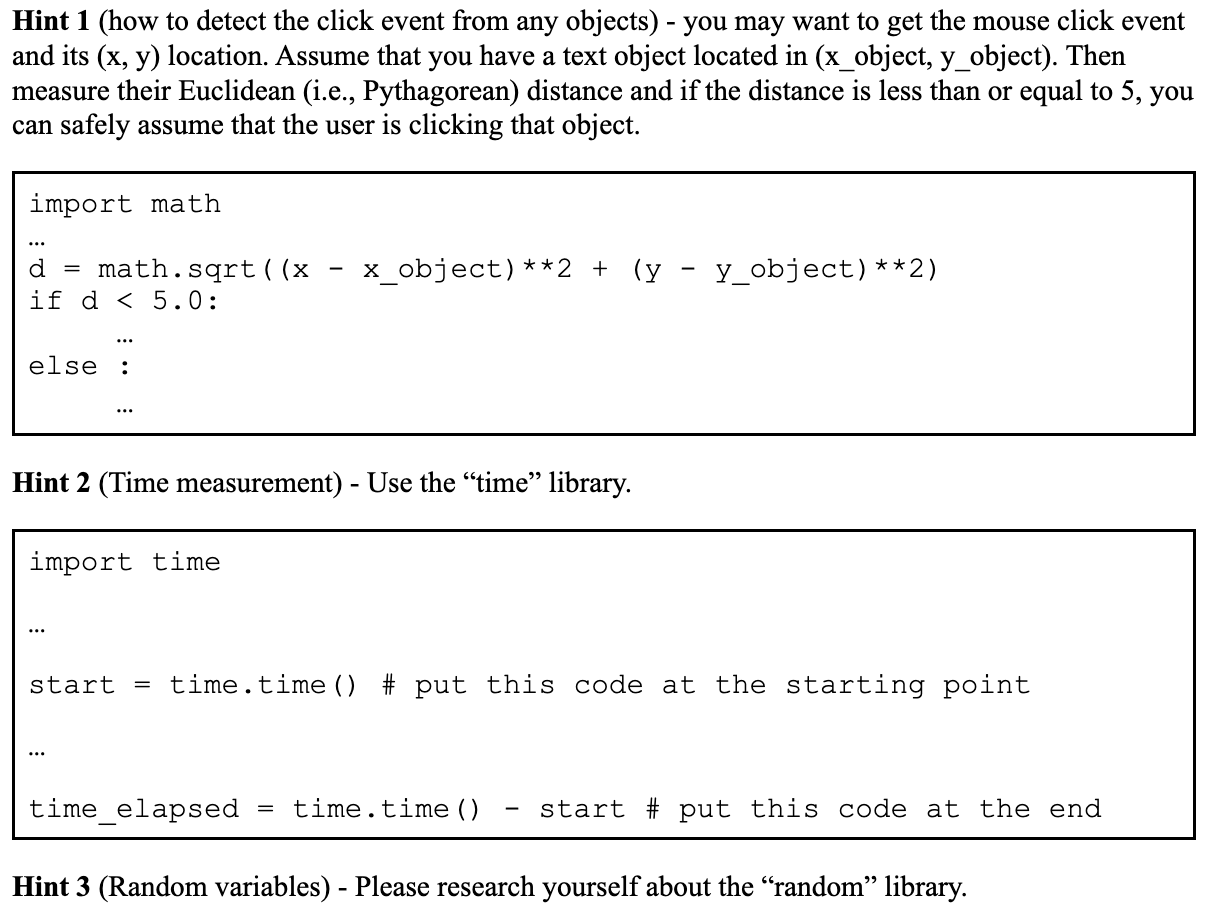
Hint 1 (how to detect the click event from any objects) - you may want to get the mouse click event and its (x, y) location. Assume that you have a text object located in (x_obj ect, y_object). Then measure their Euclidean (i.e., Pythagorean) distance and if the distance is less than or equal to 5, you can safely assume that the user is clicking that object. import math = math.sqrt((x - x_object)**2 + (y - y_object)**2) if d
Project4 Click to start
Step by Step Solution
There are 3 Steps involved in it
import tkinter as tk import random import time Task 1 Create window sized 500 x 500 pixels and title... View full answer

Get step-by-step solutions from verified subject matter experts
 Study Help