


Question: Good day, please assist with the following code in the python langauge so i can fulfill the view calendar step. TIA from __future__ import print_function
Good day, please assist with the following code in the python langauge so i can fulfill the view calendar step. TIA
Good day, please assist with the following code in the python langauge
so i can fulfill the view calendar step. TIA from __future__ import
from __future__ import print_function

import datetime
import os.path
import pandas

from google.auth.transport.requests import Request
from google.oauth2.credentials import Credentials
from google_auth_oauthlib.flow import InstalledAppFlow
from googleapiclient.discovery import build
from googleapiclient.errors import HttpError

# If modifying these scopes, delete the file token.json.
SCOPES = ['https://www.googleapis.com/auth/calendar',
'https://www.googleapis.com/auth/calendar.events'
]
# I'm the woman

def authentification():
"""Shows basic usage of the Google Calendar API.
Prints the start and name of the next 10 events on the user's calendar.
"""
creds = None
# The file token.json stores the user's access and refresh tokens, and is
# created automatically when the authorization flow completes for the first
# time.
if os.path.exists('token.json'):
creds = Credentials.from_authorized_user_file(
'token.json'
, SCOPES)
# If there are no (valid) credentials available, let the user log in.
if not creds or not creds.valid:
if creds and creds.expired and creds.refresh_token:
creds.refresh(Request())
else:
flow = InstalledAppFlow.from_client_secrets_file(
'credentials.json', SCOPES)
creds = flow.run_local_server(port=0)
# Save the credentials for the next run
with open('token.json', 'w') as token:
token.write(creds.to_json())
try:
service = build('calendar', 'v3', credentials=creds)
return service
except HttpError as error:
print('An error occurred: %s' % error)

def student_calendar():
pass


def code_clinics_calendar():
pass


def view_calendar():
pass


def main():
authentification()


if __name__ == '__main__':

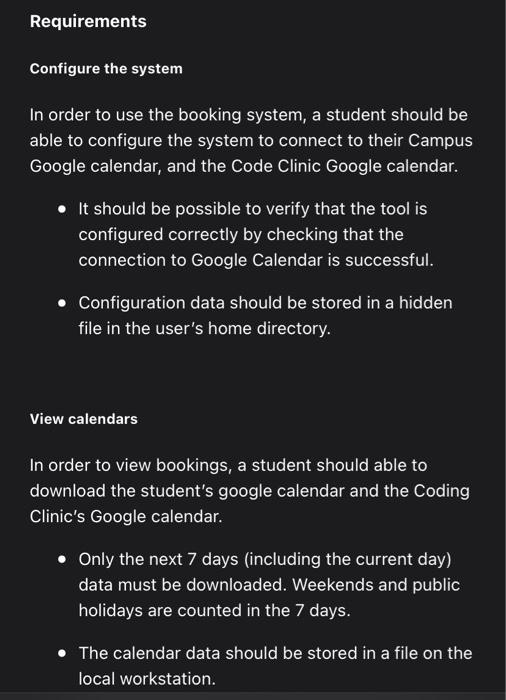
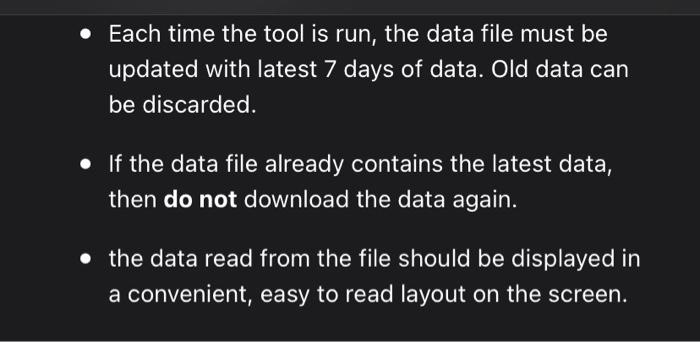
Requirements Configure the system In order to use the booking system, a student should be able to configure the system to connect to their Campus Google calendar, and the Code Clinic Google calendar. - It should be possible to verify that the tool is configured correctly by checking that the connection to Google Calendar is successful. - Configuration data should be stored in a hidden file in the user's home directory. View calendars In order to view bookings, a student should able to download the student's google calendar and the Coding Clinic's Google calendar. - Only the next 7 days (including the current day) data must be downloaded. Weekends and public holidays are counted in the 7 days. - The calendar data should be stored in a file on the local workstation. - Each time the tool is run, the data file must be updated with latest 7 days of data. Old data can be discarded. - If the data file already contains the latest data, then do not download the data again. the data read from the file should be displayed in a convenient, easy to read layout on the screen

Step by Step Solution

There are 3 Steps involved in it

1 Expert Approved Answer
Step: 1 Unlock blur-text-image
Question Has Been Solved by an Expert!

Get step-by-step solutions from verified subject matter experts

Step: 2 Unlock
Step: 3 Unlock

Students Have Also Explored These Related Databases Questions!