







Question: good morning. please help me with my coding . I have 2 problem. first, my receipt does not count that amount withrawal and balance. It
good morning. please help me with my coding . I have 2 problem.
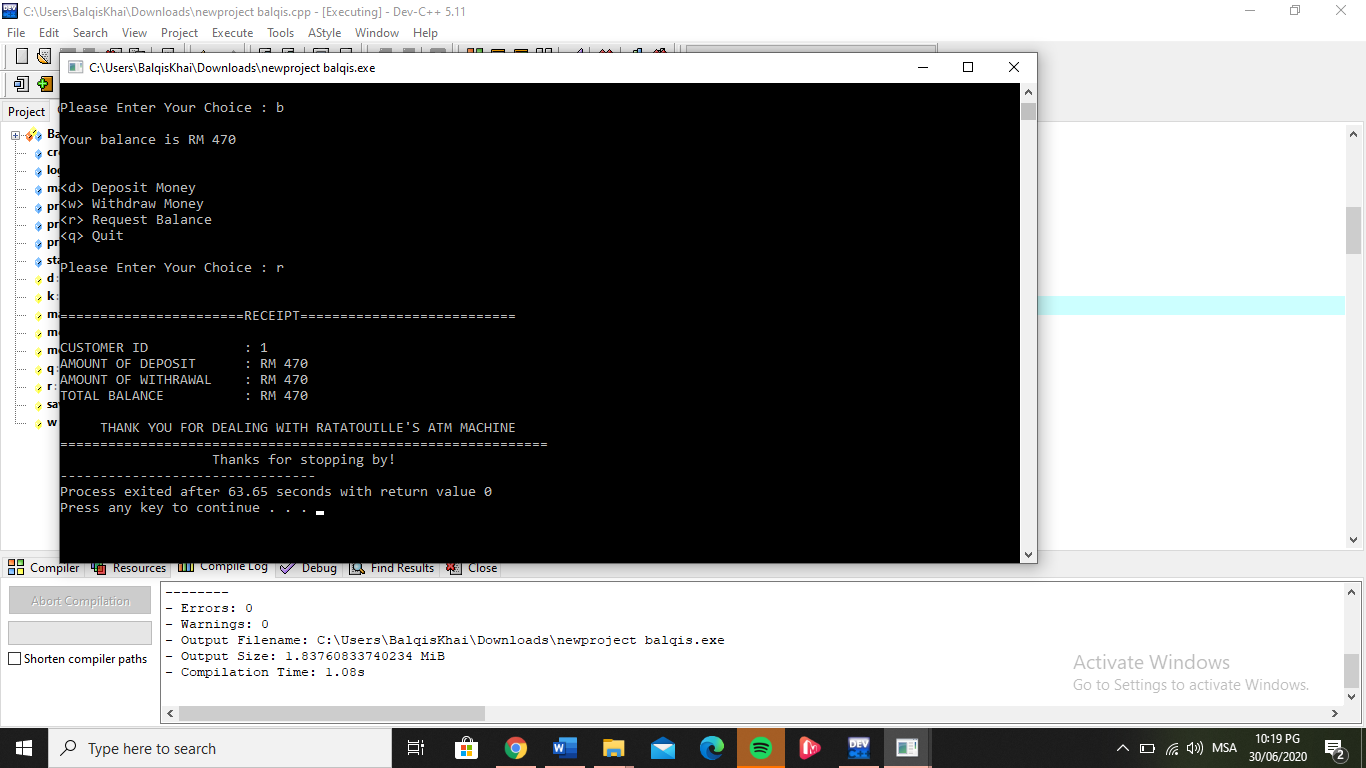
first, my receipt does not count that amount withrawal and balance. It only display the amount that deposit.
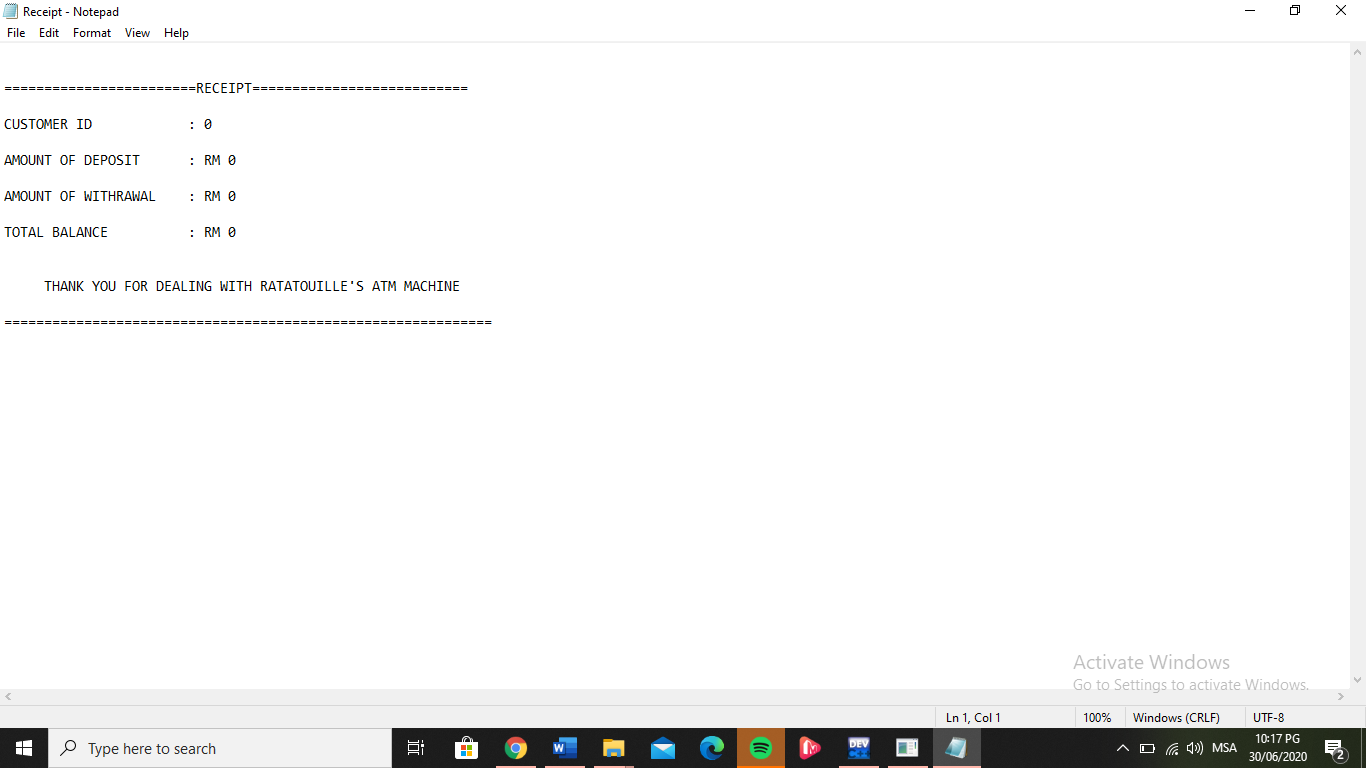
Second, my receipt that output in output file does not have any value. It only return 0.
Thank you in advance.
#include
#include
using namespace std;
struct BankAcc
{
int idd;
int pass;
double money;
};
BankAcc save[3];
void printIntroMenu();
void printMainMenu(int k,int d);
void start();
void login();
void printreceipt(BankAcc save[],ofstream &outfile,double &money);
void createAccount();
int exit();
char menuInput,d,w,r,q,k,mainInput;
double money = save[k].money;
int main()
{
// cout
// start();
cout
printIntroMenu();
ofstream outreceipt;
double take,deposit,money;
cin>>deposit;
outreceipt.open("Receipt.txt", ios:: out);
printreceipt(save,outreceipt,money);
outreceipt.close();
cout
system("pause");
return 0;
}
void printreceipt(BankAcc save[],ofstream &outfile,double &money)
{
// money = std::rand();
save[k].money = money;
outfile
outfile
outfile
outfile
outfile
outfile
outfile
outfile
outfile
}
void printIntroMenu()
{
cout
// start();
cout
cout
cout Login| ";
coutCreate New Account| ";
coutQuit| ";
cout
cout
cout
cin>>menuInput;
switch(menuInput)
{
case '1' : login();
case '2' : createAccount();
case '3' : exit(0);
}
}
void printMainMenu(int k,int d)
{
double take,deposit;
char input;
cout Deposit Money ";
cout Withdraw Money ";
cout Request Balance ";
cout Display Receipt ";
cout Quit ";
cout
cin>>input;
switch(input)
{
case 'd' :
case 'D' :
cout
cin>>deposit;
save[k].money = 0;
save[k].money = save[k].money + deposit;
printMainMenu(k,d);
break;
case 'w' :
case 'W' :
cout
cin>>take;
save[d].money = save[k].money - take;
printMainMenu(k,d);
break;
case 'b' :
case 'B' :
cout
printMainMenu(k,d);
break;
case 'r' :
case 'R' :
cout
cout
cout
cout
cout
cout
cout
cout
cout
case 'q' :
case 'Q' :
cout
cout
exit(0);
break;
}
}
void start()
{
cout
printIntroMenu();
}
void createAccount()
{
for(int i=0;i
{
if(save[i].idd==0 && save[i].pass == 0)
{
cout
cin>>save[i].idd;
cout
cin>>save[i].pass;
cout
printIntroMenu();
}
}
}
void login()
{
int id, password;
ofstream outfile;
cout
cin>>id;
cout
cin>>password;
for(int i=0;i
{
if(save[i].idd == id && save[i].pass == password)
{
cout
printMainMenu(i,d);
}
}
for(int i=0;i
{
if(save[i].idd != id && save[i].pass != password)
{
cout
start();
}
}
}
Receipt - Notepad X File Edit Format View Help ===RECEIPT === = CUSTOMER ID : 0 AMOUNT OF DEPOSIT : RM 0 AMOUNT OF WITHRAWAL : RM 0 TOTAL BALANCE : RM 0 THANK YOU FOR DEALING WITH RATATOUILLE'S ATM MACHINE ==2= Activate Windows Go to Settings to activate Windows. Ln 1, Col 1 100% Windows (CRLF) UTF-8 Type here to search DEV A D ( ()) MSA 10:17 PG 30/06/2020C:\\Users\\BalqisKhai\\Downloads\ ewproject balqis.cpp - [Executing] - Dev-C++ 5.11 X File Edit Search View Project Execute Tools AStyle Window Help [Ci\\Users\\BalqisKhai\\Downloads\ ewproject balqis.exe - X Project Please Enter Your Choice : b . Bayour balance is RM 470 $cr lo m Quit step d: Please Enter Your Choice : r k m =RECEIPT ===== m CUSTOMER ID 1 AMOUNT OF DEPOSIT RM 470 er: AMOUNT OF WITHRAWAL RM 470 sa TOTAL BALANCE RM 470 THANK YOU FOR DEALING WITH RATATOUILLE'S ATM MACHINE Thanks for stopping by! Process exited after 63.65 seconds with return value 0 Press any key to continue Compiler 4 Resources Will Compile Log @ Debug . Find Results 3 Close Abort Compilation Errors: 0 Warnings: 0 Output Filename: C:\\Users\\BalqisKhai\\Downloads\ ewproject balgis . exe Shorten compiler paths Output Size: 1. 83760833740234 MiB Compilation Time: 1.08s Activate Windows Go to Settings to activate Windows. Type here to search W DEV 10:19 PG C+ A D ( ()) MSA 30/06/2020
Step by Step Solution
There are 3 Steps involved in it

Get step-by-step solutions from verified subject matter experts
 Study Help