







Question: Grader - Instructions Excel 2019 Project Chapter 2 Running Case Portfolio Project Description: New Castle County Technical Services (NCCTS) provides technical support services for a
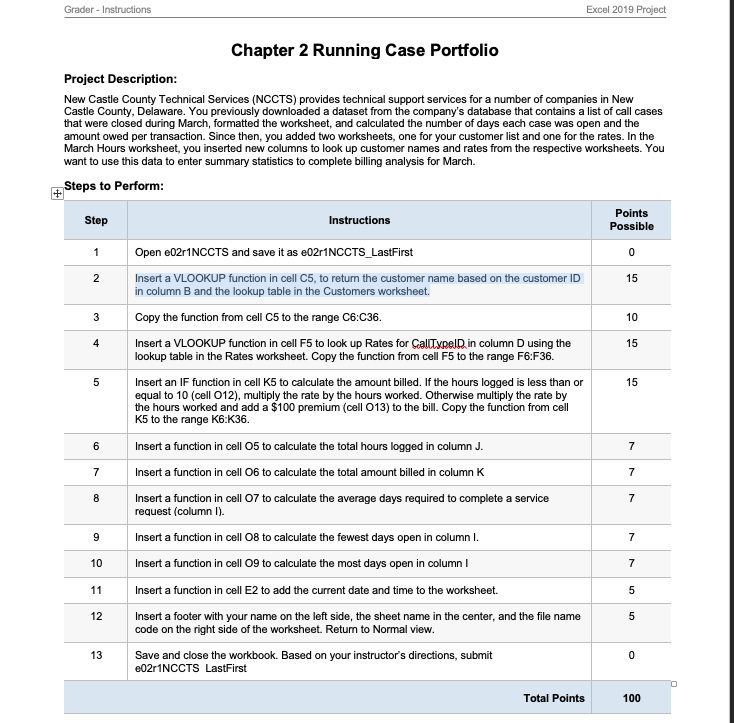
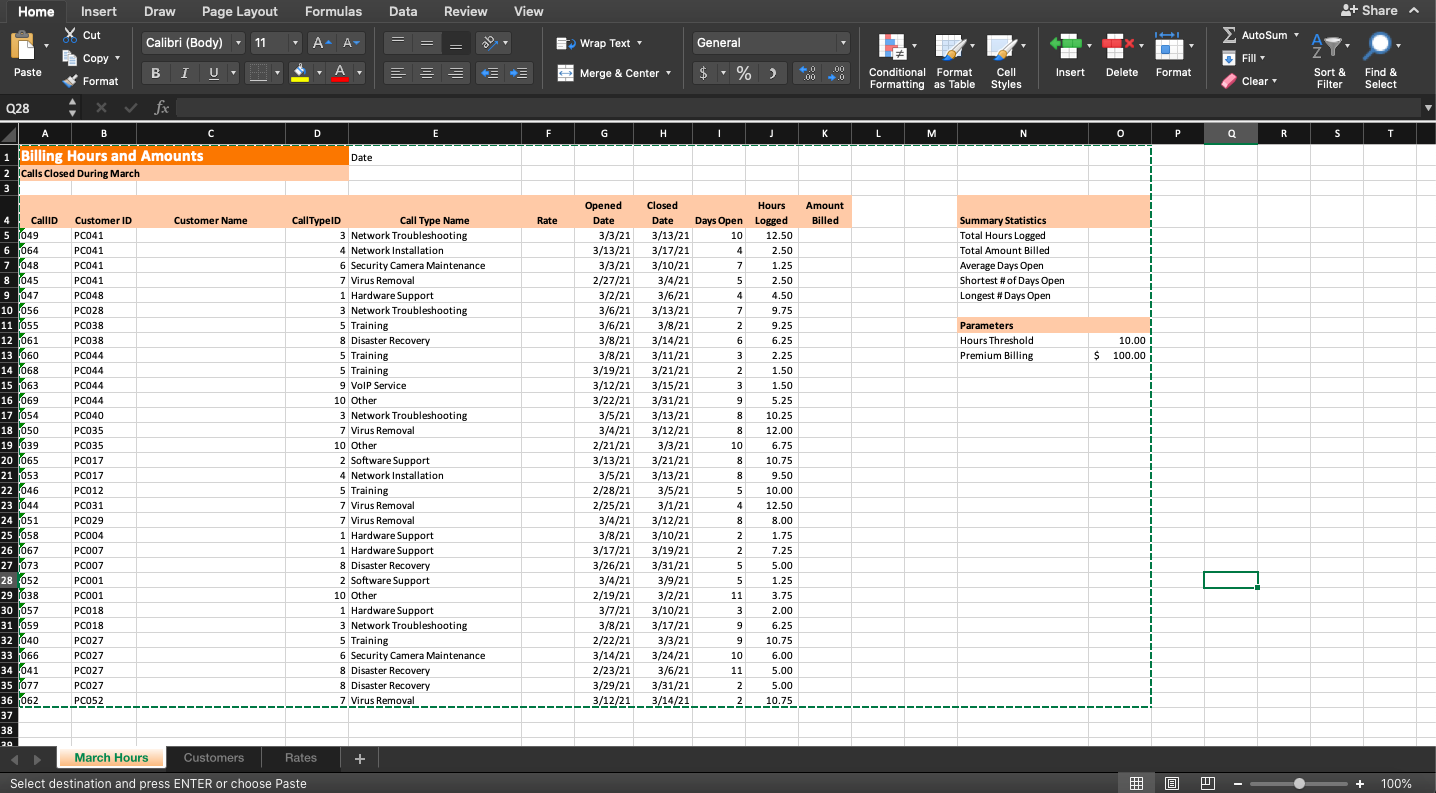
Grader - Instructions Excel 2019 Project Chapter 2 Running Case Portfolio Project Description: New Castle County Technical Services (NCCTS) provides technical support services for a number of companies in New Castle County, Delaware. You previously downloaded a dataset from the company's database that contains a list of call cases that were closed during March, formatted the worksheet, and calculated the number of days each case was open and the amount owed per transaction. Since then, you added two worksheets, one for your customer list and one for the rates. In the March Hours worksheet, you inserted new columns to look up customer names and rates from the respective worksheets. You want to use this data to enter summary statistics to complete billing analysis for March. Steps to Perform: Step Instructions Points Possible 1 0 2 15 3 10 4 15 5 15 6 Open e02r1NCCTS and save it as e02r1NCCTS_LastFirst Insert a VLOOKUP function in cell C5, to return the customer name based on the customer ID in column B and the lookup table in the Customers worksheet. Copy the function from cell C5 to the range C6:C36. Insert a VLOOKUP function in cell F5 to look up Rates for CallTypeld in column D using the lookup table in the Rates worksheet. Copy the function from cell F5 to the range F6:F36. Insert an IF function in cell K5 to calculate the amount billed. If the hours logged is less than or equal to 10 (cell 012), multiply the rate by the hours worked. Otherwise multiply the rate by the hours worked and add a $100 premium (cell 013) to the bill. Copy the function from cell K5 to the range K6:K36. Insert a function in cell 05 to calculate the total hours logged in column J. Insert a function in cell 06 to calculate the total amount billed in column K Insert a function in cell 07 to calculate the average days required to complete a service request (column 1). Insert a function in cell 08 to calculate the fewest days open in column I. Insert a function in cell 09 to calculate the most days open in column I Insert a function in cell E2 to add the current date and time to the worksheet. Insert a footer with your name on the left side, the sheet name in the center, and the file name code on the right side of the worksheet. Return to Normal view. 7 7 7 8 7 9 7 10 7 11 5 12 5 13 0 Save and close the workbook. Based on your instructor's directions, submit e02r1NCCTS LastFirst Total Points 100 Home Draw Page Layout Formulas Data Review View + Share Insert X Cut Calibri (Body) 11 A A VO, Wrap Text General AutoSum , Fill Copy " Paste BI U $, A Merge & Center $ -% %) 00 00 0 Insert Conditional Format Cell Formatting as Table Styles Delete Format Format Clear Sort & Filter Find & Select Q28 fx A B C D E F H K L M N O P Q R S T Date 1 Billing Hours and Amounts 2 Calls Closed During March 3 Hours Amount Billed Customer Name Rate Summary Statistics Total Hours Logged Total Amount Billed Average Days Open Shortest # of Days Open Longest # Days Open 1 1 Parameters Hours Threshold Premium Billing 10.00 $ 100.00 ; 1 1 4 Callid Customer ID 5 1049 PC041 6 064 PC041 7 048 PC041 8 1045 PC041 9 047 PC048 10 056 PC028 11 1055 PC038 12 061 PC038 13 060 PC044 14 068 PC044 15 063 PC044 16 069 PC044 17 054 PC040 18 050 PC035 19 039 PC035 20 1065 PC017 21 1053 PC017 22 046 PC012 23 044 PC031 24 051 PC029 25 058 PC004 26 1067 PC007 27 073 PC007 28 052 PC001 29 1038 PC001 30 057 PC018 31 059 PC018 32 1040 PC027 33 1066 PC027 34 041 PC027 35 077 PC027 36 062_PC052 37 38 20 March Hours CallTypeID Call Type Name 3 Network Troubleshooting 4 Network Installation 6 Security Camera Maintenance 7 Virus Removal 1 Hardware Support 3 Network Troubleshooting 5 Training 8 Disaster Recovery 5 Training 5 Training 9 VoIP Service 10 Other 3 Network Troubleshooting 7 Virus Removal 10 Other 2 Software Support 4 Network Installation 5 Training 7 Virus Removal 7 Virus Removal 1 Hardware Support 1 Hardware Support 8 Disaster Recovery 2 Software Support 10 Other 1 Hardware Support 3 Network Troubleshooting 5 Training 6 Security Camera Maintenance 8 Disaster Recovery 8 Disaster Recovery 7 Virus Removal 7 Opened Closed Date Date 3/3/21 3/13/21 3/13/21 3/17/21 3/3/21 3/10/21 2/27/21 3/4/21 3/2/21 3/6/21 3/6/21 3/13/21 3/6/21 3/8/21 3/8/21 3/14/21 3/8/21 3/11/21 3/19/21 3/21/21 3/12/21 3/15/21 3/22/21 3/31/21 3/5/21 3/13/21 3/4/21 3/12/21 2/21/21 3/3/21 3/13/21 3/21/21 3/5/21 3/13/21 2/28/21 3/5/21 2/25/21 3/1/21 3/4/21 3/12/21 3/8/21 3/10/21 3/17/21 3/19/21 3/26/21 3/31/21 3/4/21 3/9/21 2/19/21 3/2/21 3/7/21 3/10/21 3/8/21 3/17/21 2/22/21 3/3/21 3/14/21 3/24/21 2/23/21 3/6/21 3/29/21 3/31/21 3/12/213/14/21 1 Days Open Logged 10 12.50 4 2.50 7 1.25 5 2.50 4 4.50 7 9.75 2 9.25 6 6.25 3 2.25 2 1.50 3 1.50 9 5.25 8 10.25 8 12.00 10 6.75 8 10.75 8 9.50 5 10.00 4 12.50 8 8.00 2 1.75 2 7.25 5 5 5.00 5 1.25 11 3.75 3 2.00 9 6.25 9 10.75 10 6.00 11 5.00 2 5.00 2 1 1 -10.75 Customers Rates + Select destination and press ENTER or choose Paste EL P + 100% Grader - Instructions Excel 2019 Project Chapter 2 Running Case Portfolio Project Description: New Castle County Technical Services (NCCTS) provides technical support services for a number of companies in New Castle County, Delaware. You previously downloaded a dataset from the company's database that contains a list of call cases that were closed during March, formatted the worksheet, and calculated the number of days each case was open and the amount owed per transaction. Since then, you added two worksheets, one for your customer list and one for the rates. In the March Hours worksheet, you inserted new columns to look up customer names and rates from the respective worksheets. You want to use this data to enter summary statistics to complete billing analysis for March. Steps to Perform: Step Instructions Points Possible 1 0 2 15 3 10 4 15 5 15 6 Open e02r1NCCTS and save it as e02r1NCCTS_LastFirst Insert a VLOOKUP function in cell C5, to return the customer name based on the customer ID in column B and the lookup table in the Customers worksheet. Copy the function from cell C5 to the range C6:C36. Insert a VLOOKUP function in cell F5 to look up Rates for CallTypeld in column D using the lookup table in the Rates worksheet. Copy the function from cell F5 to the range F6:F36. Insert an IF function in cell K5 to calculate the amount billed. If the hours logged is less than or equal to 10 (cell 012), multiply the rate by the hours worked. Otherwise multiply the rate by the hours worked and add a $100 premium (cell 013) to the bill. Copy the function from cell K5 to the range K6:K36. Insert a function in cell 05 to calculate the total hours logged in column J. Insert a function in cell 06 to calculate the total amount billed in column K Insert a function in cell 07 to calculate the average days required to complete a service request (column 1). Insert a function in cell 08 to calculate the fewest days open in column I. Insert a function in cell 09 to calculate the most days open in column I Insert a function in cell E2 to add the current date and time to the worksheet. Insert a footer with your name on the left side, the sheet name in the center, and the file name code on the right side of the worksheet. Return to Normal view. 7 7 7 8 7 9 7 10 7 11 5 12 5 13 0 Save and close the workbook. Based on your instructor's directions, submit e02r1NCCTS LastFirst Total Points 100 Home Draw Page Layout Formulas Data Review View + Share Insert X Cut Calibri (Body) 11 A A VO, Wrap Text General AutoSum , Fill Copy " Paste BI U $, A Merge & Center $ -% %) 00 00 0 Insert Conditional Format Cell Formatting as Table Styles Delete Format Format Clear Sort & Filter Find & Select Q28 fx A B C D E F H K L M N O P Q R S T Date 1 Billing Hours and Amounts 2 Calls Closed During March 3 Hours Amount Billed Customer Name Rate Summary Statistics Total Hours Logged Total Amount Billed Average Days Open Shortest # of Days Open Longest # Days Open 1 1 Parameters Hours Threshold Premium Billing 10.00 $ 100.00 ; 1 1 4 Callid Customer ID 5 1049 PC041 6 064 PC041 7 048 PC041 8 1045 PC041 9 047 PC048 10 056 PC028 11 1055 PC038 12 061 PC038 13 060 PC044 14 068 PC044 15 063 PC044 16 069 PC044 17 054 PC040 18 050 PC035 19 039 PC035 20 1065 PC017 21 1053 PC017 22 046 PC012 23 044 PC031 24 051 PC029 25 058 PC004 26 1067 PC007 27 073 PC007 28 052 PC001 29 1038 PC001 30 057 PC018 31 059 PC018 32 1040 PC027 33 1066 PC027 34 041 PC027 35 077 PC027 36 062_PC052 37 38 20 March Hours CallTypeID Call Type Name 3 Network Troubleshooting 4 Network Installation 6 Security Camera Maintenance 7 Virus Removal 1 Hardware Support 3 Network Troubleshooting 5 Training 8 Disaster Recovery 5 Training 5 Training 9 VoIP Service 10 Other 3 Network Troubleshooting 7 Virus Removal 10 Other 2 Software Support 4 Network Installation 5 Training 7 Virus Removal 7 Virus Removal 1 Hardware Support 1 Hardware Support 8 Disaster Recovery 2 Software Support 10 Other 1 Hardware Support 3 Network Troubleshooting 5 Training 6 Security Camera Maintenance 8 Disaster Recovery 8 Disaster Recovery 7 Virus Removal 7 Opened Closed Date Date 3/3/21 3/13/21 3/13/21 3/17/21 3/3/21 3/10/21 2/27/21 3/4/21 3/2/21 3/6/21 3/6/21 3/13/21 3/6/21 3/8/21 3/8/21 3/14/21 3/8/21 3/11/21 3/19/21 3/21/21 3/12/21 3/15/21 3/22/21 3/31/21 3/5/21 3/13/21 3/4/21 3/12/21 2/21/21 3/3/21 3/13/21 3/21/21 3/5/21 3/13/21 2/28/21 3/5/21 2/25/21 3/1/21 3/4/21 3/12/21 3/8/21 3/10/21 3/17/21 3/19/21 3/26/21 3/31/21 3/4/21 3/9/21 2/19/21 3/2/21 3/7/21 3/10/21 3/8/21 3/17/21 2/22/21 3/3/21 3/14/21 3/24/21 2/23/21 3/6/21 3/29/21 3/31/21 3/12/213/14/21 1 Days Open Logged 10 12.50 4 2.50 7 1.25 5 2.50 4 4.50 7 9.75 2 9.25 6 6.25 3 2.25 2 1.50 3 1.50 9 5.25 8 10.25 8 12.00 10 6.75 8 10.75 8 9.50 5 10.00 4 12.50 8 8.00 2 1.75 2 7.25 5 5 5.00 5 1.25 11 3.75 3 2.00 9 6.25 9 10.75 10 6.00 11 5.00 2 5.00 2 1 1 -10.75 Customers Rates + Select destination and press ENTER or choose Paste EL P + 100%
Step by Step Solution
There are 3 Steps involved in it

Get step-by-step solutions from verified subject matter experts
 Study Help