







Question: Graphics in Python using the JES environment python code.. Long sets of instructions Example: requestIntegerInRange(Please enter one of the following requestIntegerInRange(Please enter one of the
Graphics in Python using the JES environment
python code..
Long sets of instructions
Example:
requestIntegerInRange(Please enter one of the following
requestIntegerInRange(Please enter one of the following options: 1) grayscale, 2) reduce red,
requestIntegerInRange(Please enter one of the following options: 1) grayscale, 2) reduce red, 3) reduce green, 4) reduce blue, 5) posterize)
Need to break across lines insert new line as part of the message.
Escape characters
Special characters that cannot be used directly as part of a string, eg:
new line
\t tab
\\ backslash (\)
\ single quote
Example:
showInformation(see you later)
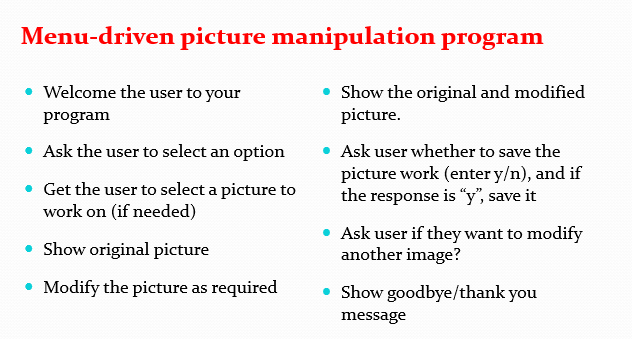
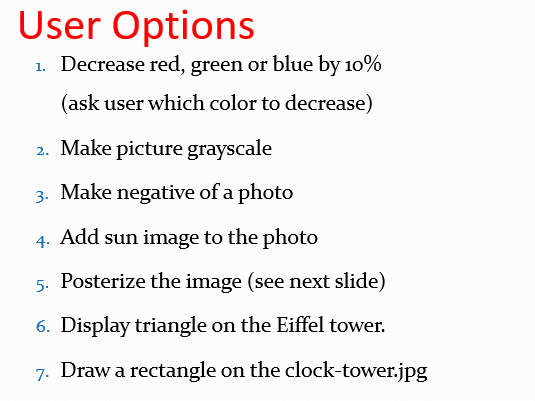
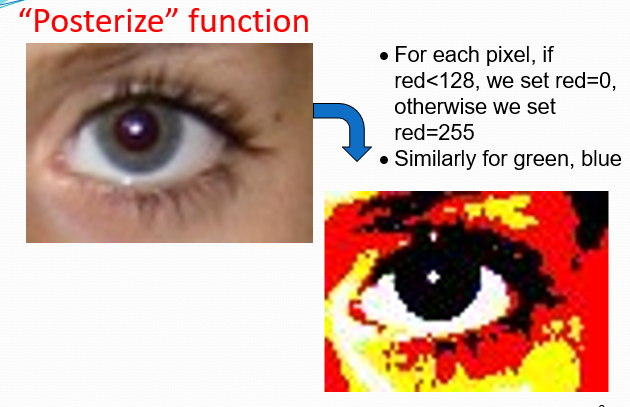
Menu-driven picture manipulation program Show the original and modified picture. Welcome the user to your program Ask the user to select an option Get the user to select a picture to work on (if needed) Ask user whether to save the picture work (enter y), and if the response is y, save it Ask user if they want to modify another image? Show goodbye/thank you message Show original picture Modify the picture as required User Options 1. Decrease red, green or blue by 10% (ask user which color to decrease) 2. Make picture grayscale 3. Make negative of a photo 4. Add sun image to the photo 5. Posterize the image (see next slide) 6. Display triangle on the Eiffel tower. 7. Draw a rectangle on the clock-tower.jpg "Posterize function . For each pixel, if red
Step by Step Solution
There are 3 Steps involved in it

Get step-by-step solutions from verified subject matter experts
 Study Help