







Question: GUI in python: please complete these two file with above requirements: 1- first file SignupW.py import tkinter as tk class SignupW: def __init__(self): self.window =
GUI in python:
please complete these two file with above requirements:
1- first file SignupW.py
2-second file LoginW.py
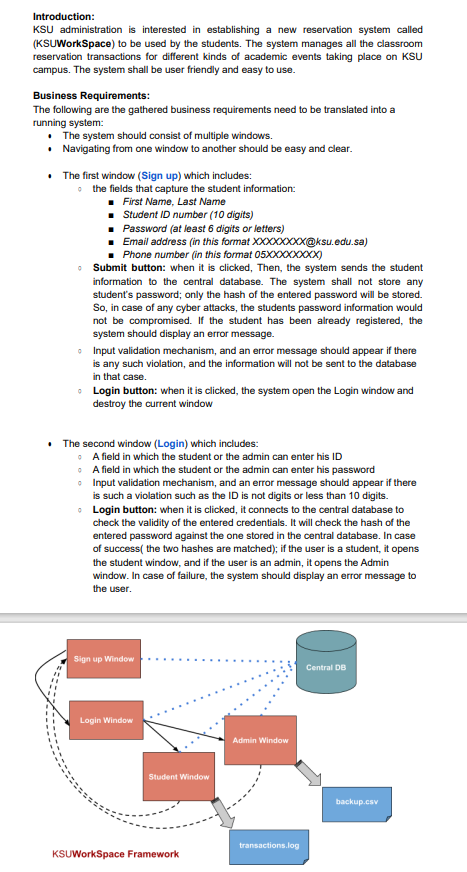
Introduction: KSU administration is interested in establishing a new reservation system called (KSUWorkSpace) to be used by the students. The system manages all the classroom reservation transactions for different kinds of academic events taking place on KSU campus. The system shall be user friendly and easy to use. Business Requirements: The following are the gathered business requirements need to be translated into a running system: - The system should consist of multiple windows. - Navigating from one window to another should be easy and clear. - The first window (Sign up) which includes: the fields that capture the student information: - First Name, Last Name - Student ID number ( 10 digits) - Password (at least 6 digits or letters) - Email address (in this format XXXXXXXX-ksu.edu.sa) - Phone number (in this format 05XXXXX ) - Submit button: when it is clicked, Then, the system sends the student information to the central database. The system shall not store any student's password; only the hash of the entered password will be stored. So, in case of any cyber attacks, the students password information would not be compromised. If the student has been already registered, the system should display an error message. - Input validation mechanism, and an error message should appear if there is any such violation, and the information will not be sent to the database in that case. - Login button: when it is clicked, the system open the Login window and destroy the current window - The second window (Login) which includes: - A field in which the student or the admin can enter his ID - A field in which the student or the admin can enter his password - Input validation mechanism, and an error message should appear if there is such a violation such as the ID is not digits or less than 10 digits. - Login button: when it is clicked, it connects to the central database to check the validity of the entered credentials. It will check the hash of the entered password against the one stored in the central database. In case of success( the two hashes are matched); if the user is a student, it opens the student window, and if the user is an admin, it opens the Admin window. In case of failure, the system should display an error message to the user
Step by Step Solution
There are 3 Steps involved in it

Get step-by-step solutions from verified subject matter experts
 Study Help