







Question: GUI Random Counter LOW High START 2.No.2. As shown in Figure 1, create a random number game to make a guess if the upcoming random
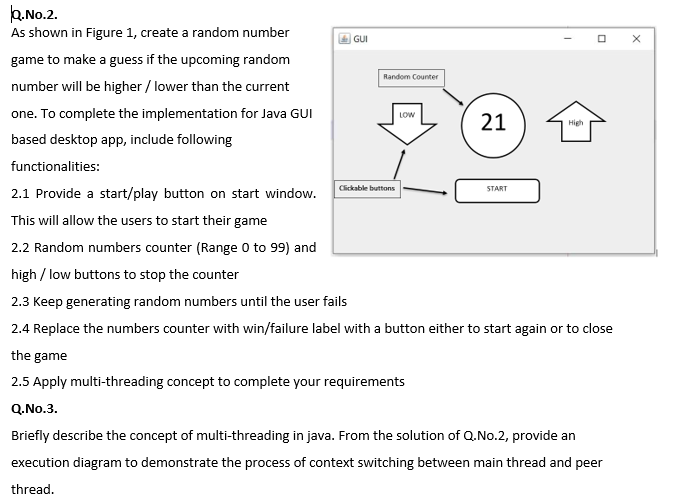
GUI Random Counter LOW High START 2.No.2. As shown in Figure 1, create a random number game to make a guess if the upcoming random number will be higher / lower than the current one. To complete the implementation for Java GUI 21 based desktop app, include following functionalities: Clickable buttons 2.1 Provide a start/play button on start window. This will allow the users to start their game 2.2 Random numbers counter (Range 0 to 99) and high / low buttons to stop the counter 2.3 Keep generating random numbers until the user fails 2.4 Replace the numbers counter with win/failure label with a button either to start again or to close the game 2.5 Apply multi-threading concept to complete your requirements Q.No.3. Briefly describe the concept of multi-threading in java. From the solution of Q.No.2, provide an execution diagram to demonstrate the process of context switching between main thread and peer thread. GUI Random Counter LOW High START 2.No.2. As shown in Figure 1, create a random number game to make a guess if the upcoming random number will be higher / lower than the current one. To complete the implementation for Java GUI 21 based desktop app, include following functionalities: Clickable buttons 2.1 Provide a start/play button on start window. This will allow the users to start their game 2.2 Random numbers counter (Range 0 to 99) and high / low buttons to stop the counter 2.3 Keep generating random numbers until the user fails 2.4 Replace the numbers counter with win/failure label with a button either to start again or to close the game 2.5 Apply multi-threading concept to complete your requirements Q.No.3. Briefly describe the concept of multi-threading in java. From the solution of Q.No.2, provide an execution diagram to demonstrate the process of context switching between main thread and peer thread
Step by Step Solution
There are 3 Steps involved in it

Get step-by-step solutions from verified subject matter experts
 Study Help