







Question: Guidance Once you setup the rendering loop, it is time to start drawing a pixel. Call your function that draws a pixel and make sure
Guidance
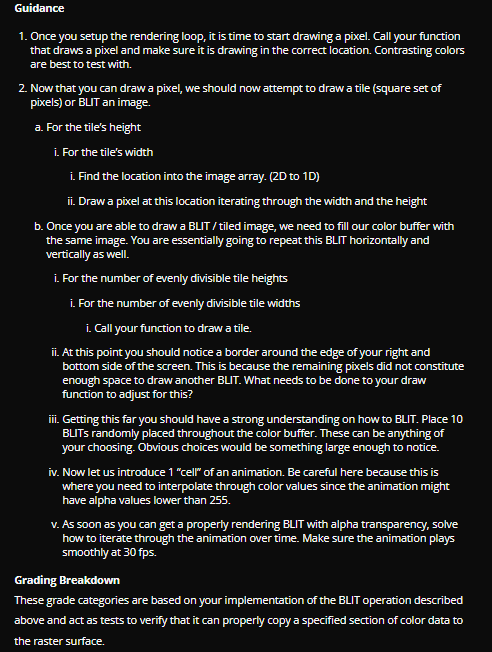
Once you setup the rendering loop, it is time to start drawing a pixel. Call your function
that draws a pixel and make sure it is drawing in the correct location. Contrasting colors
are best to test with.
Now that you can draw a pixel, we should now attempt to draw a tile square set of
pixels or BLTT an image.
a For the tile's height
i For the tile's width
i Find the location into the image array. D to D
ii Draw a pixel at this location iterating through the width and the height
b Once you are able to draw a BLIT tiled image, we need to fill our color buffer with
the same image. You are essentially going to repeat this BLIT horizontally and
vertically as well.
i For the number of evenly divisible tile heights
i For the number of evenly divisible tile widths
i Call your function to draw a tile.
ii At this point you should notice a border around the edge of your right and
bottom side of the screen. This is because the remaining pixels did not constitute
enough space to draw another BLIT. What needs to be done to your draw
function to adjust for this?
iii. Getting this far you should have a strong understanding on how to BLIT. Place
BLITs randomly placed throughout the color buffer. These can be anything of
your choosing. Obvious choices would be something large enough to notice.
iv Now let us introduce "cell" of an animation. Be careful here because this is
where you need to interpolate through color values since the animation might
have alpha values lower than
v As soon as you can get a properly rendering BLIT with alpha transparency, solve
how to iterate through the animation over time. Make sure the animation plays
smoothly at fps
Grading Breakdown
These grade categories are based on your implementation of the BLIT operation described
above and act as tests to verify that it can properly copy a specified section of color data to
the raster surface. Grading Breakdown
These grade categories are based on your implementation of the BLIT operation described
above and act as tests to verify that it can properly copy a specified section of color data to
the raster surface.
Get a tiled background showing on the entire color array
The color values will be strange but this is fine for this section.
Swap the color bits from BGRA to ARGB and get random objects in the color
array.
Some bit manipulation will be needed in order to fix the colors
If you were able to get this far, you should be able to draw random "tiled" objects
onto the color array as well.
Make sure that the objects don't wrap around the edge of the screen and that
objects that go off the bottom of the screen don't crash the application in release
mode. Get at least "cell" of an animation rendering properly with blending. Ensure that
the cell properly blends with what is behind it
Depending on the alpha value of the cell, some form of interpolation will be needed
to handle properly blending the background with the cell.
Play an animation with a high speed timer The XTime class is great for this
Animation should update at frames per second and the window itself should be
running at a minimum of FPS
Refer to the example executable to see the completed animation example.
Step by Step Solution
There are 3 Steps involved in it
1 Expert Approved Answer
Step: 1 Unlock

Question Has Been Solved by an Expert!
Get step-by-step solutions from verified subject matter experts
Step: 2 Unlock
Step: 3 Unlock
 Study Help