







Question: Guide for Code Designer Declare StartNo, EndNo as Integer Declare ResultNo as String ResultNo = (initial value of resultno) ResultNo = ResultNo &
Guide for Code Designer
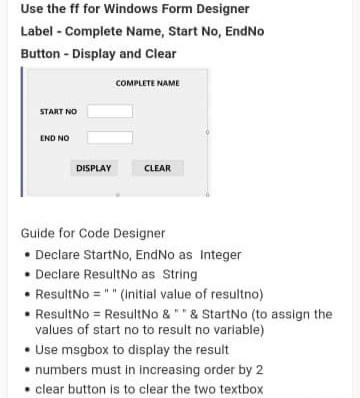
Declare StartNo, EndNo as Integer Declare ResultNo as String ResultNo = " " (initial value of resultno) ResultNo = ResultNo & " " & StartNo (to assign the values of start no to result no variable) Use msgbox to display the result numbers must in increasing order by 2 clear button is to clear the two textbox
Using Visual Basic
Use the ff for Windows Form Designer Label - Complete Name, Start No, EndNo Button-Display and Clear COMPLETE NAME START NO END NO DISPLAY CLEAR Guide for Code Designer Declare StartNo, EndNo as Integer Declare ResultNo as String ResultNo="" (Initial value of resultno) ResultNo = ResultNo&"*& StartNo (to assign the values of start no to result no variable) Use msgbox to display the result numbers must in increasing order by 2 . clear button is to clear the two textbox
Step by Step Solution
There are 3 Steps involved in it

Get step-by-step solutions from verified subject matter experts
 Study Help