







Question: H Home fx Insert Insert Page Layout Formulas Data Review View 32 A L O Recently Financial Logical Test Date & Lookup & Math &
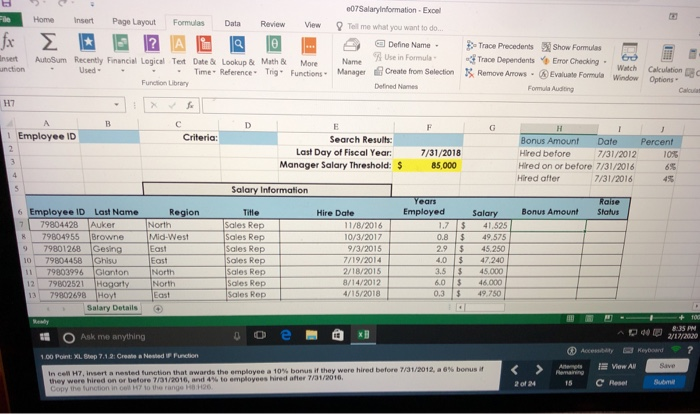
H Home fx Insert Insert Page Layout Formulas Data Review View 32 A L O Recently Financial Logical Test Date & Lookup & Math & More Used - - Time Reference Trigo Functions Function Library 007Salary Information - Excel Tell me what you want to do... 9 Defne Name Name Use in Formula Manager Create from Selection Defined Names AutoSum - unction >>Trace Precedents Show Formulas Trace Dependents Error Checking Remove Arrows - Evaluate Formula Formula Auditing Watch Window Calculation s 1 Employee ID Criteria: Search Results: Last Day of Fiscal Year: Manager Salary Threshold: $ 7/31/2018 85,000 Bonus Amount Date Hired before 7/31/2012 Hired on or before 7/31/2016 Hired after 7/31/2016 Percent 10% 69 Salary Information Bonus Amount Raise Status 6 Employee ID Last Name 7 79804428 Auker 8 79804955 Browne 9 79801268 Gesing 10 79804458 Ghisu 11 79803996 Glonton 12 79802521 Hogarty 13 79802698 Hoyt Salary Details Region North Mid-West East East North North East Title Sales Rep Sales Rep Sales Rep Rep Sales Rep Sales Rep Sales Rep Sales Rep Hire Date 11/8/2016 10/3/2017 9/3/2015 7/19/2014 2/18/2015 8/14/2012 4/15/2018 Years Employed 1.7 0.8 2.9 4.0 3.5 6.0 0.3 $ $ $ $ $ $ $ Salary 41.525 49,575 45.250 47.240 45.000 46.000 49.750 + 8:35 PM AD O Ask me anything 00 e 3 V 17/2020 Access Keyboard 1.00 Point XL Step 74 2: Create a Nested Function In cell H7, insert anested function that awards the employee a 10% bonus if they were hired before 7/31/2012, a % bonus they were hired on or before 7/31/2016, and 4% to employees hired after 7/31/2010, Copy the function in to the range 26 A 2024 Vow All C Reset 15 Suomi
Step by Step Solution
There are 3 Steps involved in it

Get step-by-step solutions from verified subject matter experts
 Study Help