



Question: Hands-On Project 6-2 1. Examine the switched LAN shown in Figure 6-13. 6 Computer Computer Switch Switch Computer Computer Switch Computer Computer Computer Figure 6-13
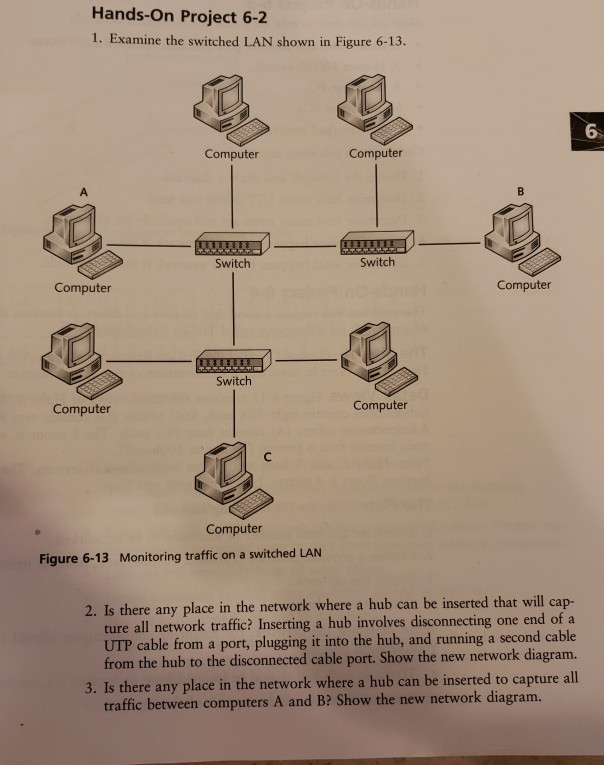

Hands-On Project 6-2 1. Examine the switched LAN shown in Figure 6-13. 6 Computer Computer Switch Switch Computer Computer Switch Computer Computer Computer Figure 6-13 Monitoring traffic on a switched LAN 2. Is there any place in the network where a hub can be inserted that will cap- ture all network traffic? Inserting a hub involves disconnecting one end of a UTP cable from a port, plugging it into the hub, and running a second cable from the hub to the disconnected cable port. Show the new network diagram. ere any place in the network where a hub can be inserted to capture all traffic between computers A and B? Show the new network diagram. 4. Is there any place in the network where a hub can be inserted to capture all traffic between computers A and C? Show the new network diagram. 5. Is there any place in the network where a hub can be inserted to capture all traffic between computers B and C? Show the new network diagram
Step by Step Solution
There are 3 Steps involved in it

Get step-by-step solutions from verified subject matter experts