







Question: hard-code the name, ID. Other fields are fields that user can edit later. You only need to display the partial Gen Ed table with the
hard-code the name, ID. Other fields are fields that user can edit later. You only need to display the partial Gen Ed table with the title Academic Foundations. You do not need to rotate the text Academic Foundations since the title is displayed above all other contents. You may use HTML, CSS, Bootstrap, or Bootstrap with React components. The table will be reused in the future and should be defined as a component containing a table row component.
Requirements include the following: 1. You must use React as the front-end engine. You cannot use jQuery, only HTML, Vue, Angular, PHP, Python, etc. to complete this project. 2. You need to define one component per file. You may use either function components or class components. You may define one Table component, and one TableRow component. 3. You need to display the Table using the React Bootstrap Table or Bootstrap Table. If you want to use other styling libraries, please ask for permission first. 4. The borders of the table must be displayed, and the border should not touch the left side of the browser window in which the course table is displayed. If you only use HTML to move the table toward the center of the page, you will receive a penalty of 15 points out of 100. 5. You need to use Bootstrap or React Bootstrap to implement the table style. If you only use HTML to display the table, you will receive a penalty of 15 points out of 100.
2) 6. You may modify the Reactjs.org project and the project in the student resources to begin your work. But, in your final project, there should not be any trace (names, components, states, etc.) that is irrelevant to our course display project. If so, your highest grade is 80/100 because that indicates a work-in-progress.
Submission Rules: 1. You need to submit two files. The first one is a word document that includes two screen shots-one with the Visual Studio Code (file Explorer, Editing TableRow, and the execution Terminal) and another one with the Browser screen. The name of the word document must be project1-
Criteria: (Example) 1. Required Components Table and TableRow components. 2. Required Styles You must use React-Bootstrap or Bootstrap in addition to the HTML or CSS. 3. Soundness Your table rows must display correct data. 4. Correct Style Correct orientation for the text. 5. Compliance to the submission rules including the naming conventions, etc. 6. Promptness Late penalty will be imposed. Any submission after grading comments are published will not be accepted.
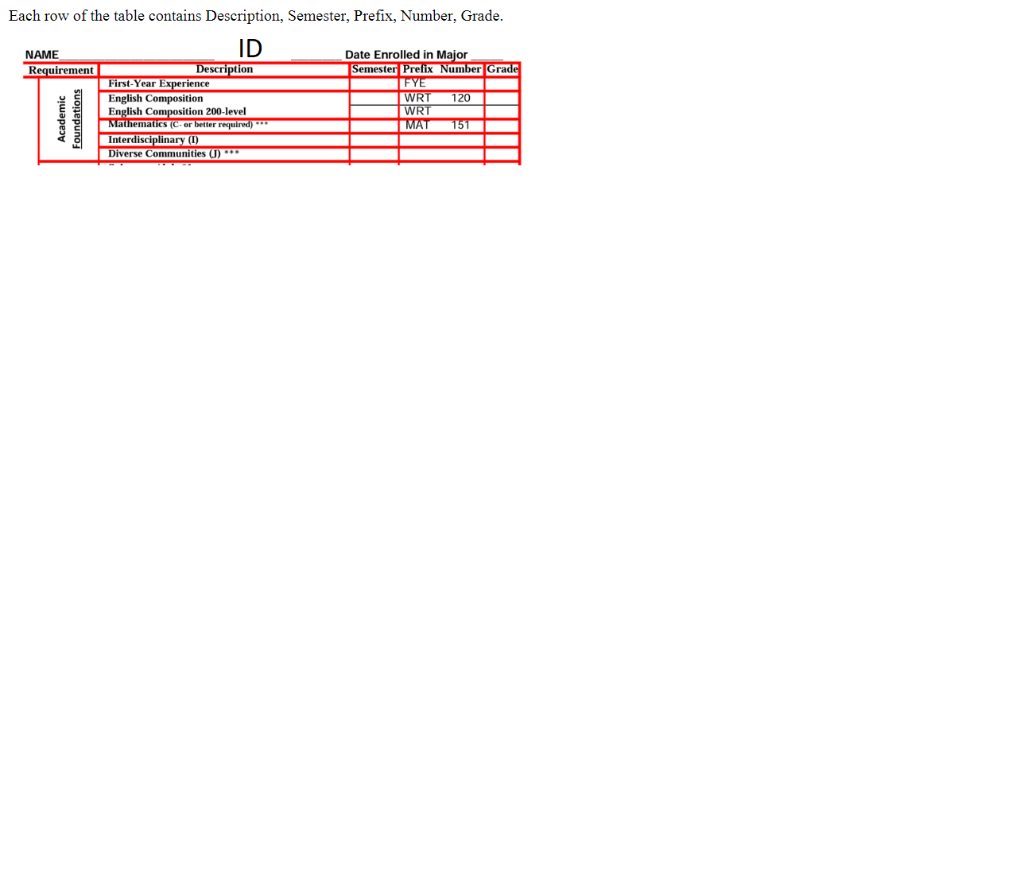
Each row of the table contains Description, Semester, Prefix, Number, Grade
Step by Step Solution
There are 3 Steps involved in it

Get step-by-step solutions from verified subject matter experts
 Study Help