







Question: Haskell List Folding 8. (6 = 3 * 2 points) Let's re-implement the foldl function in multiple ways. Your foldl only needs to work on
Haskell
List Folding
8. (6 = 3 * 2 points) Let's re-implement the foldl function in multiple ways. Your foldl only needs to work on lists.
a. Write a definition for foldl using conditional expressions: foldl1 f a x = if x == [] then etc.
[1/30] Make it foldl1a, since there's already a foldl1 in the library.
b. Rewrite the definition using function definition by cases: foldl2
c. Rewrite the definition using a case expression: foldl3 f a x = case x ....
More Information (Examples)
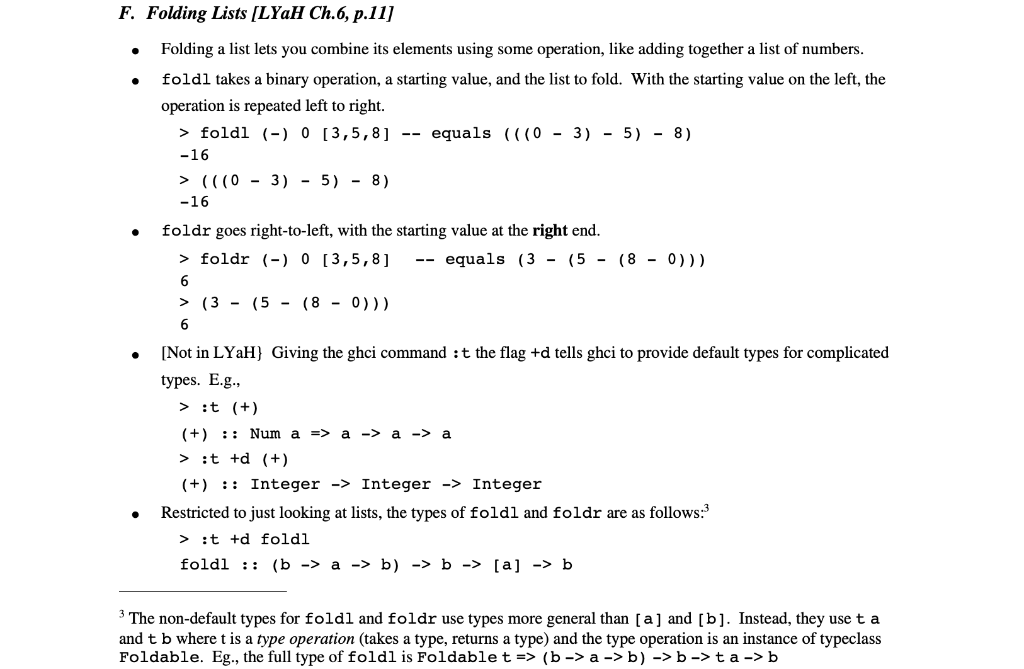
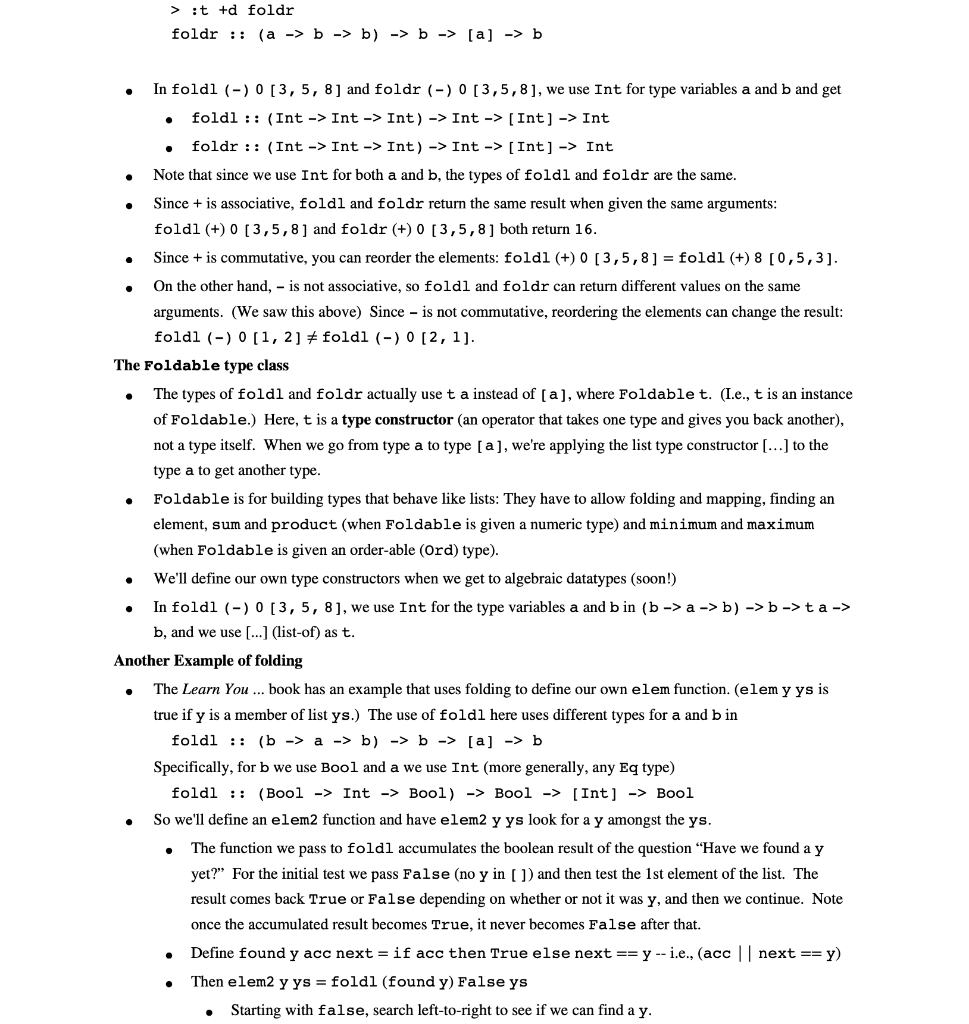
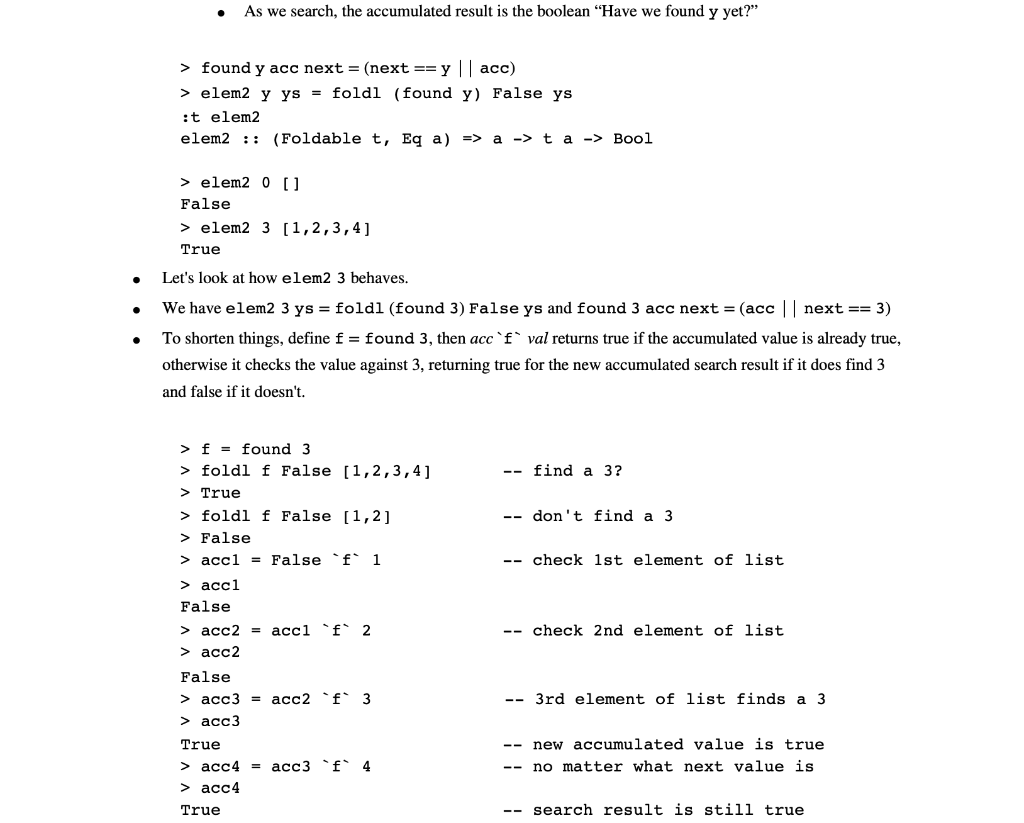
F. Folding Lists [LYaH Ch.6, p.11] Folding a list lets you combine its elements using some operation, like adding together a list of numbers. foldl takes a binary operation, a starting value, and the list to fold. With the starting value on the left, the operation is repeated left to right. > foldl (-) 0 [3,5,8] -- equals (((0 - 3) - 5) - 8) -16 > (((0 - 3) - 5) - 8) -16 foldr goes right-to-left, with the starting value at the right end. > foldr (-) O 13,5,8] -- equals (3 - (5 - (8 - 0))) > (3 - (5 - (8 - 0))) [Not in LYaH} Giving the ghci command : t the flag +d tells ghci to provide default types for complicated types. E.g., > :t (+) (+) :: Num a => a -> a -> a > :t +d (+) (+) :: Integer -> Integer -> Integer Restricted to just looking at lists, the types of foldl and foldr are as follows: > :t +d foldl foldl :: (b -> a -> b) -> b -> [a] -> b 3 The non-default types for foldl and foldr use types more general than [a] and [b]. Instead, they use ta and t b where t is a type operation (takes a type, returns a type) and the type operation is an instance of typeclass Foldable. Eg., the full type of foldl is Foldable t => (b->a ->b) -> b->ta ->b > :t +d foldr foldr :: (a -> b -> b) -> b -> [a] -> b . In foldl (-)0 3, 5, 8] and foldr (-) 0 [3,5,8], we use Int for type variables a and b and get foldl :: (Int -> Int -> Int) -> Int -> [Int) -> Int foldr :: (Int -> Int -> Int) -> Int -> [Int] -> Int Note that since we use Int for both a and b, the types of foldl and foldr are the same. Since + is associative, foldl and foldr return the same result when given the same arguments: foldl (+) 0 [3,5,8 ] and foldr (+) 0 [3,5,8) both return 16. Since + is commutative, you can reorder the elements: foldl (+) 0 [3,5,8 ] = foldl (+) 8 [0,5,3). On the other hand, - is not associative, so foldl and foldr can return different values on the same arguments. (We saw this above) Since - is not commutative, reordering the elements can change the result: foldl (-) 0 [1, 2] + foldl (-) 0 [2,1). The Foldable type class The types of foldl and foldr actually use t a instead of (a), where Foldable t. (I.e., t is an instance of Foldable.) Here, t is a type constructor (an operator that takes one type and gives you back another), not a type itself. When we go from type a to type [a], we're applying the list type constructor [...] to the type a to get another type. Foldable is for building types that behave like lists: They have to allow folding and mapping, finding an element, sum and product (when Foldable is given a numeric type) and minimum and maximum (when Foldable is given an order-able (Ord) type). We'll define our own type constructors when we get to algebraic datatypes (soon!) In foldl (-) 0 [3, 5, 8], we use Int for the type variables a and b in (b->a ->b) -> b ->ta -> b, and we use [...] (list-of) as t. Another Example of folding The Learn You ... book has an example that uses folding to define our own elem function. (elem y ys is true if y is a member of list ys.) The use of foldl here uses different types for a and b in foldl :: (b-> a -> b) -> b -> [a] -> b Specifically, for b we use Bool and a we use Int (more generally, any Eq type) foldl :: (Bool -> Int -> Bool) -> Bool -> [Int] -> Bool So we'll define an elem2 function and have elem2 y ys look for a y amongst the ys. The function we pass to foldl accumulates the boolean result of the question "Have we found a y yet?" For the initial test we pass False (no y in [ ]) and then test the 1st element of the list. The result comes back True or False depending on whether or not it was y, and then we continue. Note once the accumulated result becomes True, it never becomes False after that. Define found y acc next = if acc then True else next == y -- i.e., (acc || next == y) Then elem2 y ys = foldl (found y) False ys . Starting with false, search left-to-right to see if we can find a y. As we search, the accumulated result is the boolean "Have we found y yet?" > found y acc next = (next == y || acc) > elem2 y ys = foldl (found y) False ys :t elem2 elem2 :: (Foldable t, Eq a) => a -> t a -> Bool > elem2 OU False > elem2 3 [1,2,3,4] True Let's look at how elem2 3 behaves. We have elem2 3 ys = foldl (found 3) False ys and found 3 acc next = (acc || next == 3) To shorten things, define f = found 3, then acc fval returns true if the accumulated value is already true, otherwise it checks the value against 3, returning true for the new accumulated search result if it does find 3 and false if it doesn't. -- find a 3? -- don't find a 3 -- check 1st element of list > f = found 3 > foldl f False [1,2,3,4] > True > foldl f False [1,2] > False > accl = False 'f' 1 > accl False > acc2 = accl 'f' 2 > acc2 False > acc3 = acc2 'f' 3 > acc3 True > acc4 = acc3 'f' 4 > acc4 True -- check 2nd element of list -- 3rd element of list finds a 3 -- new accumulated value is true -- no matter what next value is -- search result is still true F. Folding Lists [LYaH Ch.6, p.11] Folding a list lets you combine its elements using some operation, like adding together a list of numbers. foldl takes a binary operation, a starting value, and the list to fold. With the starting value on the left, the operation is repeated left to right. > foldl (-) 0 [3,5,8] -- equals (((0 - 3) - 5) - 8) -16 > (((0 - 3) - 5) - 8) -16 foldr goes right-to-left, with the starting value at the right end. > foldr (-) O 13,5,8] -- equals (3 - (5 - (8 - 0))) > (3 - (5 - (8 - 0))) [Not in LYaH} Giving the ghci command : t the flag +d tells ghci to provide default types for complicated types. E.g., > :t (+) (+) :: Num a => a -> a -> a > :t +d (+) (+) :: Integer -> Integer -> Integer Restricted to just looking at lists, the types of foldl and foldr are as follows: > :t +d foldl foldl :: (b -> a -> b) -> b -> [a] -> b 3 The non-default types for foldl and foldr use types more general than [a] and [b]. Instead, they use ta and t b where t is a type operation (takes a type, returns a type) and the type operation is an instance of typeclass Foldable. Eg., the full type of foldl is Foldable t => (b->a ->b) -> b->ta ->b > :t +d foldr foldr :: (a -> b -> b) -> b -> [a] -> b . In foldl (-)0 3, 5, 8] and foldr (-) 0 [3,5,8], we use Int for type variables a and b and get foldl :: (Int -> Int -> Int) -> Int -> [Int) -> Int foldr :: (Int -> Int -> Int) -> Int -> [Int] -> Int Note that since we use Int for both a and b, the types of foldl and foldr are the same. Since + is associative, foldl and foldr return the same result when given the same arguments: foldl (+) 0 [3,5,8 ] and foldr (+) 0 [3,5,8) both return 16. Since + is commutative, you can reorder the elements: foldl (+) 0 [3,5,8 ] = foldl (+) 8 [0,5,3). On the other hand, - is not associative, so foldl and foldr can return different values on the same arguments. (We saw this above) Since - is not commutative, reordering the elements can change the result: foldl (-) 0 [1, 2] + foldl (-) 0 [2,1). The Foldable type class The types of foldl and foldr actually use t a instead of (a), where Foldable t. (I.e., t is an instance of Foldable.) Here, t is a type constructor (an operator that takes one type and gives you back another), not a type itself. When we go from type a to type [a], we're applying the list type constructor [...] to the type a to get another type. Foldable is for building types that behave like lists: They have to allow folding and mapping, finding an element, sum and product (when Foldable is given a numeric type) and minimum and maximum (when Foldable is given an order-able (Ord) type). We'll define our own type constructors when we get to algebraic datatypes (soon!) In foldl (-) 0 [3, 5, 8], we use Int for the type variables a and b in (b->a ->b) -> b ->ta -> b, and we use [...] (list-of) as t. Another Example of folding The Learn You ... book has an example that uses folding to define our own elem function. (elem y ys is true if y is a member of list ys.) The use of foldl here uses different types for a and b in foldl :: (b-> a -> b) -> b -> [a] -> b Specifically, for b we use Bool and a we use Int (more generally, any Eq type) foldl :: (Bool -> Int -> Bool) -> Bool -> [Int] -> Bool So we'll define an elem2 function and have elem2 y ys look for a y amongst the ys. The function we pass to foldl accumulates the boolean result of the question "Have we found a y yet?" For the initial test we pass False (no y in [ ]) and then test the 1st element of the list. The result comes back True or False depending on whether or not it was y, and then we continue. Note once the accumulated result becomes True, it never becomes False after that. Define found y acc next = if acc then True else next == y -- i.e., (acc || next == y) Then elem2 y ys = foldl (found y) False ys . Starting with false, search left-to-right to see if we can find a y. As we search, the accumulated result is the boolean "Have we found y yet?" > found y acc next = (next == y || acc) > elem2 y ys = foldl (found y) False ys :t elem2 elem2 :: (Foldable t, Eq a) => a -> t a -> Bool > elem2 OU False > elem2 3 [1,2,3,4] True Let's look at how elem2 3 behaves. We have elem2 3 ys = foldl (found 3) False ys and found 3 acc next = (acc || next == 3) To shorten things, define f = found 3, then acc fval returns true if the accumulated value is already true, otherwise it checks the value against 3, returning true for the new accumulated search result if it does find 3 and false if it doesn't. -- find a 3? -- don't find a 3 -- check 1st element of list > f = found 3 > foldl f False [1,2,3,4] > True > foldl f False [1,2] > False > accl = False 'f' 1 > accl False > acc2 = accl 'f' 2 > acc2 False > acc3 = acc2 'f' 3 > acc3 True > acc4 = acc3 'f' 4 > acc4 True -- check 2nd element of list -- 3rd element of list finds a 3 -- new accumulated value is true -- no matter what next value is -- search result is still true
Step by Step Solution
There are 3 Steps involved in it

Get step-by-step solutions from verified subject matter experts
 Study Help